Hantu Hamood Habibi 3D

Hantu Hamood Habibi 3D

Adventure

| LemauDev

Play on PC with BlueStacks or from our cloud

  • Overview
  • Game Features
  • How to Play

Page Modified On: April 24, 2026

Play Hantu Hamood Habibi 3D on PC or Mac

Explore a whole new adventure with Hantu Hamood Habibi 3D, a Adventure game created by LemauDev. Experience great gameplay with BlueStacks, the most popular gaming platform to play Android games on your PC or Mac.

About the Game

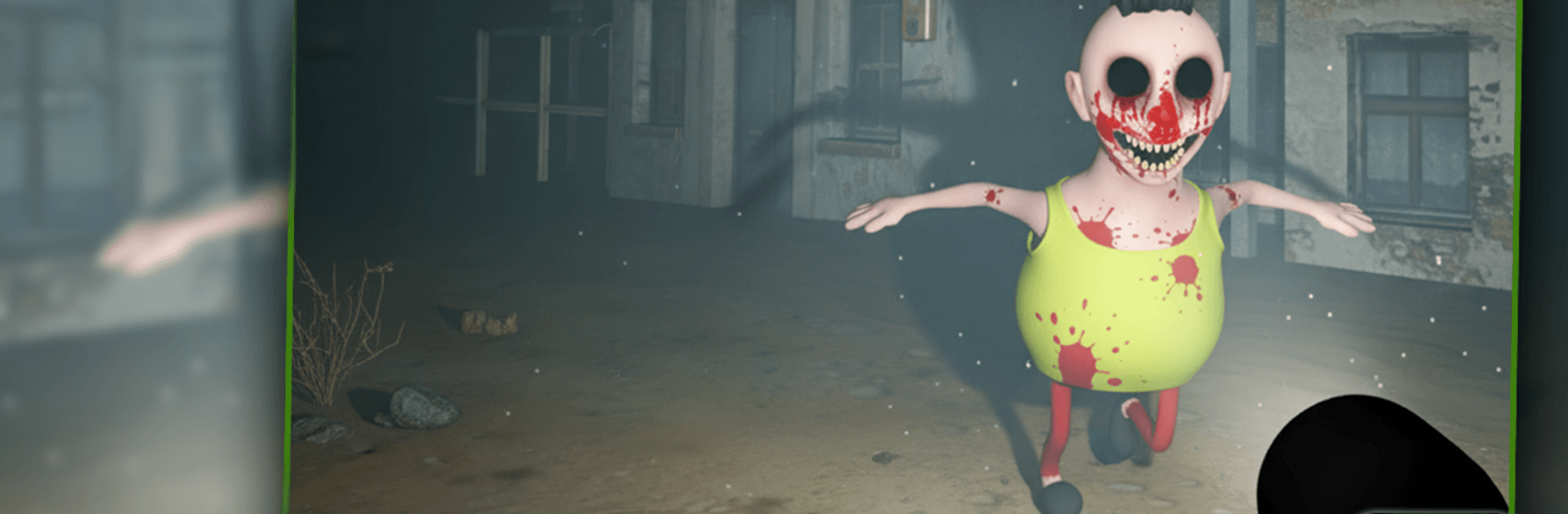
Hantu Hamood Habibi 3D is a tense horror Adventure where you’re never truly alone. You’ll creep through eerie spaces, hunt for crucial items, and stay one step ahead of a crafty spirit that’s always on your trail. Built by LemauDev, it leans into the thrill of being chased, the snap of a sudden scare, and the relief of making it to safety—barely.

Game Features

  • Relentless Hunter: A sharp, unpredictable ghost tracks your movement and punishes sloppy footsteps, keeping pressure high from start to finish.
  • Survival Objectives: Scour rooms and corridors for the items you need to complete each mission while the threat circles nearby.
  • 3D Horror Atmosphere: Clean 3D visuals, moody lighting, and tight spaces build a heavy, claustrophobic vibe—optimized for mobile devices.
  • Jumpscares With Intent: Frights aren’t random; they hit when your guard drops, turning mistakes into heart-stopping moments.
  • Hide, Run, Outsmart: Duck into hiding spots, time your sprints, and use the environment to break line of sight and regain control.
  • Smooth, Simple Controls: Responsive touch controls make quick reactions feel natural. Prefer a bigger screen? It also runs smoothly on BlueStacks.
  • Focused, High-Tension Play: Missions keep you moving with clear goals and escalating danger, rewarding careful planning under pressure.

Ready to top the leaderboard? We bet you do. Let precise controls and sharp visuals optimized on BlueStacks lead you to victory.


Game Features

Enhancements

  • Macros
  • Multi Instance
  • Multi Instance Sync
  • Script
  • Enhancements
Macros

Macros

Automate the predictable in Hantu Hamood Habibi 3D and transform your gameplay with Macros. Get access to inventive Macros in the BlueStacks Macro Community
Multi Instance

Multi Instance

Play Hantu Hamood Habibi 3D on one window. And chat with your friend on the other. Press CTRL + Shift + 8 to open the Multi-Instance Manager. And start creating fresh instances or clone an existing one.
Multi Instance Sync

Multi Instance Sync

Play Hantu Hamood Habibi 3D with the power of Multi-Instance Sync. Replicate what you are doing on the main instance on all other instances. Level up faster, play more.
Script

Script

Script your way to gaming glory in Hantu Hamood Habibi 3D with BlueStacks Script. Write and run a set of commands to automate repeated tasks. Trigger the command by assigning it to any key.
Read More

How to Download and Play Hantu Hamood Habibi 3D on PC or Mac

  • Download and install BlueStacks on your PC or Mac

  • Complete Google sign-in to access the Play Store, or do it later

  • Look for Hantu Hamood Habibi 3D in the search bar at the top right corner

  • Click to install Hantu Hamood Habibi 3D from the search results

  • Complete Google sign-in (if you skipped step 2) to install Hantu Hamood Habibi 3D

  • Click the Hantu Hamood Habibi 3D icon on the home screen to start playing

video
Watch Video

Minimum System Requirements

With BlueStacks 5, you can get started on a PC that fulfills the following requirements.

  • Operating System

    Microsoft Windows 7 or above, macOS 11 (Big Sur) or above

  • Processor

    Intel, AMD or Apple Silicon Processor

  • RAM

    at least 4GB

  • HDD

    10GB Free Disk Space

Note:

* You must be an Administrator on your PC. Up to date graphics drivers from Microsoft or the chipset vendor.

Hantu Hamood Habibi 3D - FAQs

  • How to play Hantu Hamood Habibi 3D on Windows PC & Mac?

    Play Hantu Hamood Habibi 3D on your PC or Mac by following these simple steps.

    • Click on 'Play Hantu Hamood Habibi 3D on PC’ to download BlueStacks
    • Install it and log-in to Google Play Store
    • Launch and play the game.
  • Why is BlueStacks the fastest and safest platform to play games on PC?

    BlueStacks respects your privacy and is always safe and secure to use. It does not carry any malware, spyware, or any sort of additional software that could harm your PC.

    It is engineered to optimize speed and performance for a seamless gaming experience.

  • What are Hantu Hamood Habibi 3D PC requirements?

    Minimum requirement to run Hantu Hamood Habibi 3D on your PC

    • OS: Microsoft Windows 7 or above MacOS 11 (Big Sur) or above
    • Processor: Intel, AMD or Apple Silicon Processor
    • RAM: Your PC must have at least 4GB of RAM. (Note that having 4GB or more disk space is not a substitute for RAM)
    • HDD: 10GB Free Disk Space.
    • You must be an Administrator on your PC.