Rush Hero: AFK Legends RPG

Rush Hero: AFK Legends RPG

Role Playing

| Games Extras

Play on PC with BlueStacks or from our cloud

  • Overview
  • Game Features
  • How to Play

Page Modified On: October 23, 2026

Play Rush Hero: AFK Legends RPG on PC or Mac

Rush Hero: AFK Legends RPG by Games Extras has plenty to keep you busy. BlueStacks lets you play it on PC or Mac with more screen space, better control, and fewer mobile limits.

About the Game

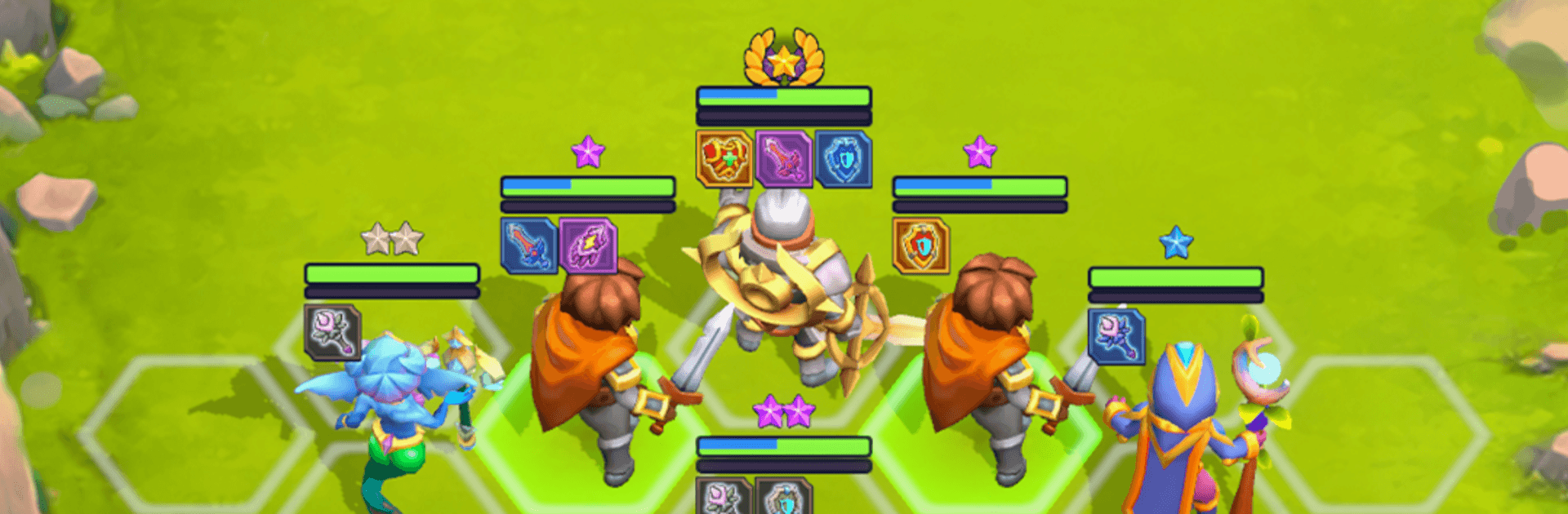
Rush Hero: AFK Legends RPG is a tactical autobattler that turns quick decisions into big wins. It’s a laid-back, strategy-first Role Playing experience where your team fights automatically, but the planning—who you buy, how you merge, and where you place units on the hex board—makes all the difference. Prefer playing on a bigger screen? It runs smoothly on BlueStacks without getting in the way.

Game Features

  • Hex-Grid Tactics, Hands-Off Fights: Place your squad, hit start, and watch abilities fly as the battle plays out automatically on a clean hex battlefield.
  • Hero Merging That Matters: Combine matching heroes to boost their tier, unlocking stronger stats and nastier power spikes as your roster comes together.
  • Five Heroes, Clear Roles: Every hero brings a basic attack, a passive, and an ultimate, so team synergies feel real—think damage dealers, anchors, and clever utility.
  • Grow Your Squad Slots: Begin with a compact lineup and spend coins to open extra slots when you’re ready to scale up your plan.
  • Between-Fight Prep Windows: Mid-round breaks let you shop from a small gear selection, skip for later, and pick one of three team-wide passives to shape your build.
  • Gear You Can Tinker With: Earn equipment from battles, then fuse duplicates to unlock bonus stats or added effects that push a favorite hero over the top.
  • Round-Based Climb With Bosses: Each run stacks difficulty across multiple stages and caps with a boss fight that pressure-tests your positioning and upgrades.
  • Snappy Runs, Real Strategy: Quick battles keep the pace brisk, while your choices—buys, merges, slots, and gear—decide whether the next stage is a breeze or a brick wall.
  • Coins Drive Your Momentum: Win fights to earn currency, then reinvest in heroes, gear, and squad space to keep your build evolving from round to round.

Start your journey now. Download the game on BlueStacks, invite your friends, and march on a new adventure.


Game Features

Enhancements

  • Macros
  • Rerolling
  • Eco Mode
  • Multi Instance Sync
  • Enhancements
Macros

Macros

Focus more on the fun part of the game, skip the tedious aspects. Master Rush Hero: AFK Legends RPG with Macros. Record yourself completing the monotonous tasks you wish to automate and replay them later with just one keypress.
Rerolling

Rerolling

Speed up the rerolling process in Rush Hero: AFK Legends RPG. Perform multiple summons and keep looking for the best Heroes. Use Multi-Instance sync to replicate the rerolling mechanism in all instances.
Eco Mode

Eco Mode

Farm in-game resources with ease in Rush Hero: AFK Legends RPG. Enable the Eco Mode when running the game in multiple instances. And lower your PC's resource consumption.
Multi Instance Sync

Multi Instance Sync

With the Multi-instance Sync, you can do even more in Rush Hero: AFK Legends RPG. Sync the action of the main instance and repeat them in real time for all other instances. Sync and sit back, let the game progress unfold.
Read More

How to Download and Play Rush Hero: AFK Legends RPG on PC or Mac

  • Download and install BlueStacks on your PC or Mac

  • Complete Google sign-in to access the Play Store, or do it later

  • Look for Rush Hero: AFK Legends RPG in the search bar at the top right corner

  • Click to install Rush Hero: AFK Legends RPG from the search results

  • Complete Google sign-in (if you skipped step 2) to install Rush Hero: AFK Legends RPG

  • Click the Rush Hero: AFK Legends RPG icon on the home screen to start playing

video
Watch Video

Minimum System Requirements

With BlueStacks 5, you can get started on a PC that fulfills the following requirements.

  • Operating System

    Microsoft Windows 7 or above, macOS 11 (Big Sur) or above

  • Processor

    Intel, AMD or Apple Silicon Processor

  • RAM

    at least 4GB

  • HDD

    10GB Free Disk Space

Note:

* You must be an Administrator on your PC. Up to date graphics drivers from Microsoft or the chipset vendor.

Rush Hero: AFK Legends RPG - FAQs

  • How to play Rush Hero: AFK Legends RPG on Windows PC & Mac?

    Play Rush Hero: AFK Legends RPG on your PC or Mac by following these simple steps.

    • Click on 'Play Rush Hero: AFK Legends RPG on PC’ to download BlueStacks
    • Install it and log-in to Google Play Store
    • Launch and play the game.
  • Why is BlueStacks the fastest and safest platform to play games on PC?

    BlueStacks respects your privacy and is always safe and secure to use. It does not carry any malware, spyware, or any sort of additional software that could harm your PC.

    It is engineered to optimize speed and performance for a seamless gaming experience.

  • What are Rush Hero: AFK Legends RPG PC requirements?

    Minimum requirement to run Rush Hero: AFK Legends RPG on your PC

    • OS: Microsoft Windows 7 or above MacOS 11 (Big Sur) or above
    • Processor: Intel, AMD or Apple Silicon Processor
    • RAM: Your PC must have at least 4GB of RAM. (Note that having 4GB or more disk space is not a substitute for RAM)
    • HDD: 10GB Free Disk Space.
    • You must be an Administrator on your PC.