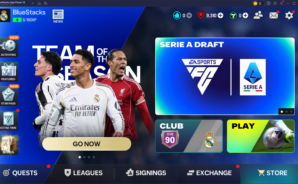
EA SPORTS FC Soccer Mobile 26

EA SPORTS FC Soccer Mobile 26

Sports

| ELECTRONIC ARTS

BlueStacks Verified

Play on PC with BlueStacks or from our cloud

  • Overview
  • Tips & Tricks
  • Game Features
  • How to Play

Page Modified On: September 10, 2026

Play EA SPORTS FC Soccer Mobile 26 on PC or Mac

Bring your A-game to EA SPORTS FC Soccer Mobile 26, the Sports game sensation from ELECTRONIC ARTS. Give your gameplay the much-needed boost with precise game controls, high FPS graphics, and top-tier features on your PC or Mac with BlueStacks.

About the Game

EA SPORTS FC Soccer Mobile 26 is a Sports title built for anyone who lives and breathes the beautiful game. Build a dream squad, chase trophies with your country, and test your skills against real players in competitive modes that actually feel fair. Want a bigger screen and crisp controls? It also runs smoothly on PC with BlueStacks.

Game Features

  • National Team Tournament: Pick your country from a large roster of officially licensed national teams and work through authentic brackets, hunt for glory, and replay runs to try new strategies.
  • Ultimate Team Building: Collect current stars and legendary ICONs, mix club allegiances into one squad, and fine-tune chemistry to create a lineup that fits your style.
  • Real-Time PvP Modes: Jump into Head-to-Head 1v1, go all-out in VS Attack, enter Club Challenge, or prove your tactics in Manager Mode—each mode rewards a different type of mastery.
  • Quick Match With Friends: Send an invite, choose your Club, National Team, or Ultimate Team, and settle bragging rights in short, high-energy matches.
  • Authentic Licenses: Play with thousands of real players across major leagues and competitions, with badges, kits, and names that match the real thing.
  • True-To-Player Feel: Experience signature PlayStyles, realistic attributes, slick passing, and responsive skill moves that make stars play like themselves.
  • Tactical Control: Switch formations on the fly, adjust press and build-up, assign set-piece takers, and manage stamina and subs to win the small battles that decide matches.
  • Live Events and Training: Knock out daily drills, short challenges, and even quick mini-games and trivia to earn materials that upgrade your squad.
  • League and Division Play: Join a League to chase group rewards, climb competitive ladders, and stay sharp against opponents who keep you on your toes.
  • Smart Matchmaking: Face opponents near your level so games feel competitive, not chaotic, and every win actually means something.

Start your journey now. Download the game on BlueStacks, invite your friends, and march on a new adventure.

Game Features

Game controls

  • Movement
  • Skill Cast

Enhancements

  • Macros
  • Multi Instance
  • Multi Instance Sync
  • Script
  • Game controls
  • Enhancements
Movement
Skill Cast
Macros

Macros

Automate the predictable in EA SPORTS FC Soccer Mobile 26 and transform your gameplay with Macros. Get access to inventive Macros in the BlueStacks Macro Community
Multi Instance

Multi Instance

Play EA SPORTS FC Soccer Mobile 26 on one window. And chat with your friend on the other. Press CTRL + Shift + 8 to open the Multi-Instance Manager. And start creating fresh instances or clone an existing one.
Multi Instance Sync

Multi Instance Sync

Play EA SPORTS FC Soccer Mobile 26 with the power of Multi-Instance Sync. Replicate what you are doing on the main instance on all other instances. Level up faster, play more.
Script

Script

Script your way to gaming glory in EA SPORTS FC Soccer Mobile 26 with BlueStacks Script. Write and run a set of commands to automate repeated tasks. Trigger the command by assigning it to any key.
Read More

How to Download and Play EA SPORTS FC Soccer Mobile 26 on PC or Mac

  • Download and install BlueStacks on your PC or Mac

  • Complete Google sign-in to access the Play Store, or do it later

  • Look for EA SPORTS FC Soccer Mobile 26 in the search bar at the top right corner

  • Click to install EA SPORTS FC Soccer Mobile 26 from the search results

  • Complete Google sign-in (if you skipped step 2) to install EA SPORTS FC Soccer Mobile 26

  • Click the EA SPORTS FC Soccer Mobile 26 icon on the home screen to start playing

video
Watch Video

Minimum System Requirements

With BlueStacks 5, you can get started on a PC that fulfills the following requirements.

  • Operating System

    Microsoft Windows 7 or above, macOS 11 (Big Sur) or above

  • Processor

    Intel, AMD or Apple Silicon Processor

  • RAM

    at least 4GB

  • HDD

    10GB Free Disk Space

Note:

* You must be an Administrator on your PC. Up to date graphics drivers from Microsoft or the chipset vendor.

EA SPORTS FC Soccer Mobile 26 - FAQs

  • How to play EA SPORTS FC Soccer Mobile 26 on Windows PC & Mac?

    Play EA SPORTS FC Soccer Mobile 26 on your PC or Mac by following these simple steps.

    • Click on 'Play EA SPORTS FC Soccer Mobile 26 on PC’ to download BlueStacks
    • Install it and log-in to Google Play Store
    • Launch and play the game.
  • Why is BlueStacks the fastest and safest platform to play games on PC?

    BlueStacks respects your privacy and is always safe and secure to use. It does not carry any malware, spyware, or any sort of additional software that could harm your PC.

    It is engineered to optimize speed and performance for a seamless gaming experience.

  • What are EA SPORTS FC Soccer Mobile 26 PC requirements?

    Minimum requirement to run EA SPORTS FC Soccer Mobile 26 on your PC

    • OS: Microsoft Windows 7 or above MacOS 11 (Big Sur) or above
    • Processor: Intel, AMD or Apple Silicon Processor
    • RAM: Your PC must have at least 4GB of RAM. (Note that having 4GB or more disk space is not a substitute for RAM)
    • HDD: 10GB Free Disk Space.
    • You must be an Administrator on your PC.