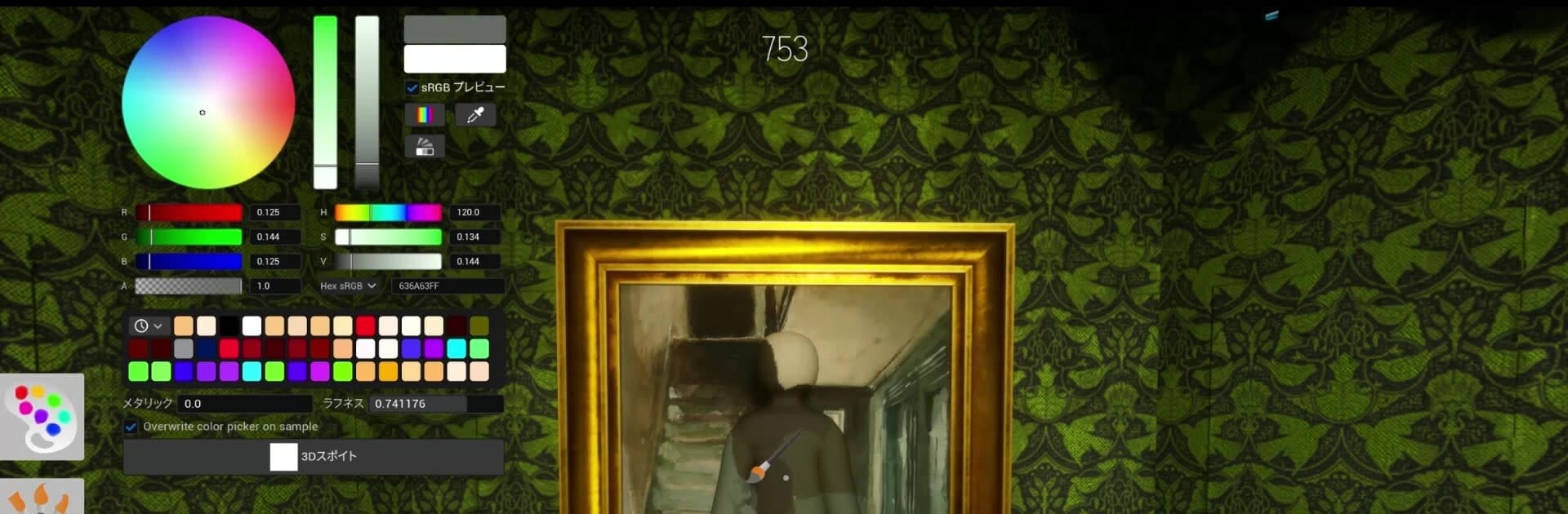
MECCHA CHAMELEON
MECCHA CHAMELEON

MECCHA CHAMELEON

Sports

| PlayLand Studio

Play on PC with BlueStacks or from our cloud

  • Overview
  • Game Features
  • How to Play

Page Modified On: July 24, 2026

Play MECCHA CHAMELEON on PC or Mac

Play MECCHA CHAMELEON by PlayLand Studio on PC or Mac with BlueStacks. Use a bigger screen, mouse and keyboard controls, and smoother performance while you play.

About the Game

MECCHA CHAMELEON is a fast, paint-and-hide party game where your best weapon is a color picker. Each round, you’ll either hunt or hide, with quick matches that turn tense in a heartbeat. Expect goofy poses, gasp-worthy escapes, and that glorious “wait, you were right there?!” reveal when the timer hits zero.

Game Features

  • Color Camouflage: Brush your blank body with the perfect shade to melt into walls, props, and floors—chameleon style. A smart color choice and a steady hand can make you practically invisible.
  • Hide-and-Seek, Remixed: Classic rules with a twist. Hiders try to survive the clock, while Seekers race to spot everyone before time runs out.
  • Pose Matters: Blending in isn’t just about paint. Strike a believable stance and sell the scene—your “acting” can fool even sharp-eyed Seekers.
  • Pick Your Role: Join the Hider team to test your mimic game or jump in as a Seeker and scan every corner for suspicious shapes.
  • Easy Multiplayer Rooms: Play with friends or hop in with strangers. Hosts can make servers public or private and set up matches in seconds.
  • Flexible Group Sizes: Designed to feel fun whether it’s a tiny showdown or a busy lobby. Around 2–10 players is the sweet spot, depending on the host’s connection.
  • Streamer-Friendly: Want viewer games? Hosting is straightforward, so audiences can join without a fuss.
  • Sports Energy, Party Spirit: Filed under Sports, but it plays like a competitive party challenge—fast, playful, and surprisingly skillful.
  • PC-Friendly Option: Prefer painting with a mouse and scanning on a bigger screen? BlueStacks makes it simple to play on your computer without changing the vibe.

Start playing MECCHA CHAMELEON on BlueStacks and get a smoother, more comfortable PC or Mac setup.


Game Features

Enhancements

  • Macros
  • Multi Instance
  • Multi Instance Sync
  • Script
  • Enhancements
Macros

Macros

Automate the predictable in MECCHA CHAMELEON and transform your gameplay with Macros. Get access to inventive Macros in the BlueStacks Macro Community
Multi Instance

Multi Instance

Play MECCHA CHAMELEON on one window. And chat with your friend on the other. Press CTRL + Shift + 8 to open the Multi-Instance Manager. And start creating fresh instances or clone an existing one.
Multi Instance Sync

Multi Instance Sync

Play MECCHA CHAMELEON with the power of Multi-Instance Sync. Replicate what you are doing on the main instance on all other instances. Level up faster, play more.
Script

Script

Script your way to gaming glory in MECCHA CHAMELEON with BlueStacks Script. Write and run a set of commands to automate repeated tasks. Trigger the command by assigning it to any key.
Read More

How to Download and Play MECCHA CHAMELEON on PC or Mac

  • Download and install BlueStacks on your PC or Mac

  • Complete Google sign-in to access the Play Store, or do it later

  • Look for MECCHA CHAMELEON in the search bar at the top right corner

  • Click to install MECCHA CHAMELEON from the search results

  • Complete Google sign-in (if you skipped step 2) to install MECCHA CHAMELEON

  • Click the MECCHA CHAMELEON icon on the home screen to start playing

video
Watch Video

Minimum System Requirements

With BlueStacks 5, you can get started on a PC that fulfills the following requirements.

  • Operating System

    Microsoft Windows 7 or above, macOS 11 (Big Sur) or above

  • Processor

    Intel, AMD or Apple Silicon Processor

  • RAM

    at least 4GB

  • HDD

    10GB Free Disk Space

Note:

* You must be an Administrator on your PC. Up to date graphics drivers from Microsoft or the chipset vendor.

MECCHA CHAMELEON - FAQs

  • How to play MECCHA CHAMELEON on Windows PC & Mac?

    Play MECCHA CHAMELEON on your PC or Mac by following these simple steps.

    • Click on 'Play MECCHA CHAMELEON on PC’ to download BlueStacks
    • Install it and log-in to Google Play Store
    • Launch and play the game.
  • Why is BlueStacks the fastest and safest platform to play games on PC?

    BlueStacks respects your privacy and is always safe and secure to use. It does not carry any malware, spyware, or any sort of additional software that could harm your PC.

    It is engineered to optimize speed and performance for a seamless gaming experience.

  • What are MECCHA CHAMELEON PC requirements?

    Minimum requirement to run MECCHA CHAMELEON on your PC

    • OS: Microsoft Windows 7 or above MacOS 11 (Big Sur) or above
    • Processor: Intel, AMD or Apple Silicon Processor
    • RAM: Your PC must have at least 4GB of RAM. (Note that having 4GB or more disk space is not a substitute for RAM)
    • HDD: 10GB Free Disk Space.
    • You must be an Administrator on your PC.