I Am Monkey School Pranskter

I Am Monkey School Pranskter

Strategy

| BMH Sol

Play on PC with BlueStacks or from our cloud

  • Overview
  • Game Features
  • How to Play

Page Modified On: June 09, 2026

Play I Am Monkey School Pranskter on PC or Mac

I Am Monkey School Pranskter by BMH Sol has plenty to keep you busy. BlueStacks lets you play it on PC or Mac with more screen space, better control, and fewer mobile limits.

About the Game

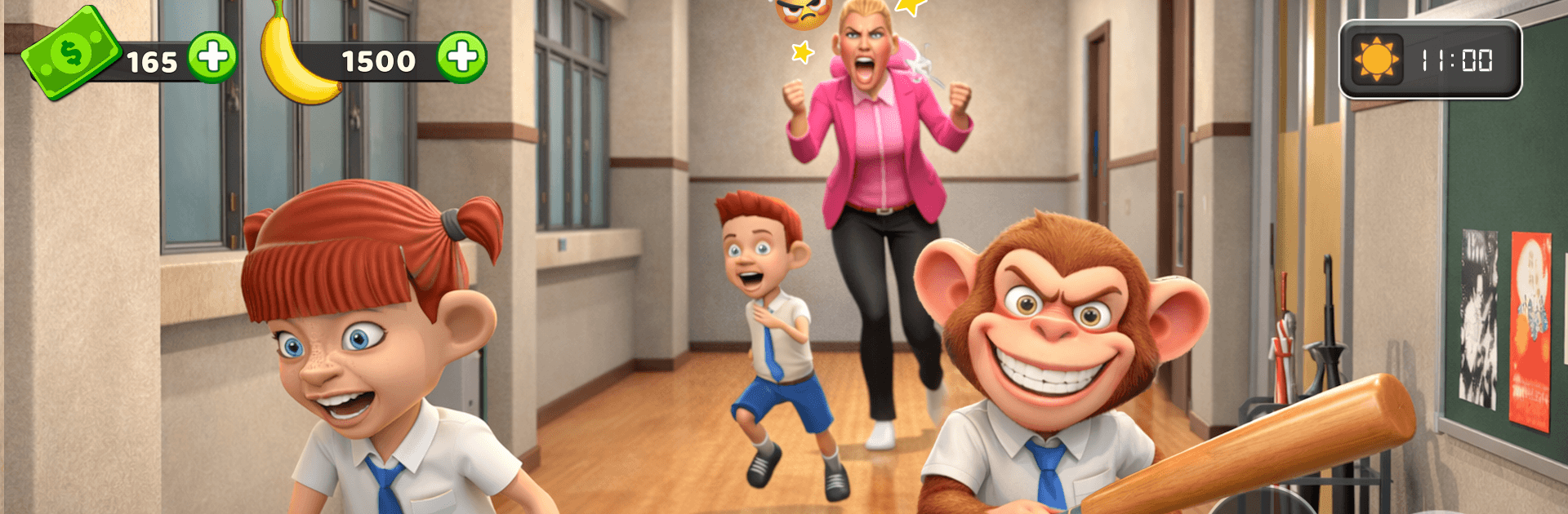
I Am Monkey School Pranskter is a cheeky Strategy caper where a quick-witted monkey turns a busy school day into a stealthy playground. You’ll map out routes, time your swings, and pull off harmless gags while staying a step ahead of watchful teachers. It’s sneaky, puzzle-y, and happily banana-fueled.

Game Features

  • Sneaky Strategy: Study patrol patterns, pick the perfect moment, and line up pranks without getting spotted.
  • Pranks with Payoff: Set up goofy chain reactions—one well-timed gag can send a whole hallway into giggles.
  • Bite-Size Puzzles: Crack simple classroom brainteasers to open shortcuts, unlock doors, and distract nosy hall monitors.
  • Monkey Moves: Swing from beams, slide under desks, and scamper through vents to escape tight spots.
  • Teachers on Patrol: Use lockers, curtains, and corners as hideouts while you outsmart the grown-ups.
  • Snack Snatching: Nab tasty treats as collectibles to fuel bigger, bolder mischief across each area.
  • Colorful Campus: Explore classrooms, the library, cafeteria, gym, and a few off-limits places that beg to be discovered.
  • New Twists Every Level: Fresh hazards and rules—like squeaky floors or nosy science bots—keep you adapting.
  • Secret Nooks: Hunt for hidden alcoves and oddball props that make pranks smarter (and funnier).
  • Replay-Friendly: Try alternate routes, experiment with different setups, and refine your perfect hallway heist.
  • Smooth on PC: Prefer a bigger screen? It also plays nicely on BlueStacks without making a fuss.

BlueStacks gives you more room to focus on the game and less time adjusting around mobile limitations.


Game Features

Enhancements

  • Macros
  • Multi Instance
  • Multi Instance Sync
  • Eco Mode
  • Enhancements
Macros

Macros

Skip the boring parts of a game. Play I Am Monkey School Pranskter with Macros and get the edge. Simply record a sequence of commands and execute them at any moment.
Multi Instance

Multi Instance

Why limit to one game on your phone when you can play many on your PC? Open multiple instances of I Am Monkey School Pranskter at once with Multi-Instance. Leverage the power of different accounts by doing more.
Multi Instance Sync

Multi Instance Sync

Get the best out of I Am Monkey School Pranskter with Multi-Instance Sync. Play the game from different accounts and build your own empire. Use Multi-instance sync to repeat the action in the main BlueStacks instance on all other instances.
Eco Mode

Eco Mode

Find the rarest heroes by making multiple summons in I Am Monkey School Pranskter. And while you are at it, reduce your PC’s resource consumption with the Eco Mode. Farm efficiently. Get the best results.
Read More

How to Download and Play I Am Monkey School Pranskter on PC or Mac

  • Download and install BlueStacks on your PC or Mac

  • Complete Google sign-in to access the Play Store, or do it later

  • Look for I Am Monkey School Pranskter in the search bar at the top right corner

  • Click to install I Am Monkey School Pranskter from the search results

  • Complete Google sign-in (if you skipped step 2) to install I Am Monkey School Pranskter

  • Click the I Am Monkey School Pranskter icon on the home screen to start playing

video
Watch Video

Minimum System Requirements

With BlueStacks 5, you can get started on a PC that fulfills the following requirements.

  • Operating System

    Microsoft Windows 7 or above, macOS 11 (Big Sur) or above

  • Processor

    Intel, AMD or Apple Silicon Processor

  • RAM

    at least 4GB

  • HDD

    10GB Free Disk Space

Note:

* You must be an Administrator on your PC. Up to date graphics drivers from Microsoft or the chipset vendor.

I Am Monkey School Pranskter - FAQs

  • How to play I Am Monkey School Pranskter on Windows PC & Mac?

    Play I Am Monkey School Pranskter on your PC or Mac by following these simple steps.

    • Click on 'Play I Am Monkey School Pranskter on PC’ to download BlueStacks
    • Install it and log-in to Google Play Store
    • Launch and play the game.
  • Why is BlueStacks the fastest and safest platform to play games on PC?

    BlueStacks respects your privacy and is always safe and secure to use. It does not carry any malware, spyware, or any sort of additional software that could harm your PC.

    It is engineered to optimize speed and performance for a seamless gaming experience.

  • What are I Am Monkey School Pranskter PC requirements?

    Minimum requirement to run I Am Monkey School Pranskter on your PC

    • OS: Microsoft Windows 7 or above MacOS 11 (Big Sur) or above
    • Processor: Intel, AMD or Apple Silicon Processor
    • RAM: Your PC must have at least 4GB of RAM. (Note that having 4GB or more disk space is not a substitute for RAM)
    • HDD: 10GB Free Disk Space.
    • You must be an Administrator on your PC.