BlueStacks 5 vs. LDPlayer 9: Performance Report 2026

We recently ran a fresh round of benchmarks to compare BlueStacks 5 with its closest competitor across a range of systems — from high-end Nvidia setups to everyday Intel laptops.
The goal was simple: see how both hold up in real-world usage.
1. Raw Power (Antutu Total Score)
Antutu gives a broad view of overall performance — CPU, GPU, memory, everything combined. Across most setups, BlueStacks consistently delivered higher total scores. On Intel systems in particular, the gap was noticeable at around 23%, with BlueStacks also maintaining a steady lead of 4.1% on Nvidia and 6.6% on AMD systems. In practical terms, that shows up as fewer frame drops and more consistent gameplay, especially in heavier titles.
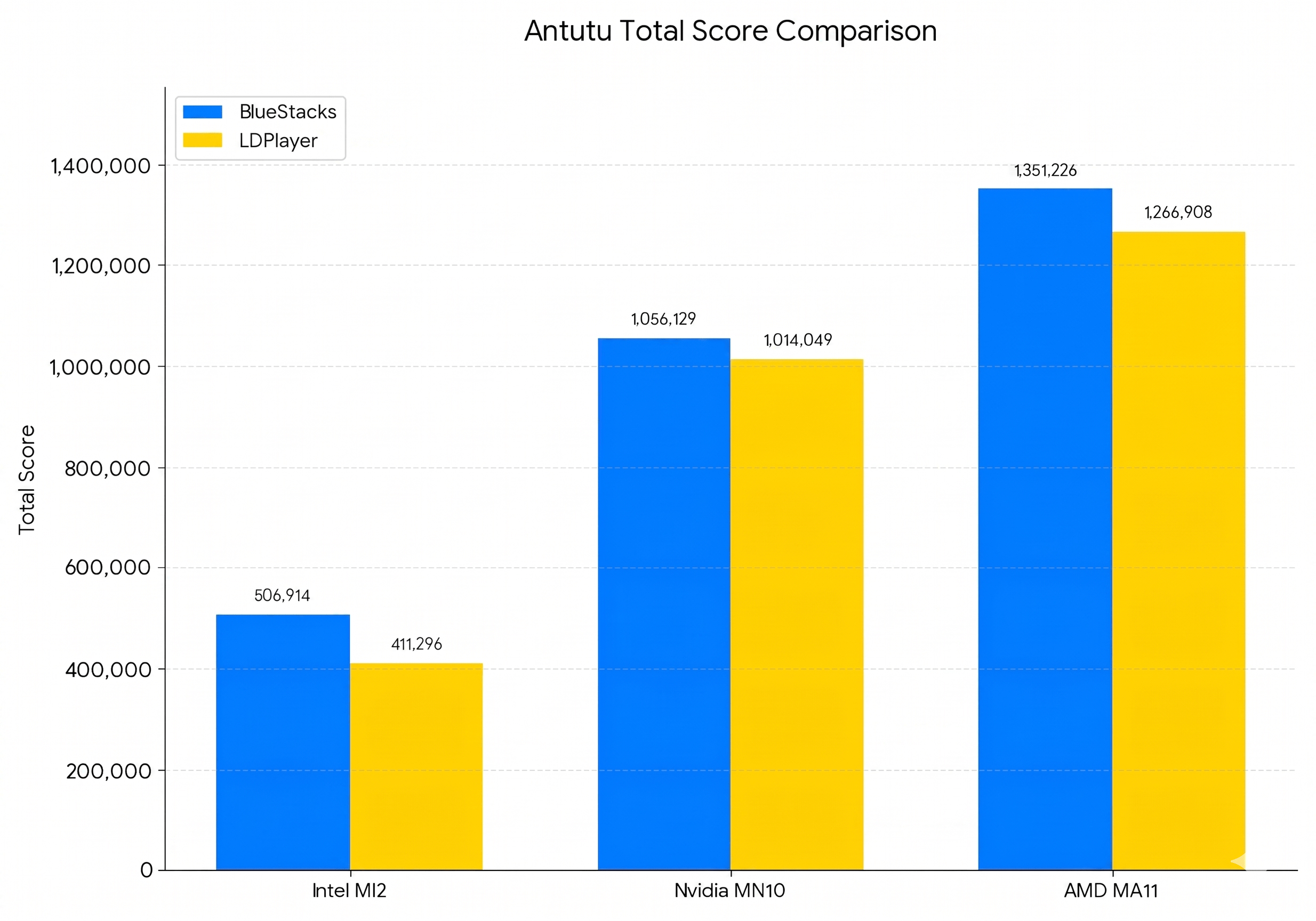
BlueStacks vs. Competitor across different PC setups.
2. Graphics and FPS (Antutu GPU Subscore)
The GPU subscore reflects how well the emulator handles 3D rendering and higher frame rates. BlueStacks comes out ahead here, especially on AMD and Intel hardware. What that means in use: you can push higher graphics settings without the experience breaking down into stutters or inconsistent frames.
In the GPU test, BlueStacks led across all systems — around 62% higher on Intel, about 4% higher on Nvidia, and nearly 6% higher on AMD compared to LDPlayer.
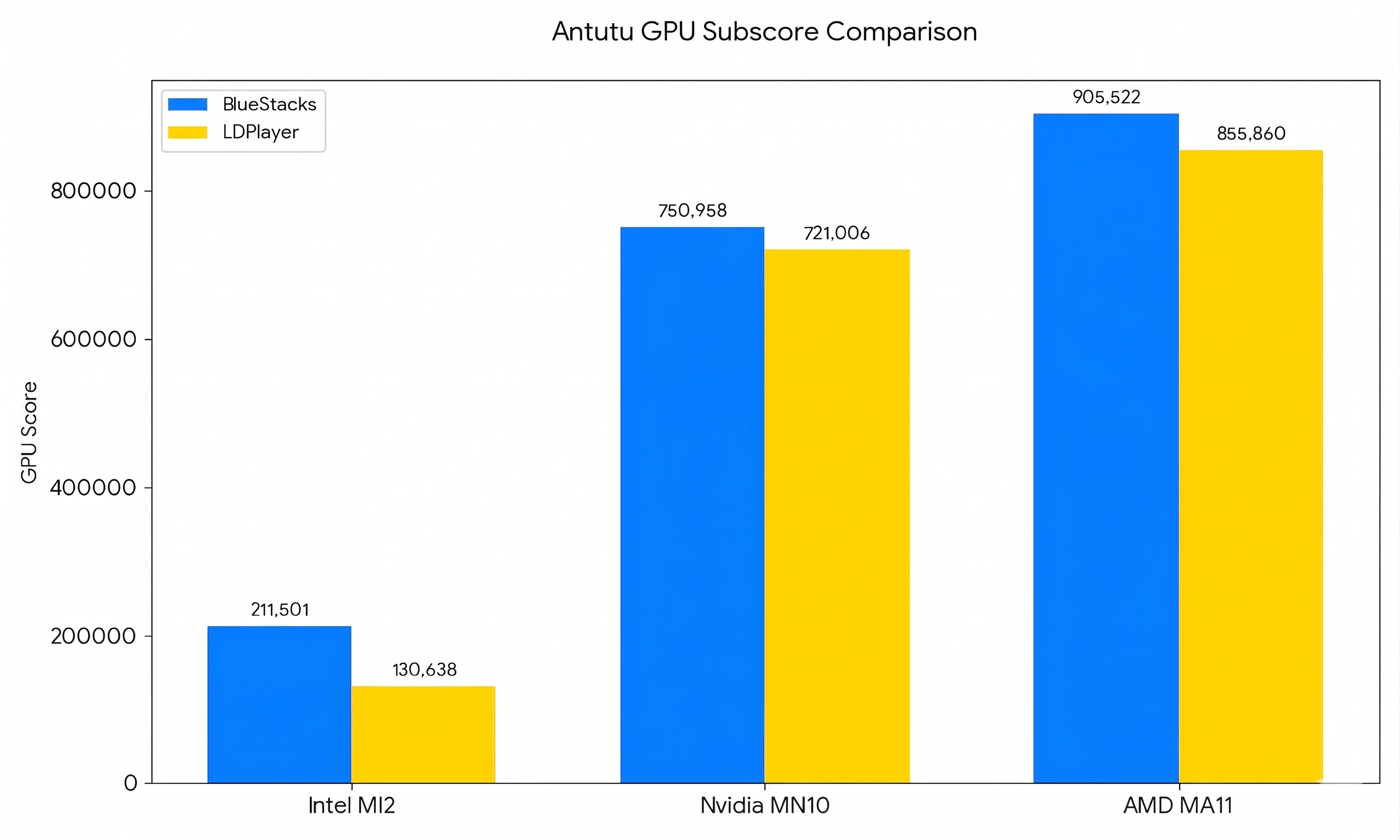
BlueStacks handles 3D graphics better
3. Responsiveness (Geekbench 6 Single-Core)
Single-core performance is often what defines how “fast” an emulator feels. Menu navigation, in-game UI, quick inputs, all of this depends on it. BlueStacks shows a clear lead here, particularly on Nvidia systems where it responds up to 51% faster. It’s something you feel immediately while using it.
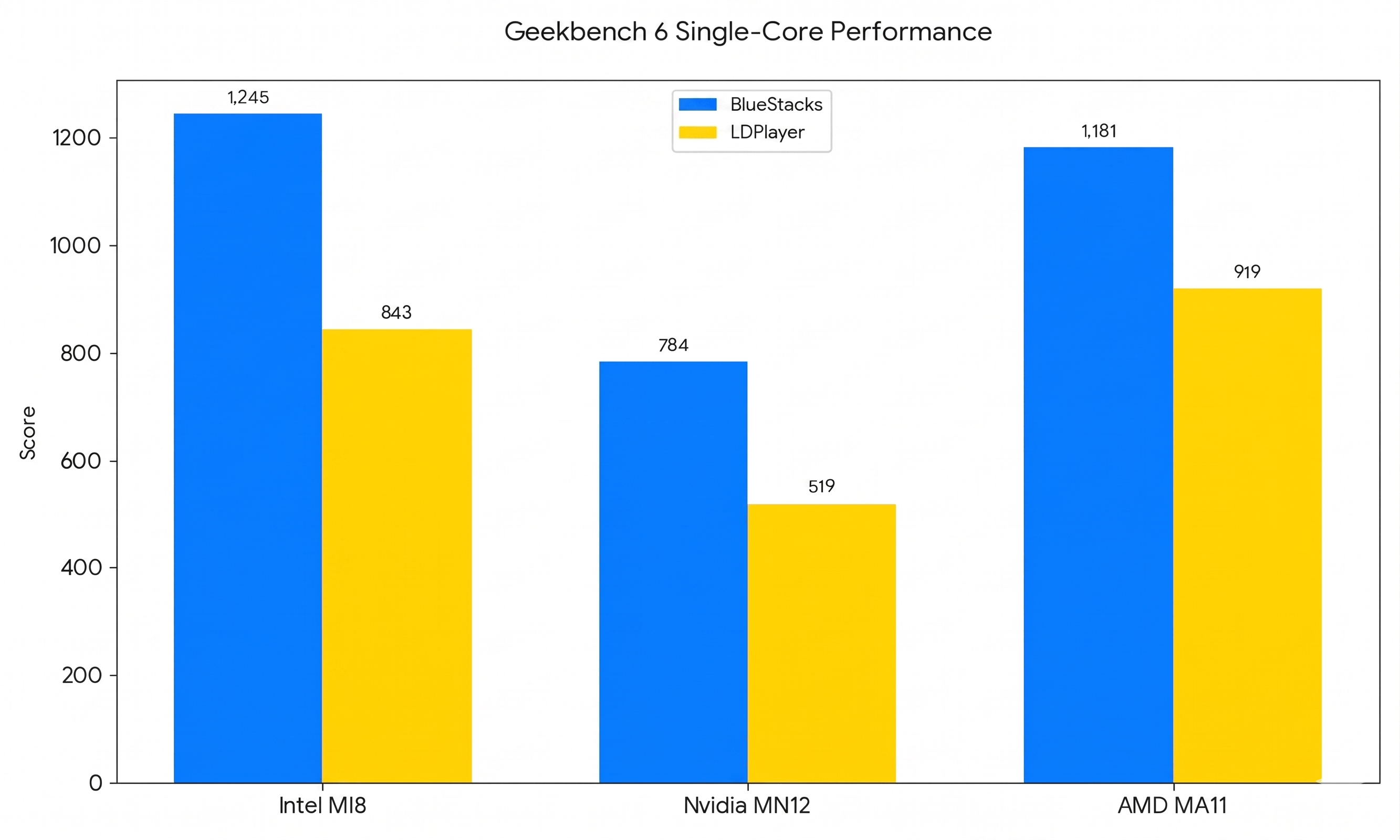
How fast the emulator reacts to your clicks.
4. Handling the Heavy Stuff (Geekbench 6 Multi-Core)
Multi-core performance matters more when you start pushing the system, multiple instances, background apps, or streaming while playing. While results are closer on some AMD setups, BlueStacks maintains an edge on Intel (around 42%) and Nvidia configurations, making it a more stable option when you’re doing more than just running a single game.
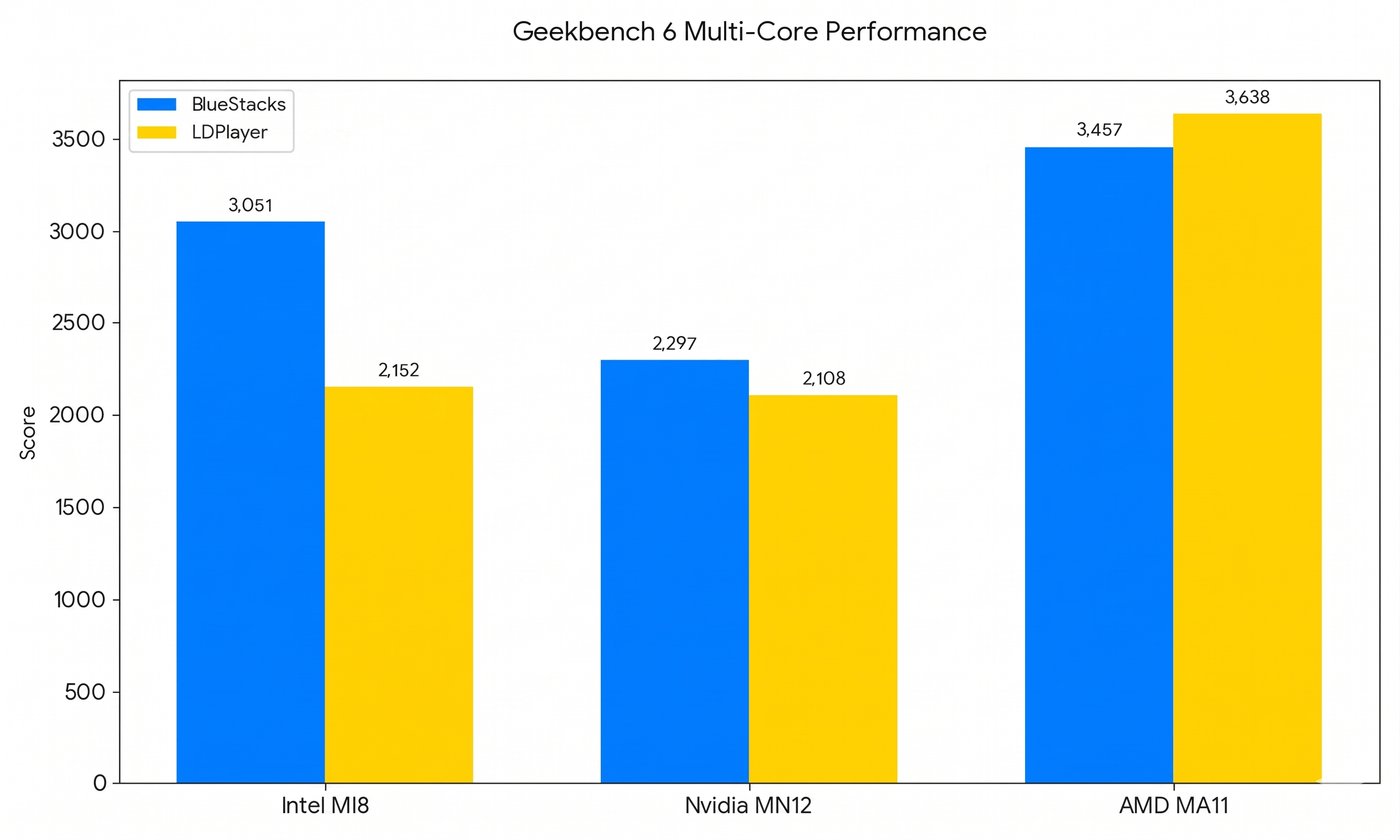
Performance when you’re pushing the emulator to its limits.
5. Modern Gaming Tech (Geekbench Vulkan)
Vulkan support has become increasingly important for newer modern titles. In our tests, BlueStacks showed a strong advantage on AMD hardware. On Nvidia systems, the competitor ran into stability issues with certain drivers, while BlueStacks remained consistent. While Vulkan results were close on Intel systems, BlueStacks showed a clear advantage on AMD, delivering around 33% higher GPU performance than LDPlayer.
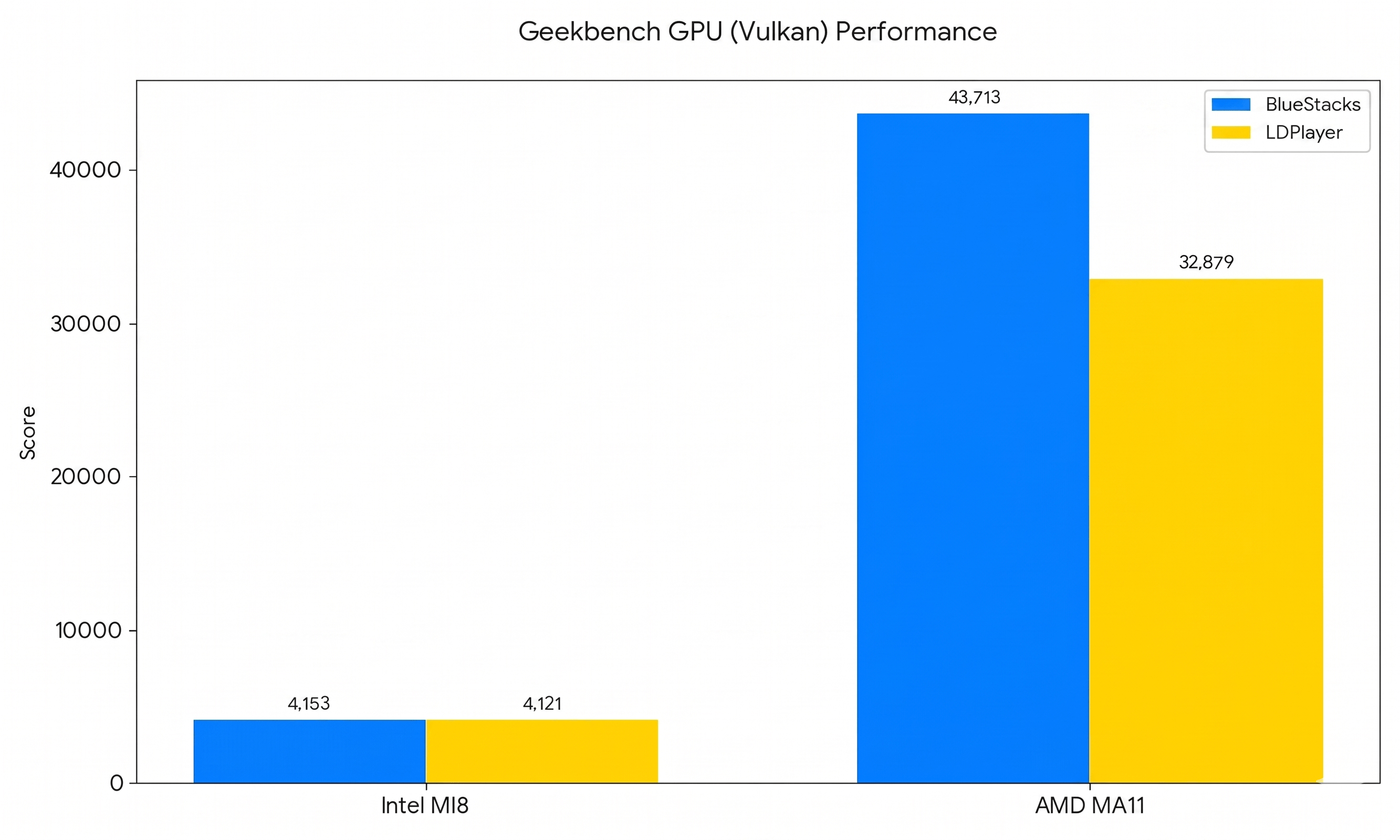
Vulkan API scores (Where the competition crashed, BlueStacks kept going).
6. Get Gaming Faster (Boot Time)
This is one of the more immediate differences. BlueStacks 5 starts up in roughly 6 to 13 seconds across most systems. The competitor, in comparison, can take closer to 50 seconds. BlueStacks is 5 to 7 times faster to boot than LDPlayer.
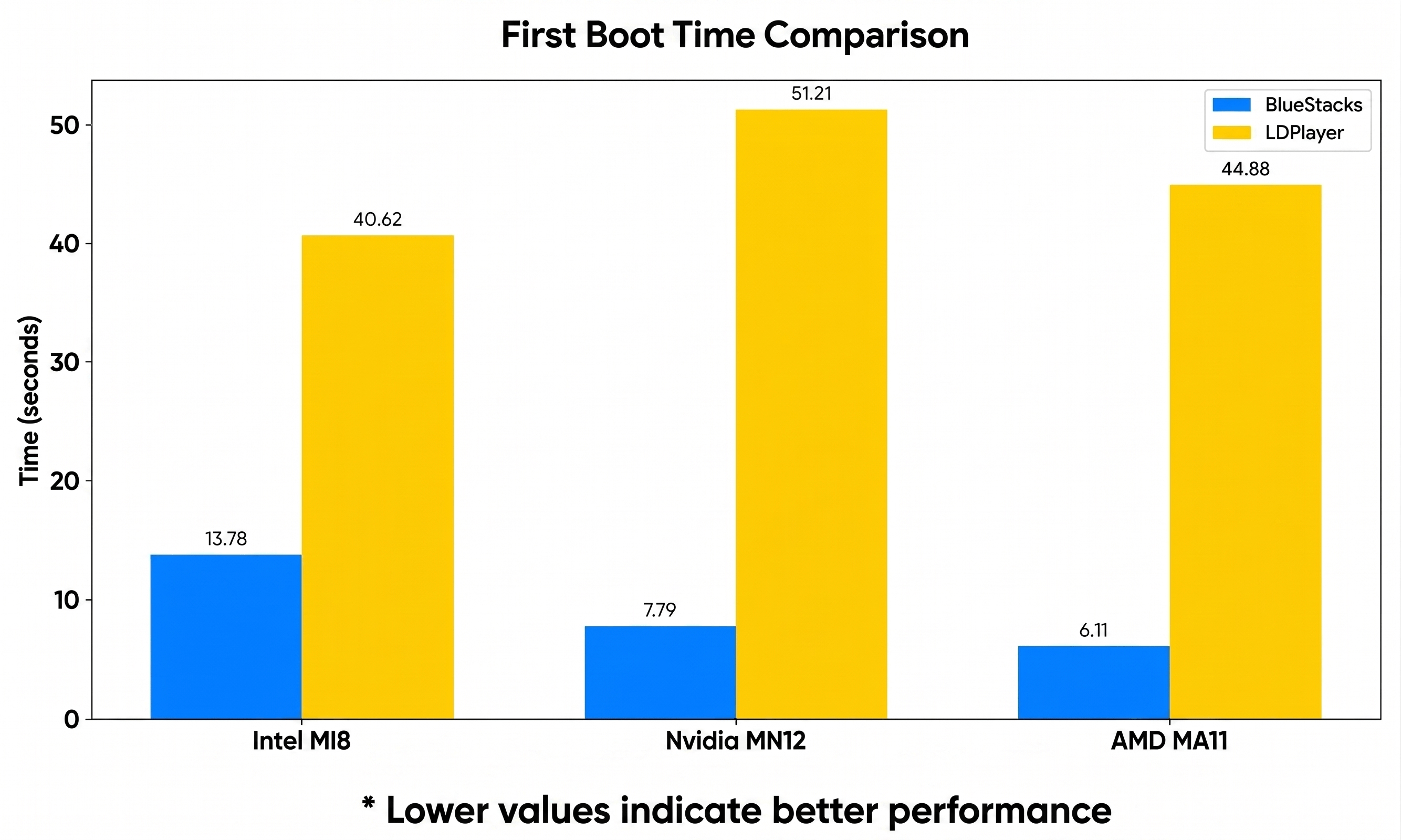
Boot speed in seconds (Lower is much better!).
Across all tests, the pattern is fairly consistent. BlueStacks 5 performs better across the board, from raw power and graphics handling to responsiveness and startup time. If you’re a casual player, the difference shows up as smoother gameplay and fewer interruptions. If you’re a power user, someone running multiple instances or pushing higher settings, it becomes even more noticeable.
Community Note: What Some Players Say
In a recent Reddit discussion, a player who switched from LDPlayer to BlueStacks described the experience as “miles better.” Performance always depends on factors like PC hardware, game settings, and emulator configuration, but this feedback is consistent with our own benchmark results, where BlueStacks showed stronger startup speed, responsiveness, graphics handling, and overall stability across a range of test systems. If you’re weighing the two, it’s worth trying BlueStacks on your own setup and seeing the difference for yourself.
For more comparisons, check out our detailed BlueStacks 5 vs LDPlayer vs MEmu vs Nox benchmark report, and read our BlueStacks vs Google Play Games on PC comparison to see which option is better for Android gaming on PC.