Hungry Shark World
Hungry Shark World

Hungry Shark World

Action

| Ubisoft Entertainment

BlueStacks Verified

Play on PC with BlueStacks or from our cloud

  • Overview
  • Tips & Tricks
  • Game Features
  • How to Play

Page Modified On: October 07, 2026

Play Hungry Shark World on PC or Mac

Hungry Shark World brings the Arcade genre to life, and throws up exciting challenges for gamers. Developed by Ubisoft Entertainment, this Android game is best experienced on BlueStacks, the World’s #1 app player for PC and Mac users.

About the Game

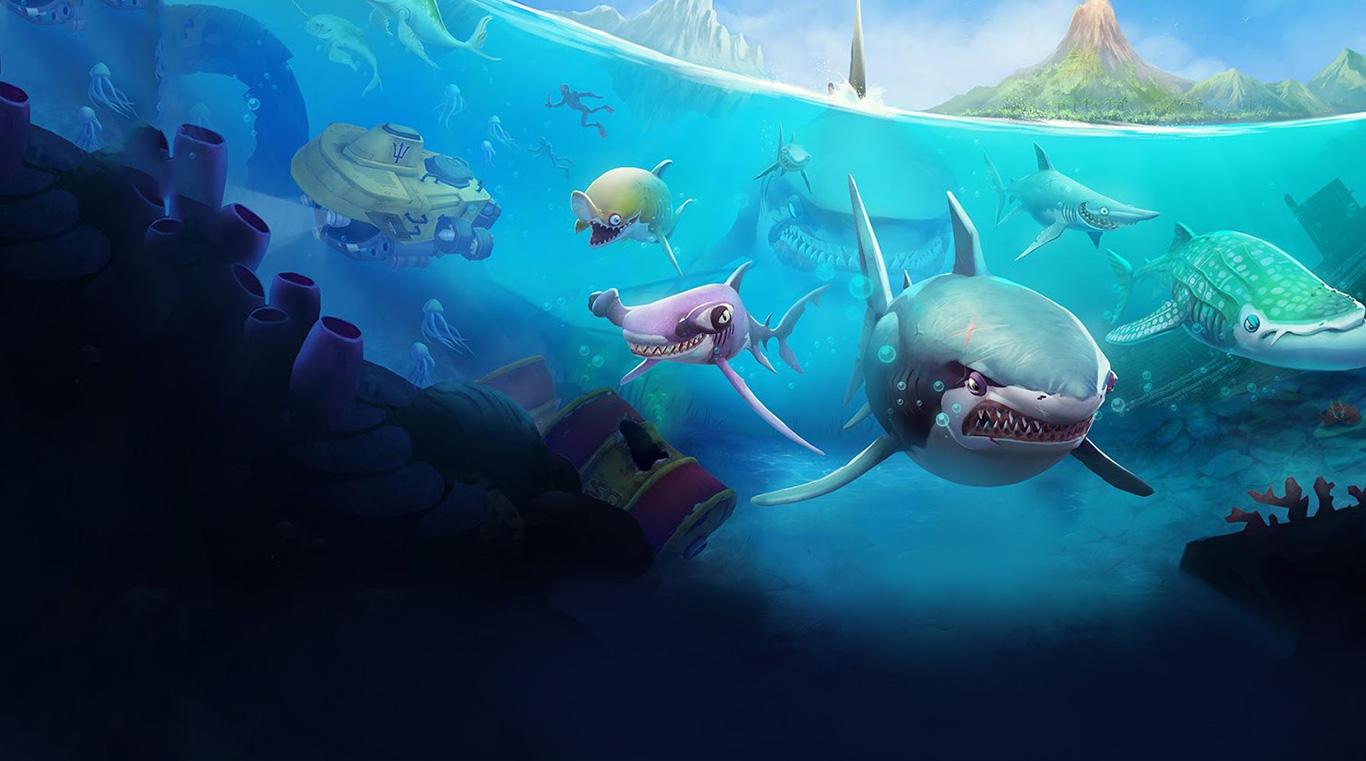
Hungry Shark World is an Arcade feast where you’re a relentlessly hungry shark trying to stay alive by, well, eating everything you can. Glide through massive oceans, snack on anything from tiny fish to much bigger “meals,” and keep your health bar full while dodging threats. Prefer kicking back at a desk? It plays great on PC with BlueStacks, too.

Game Features

  • 43 Sharks, 8 Sizes: Start small and work your way up to ocean legends like the Great White, each with its own personality and bite.
  • Big, Busy Maps: Explore the tropical Pacific Islands, the icy Arctic, the exotic Arabian Sea, and the lively South China Sea packed with hazards and snacks alike.
  • Flashy 3D Action: Smooth, fast visuals bring the mayhem to life, from swirling schools of fish to exploding hazards.
  • Eat-Or-Be-Eaten Play: The seas are crowded with prey and predators—fish, whales, submarines, and more—so keep moving and keep munching.
  • Gear That Gets Wild: Strap on quirky gadgets (yes, jetpacks and umbrellas are a thing) to swim faster, bite harder, and last longer.
  • Skins With Stats: Dress your shark in standout looks that also boost speed, toughness, and survival time.
  • Missions And Boss Fights: Tackle score chases, prey hunts, and big, tense boss encounters that test your reflexes.
  • Handy Ocean Buddies: Recruit baby sharks, an octopus, even a bald eagle for bonus abilities that help you score and survive.
  • Power Surges: Trigger SuperSize bursts, rushes, explosions, hypnosis, and other chaos for short, glorious feeding frenzies.
  • Extinction Mode: Evolve into Apex forms and take on a high-stakes challenge that pushes your skills to the limit.
  • Compete And Collect: Climb leaderboards, unlock achievements, and keep chasing a better run with every attempt.
  • Play Your Way: Earn gems, gold, and pearls by playing, or pick up optional purchases; ads are present and can disappear after any purchase.

Ready to top the leaderboard? We bet you do. Let precise controls and sharp visuals optimized on BlueStacks lead you to victory.


Game Features

Game controls

  • Tap Spots
  • Other Moves

Enhancements

  • Macros
  • Multi Instance
  • Multi Instance Sync
  • Script
  • Game controls
  • Enhancements
Tap Spots
Other Moves
Macros

Macros

Automate the predictable in Hungry Shark World and transform your gameplay with Macros. Get access to inventive Macros in the BlueStacks Macro Community
Multi Instance

Multi Instance

Play Hungry Shark World on one window. And chat with your friend on the other. Press CTRL + Shift + 8 to open the Multi-Instance Manager. And start creating fresh instances or clone an existing one.
Multi Instance Sync

Multi Instance Sync

Play Hungry Shark World with the power of Multi-Instance Sync. Replicate what you are doing on the main instance on all other instances. Level up faster, play more.
Script

Script

Script your way to gaming glory in Hungry Shark World with BlueStacks Script. Write and run a set of commands to automate repeated tasks. Trigger the command by assigning it to any key.
Read More

How to Download and Play Hungry Shark World on PC or Mac

  • Download and install BlueStacks on your PC or Mac

  • Complete Google sign-in to access the Play Store, or do it later

  • Look for Hungry Shark World in the search bar at the top right corner

  • Click to install Hungry Shark World from the search results

  • Complete Google sign-in (if you skipped step 2) to install Hungry Shark World

  • Click the Hungry Shark World icon on the home screen to start playing

video
Watch Video

Minimum System Requirements

With BlueStacks 5, you can get started on a PC that fulfills the following requirements.

  • Operating System

    Microsoft Windows 7 or above, macOS 11 (Big Sur) or above

  • Processor

    Intel, AMD or Apple Silicon Processor

  • RAM

    at least 4GB

  • HDD

    10GB Free Disk Space

Note:

* You must be an Administrator on your PC. Up to date graphics drivers from Microsoft or the chipset vendor.

Hungry Shark World - FAQs

  • How to play Hungry Shark World on Windows PC & Mac?

    Play Hungry Shark World on your PC or Mac by following these simple steps.

    • Click on 'Play Hungry Shark World on PC’ to download BlueStacks
    • Install it and log-in to Google Play Store
    • Launch and play the game.
  • Why is BlueStacks the fastest and safest platform to play games on PC?

    BlueStacks respects your privacy and is always safe and secure to use. It does not carry any malware, spyware, or any sort of additional software that could harm your PC.

    It is engineered to optimize speed and performance for a seamless gaming experience.

  • What are Hungry Shark World PC requirements?

    Minimum requirement to run Hungry Shark World on your PC

    • OS: Microsoft Windows 7 or above MacOS 11 (Big Sur) or above
    • Processor: Intel, AMD or Apple Silicon Processor
    • RAM: Your PC must have at least 4GB of RAM. (Note that having 4GB or more disk space is not a substitute for RAM)
    • HDD: 10GB Free Disk Space.
    • You must be an Administrator on your PC.