Last Day on Earth: Survival

Last Day on Earth: Survival

Action

| KEFIR

Play on PC with BlueStacks or from our cloud

  • Overview
  • Tips & Tricks
  • Game Features
  • How to Play

Page Modified On: April 13, 2026

Play Last Day on Earth: Survival on PC or Mac

From the innovators and creators at KEFIR, Last Day on Earth: Survival is another fun addition to the World of Action games. Go beyond your mobile screen and play it bigger and better on your PC or Mac. An immersive experience awaits you.

About the Game

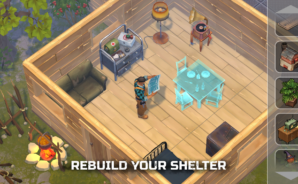
Last Day on Earth: Survival throws you into a gritty, zombie-ridden wasteland where every decision actually matters. You’ll scavenge for parts, craft what you need, and turn a flimsy shack into a place worth defending. Built by KEFIR, this Genre: Action survival game plays great on mobile—and it’s easy to hop onto BlueStacks if you want a bigger screen and smoother controls.

Game Features

  • Build and Fortify — Start with empty pockets and your own two hands. Gather resources, set up workbenches, upgrade walls, lay traps, and secure storage to protect the gear you fought for.

  • Craft What Keeps You Alive — Turn scraps into essentials: tools, melee weapons, guns, armor, medicine, even explosives. Each blueprint opens up smarter ways to stay breathing.

  • Smart Loot Runs — Head into forests, suburbs, military sites, toxic zones, and bunkers. Safer spots give you basics; dangerous ones hide rare parts you’ll need for advanced gear and base upgrades.

  • Combat Your Way — Go quiet with blades or go loud with shotguns and grenades. Tinker with weapon mods to boost power, rate of fire, range, and special effects for fights that feel tactical, not mindless.

  • Hold the Line — Defend your base from the undead and opportunistic raiders. Plan your layout, reinforce weak points, and keep your most valuable loot locked down.

  • Boss Fights with Real Stakes — Face nasty special enemies in rough conditions. Win, and you’ll walk away with rare rewards that change how you play.

  • Faithful Companions — Train pets like huskies and shepherds to help haul loot, track threats, and lend teeth in a pinch. It’s survival—with a wagging tail.

  • Hit the Road — Build a Chopper, piece together an ATV, or launch a motorboat to reach remote territories loaded with resources you can’t get anywhere else.

  • Clans & PvP at the Crater — Team up for trades and co-op runs, or challenge other survivors in competitive fights. Cooperation helps, but going lone wolf is totally viable.

  • Locations That Bite Back — Police stations, farms, ports, bunkers, and infested zones all play differently, with unique enemies, puzzles, and loot worth the risk.

Make your gaming sessions memorable with precise controls that give you an edge in close combats and visuals that pop up, bringing every character to life.

Game Features

Enhancements

  • Macros
  • Rerolling
  • Eco Mode
  • Multi Instance Sync
  • Enhancements
Macros

Macros

Focus more on the fun part of the game, skip the tedious aspects. Master Last Day on Earth: Survival with Macros. Record yourself completing the monotonous tasks you wish to automate and replay them later with just one keypress.
Rerolling

Rerolling

Speed up the rerolling process in Last Day on Earth: Survival. Perform multiple summons and keep looking for the best Heroes. Use Multi-Instance sync to replicate the rerolling mechanism in all instances.
Eco Mode

Eco Mode

Farm in-game resources with ease in Last Day on Earth: Survival. Enable the Eco Mode when running the game in multiple instances. And lower your PC's resource consumption.
Multi Instance Sync

Multi Instance Sync

With the Multi-instance Sync, you can do even more in Last Day on Earth: Survival. Sync the action of the main instance and repeat them in real time for all other instances. Sync and sit back, let the game progress unfold.
Read More

How to Download and Play Last Day on Earth: Survival on PC or Mac

  • Download and install BlueStacks on your PC or Mac

  • Complete Google sign-in to access the Play Store, or do it later

  • Look for Last Day on Earth: Survival in the search bar at the top right corner

  • Click to install Last Day on Earth: Survival from the search results

  • Complete Google sign-in (if you skipped step 2) to install Last Day on Earth: Survival

  • Click the Last Day on Earth: Survival icon on the home screen to start playing

video
Watch Video

Minimum System Requirements

With BlueStacks 5, you can get started on a PC that fulfills the following requirements.

  • Operating System

    Microsoft Windows 7 or above, macOS 11 (Big Sur) or above

  • Processor

    Intel, AMD or Apple Silicon Processor

  • RAM

    at least 4GB

  • HDD

    10GB Free Disk Space

Note:

* You must be an Administrator on your PC. Up to date graphics drivers from Microsoft or the chipset vendor.

Last Day on Earth: Survival - FAQs

  • How to play Last Day on Earth: Survival on Windows PC & Mac?

    Play Last Day on Earth: Survival on your PC or Mac by following these simple steps.

    • Click on 'Play Last Day on Earth: Survival on PC’ to download BlueStacks
    • Install it and log-in to Google Play Store
    • Launch and play the game.
  • Why is BlueStacks the fastest and safest platform to play games on PC?

    BlueStacks respects your privacy and is always safe and secure to use. It does not carry any malware, spyware, or any sort of additional software that could harm your PC.

    It is engineered to optimize speed and performance for a seamless gaming experience.

  • What are Last Day on Earth: Survival PC requirements?

    Minimum requirement to run Last Day on Earth: Survival on your PC

    • OS: Microsoft Windows 7 or above MacOS 11 (Big Sur) or above
    • Processor: Intel, AMD or Apple Silicon Processor
    • RAM: Your PC must have at least 4GB of RAM. (Note that having 4GB or more disk space is not a substitute for RAM)
    • HDD: 10GB Free Disk Space.
    • You must be an Administrator on your PC.