Metal Ranger. 2D Shooter

Metal Ranger. 2D Shooter

Action

| Albert Zig

Play on PC with BlueStacks or from our cloud

  • Overview
  • Game Features
  • How to Play

Page Modified On: September 12, 2025

Play Metal Ranger. 2D Shooter on PC or Mac

Bring your A-game to Metal Ranger. 2D Shooter, the Action game sensation from Albert Zig. Give your gameplay the much-needed boost with precise game controls, high FPS graphics, and top-tier features on your PC or Mac with BlueStacks.

Metal Ranger is a side‑scroll shooter that leans hard into retro sci fi, the kind with chrome armor, neon signs, and a moody synth soundtrack humming in the background. The setup is simple and fun. A steel‑clad ranger runs and jumps through Martian factories, tight tunnels, and a city that feels retro and cyberpunk at the same time, blasting giant mutant bugs that spill in from every direction. It looks 2D, but the stages have layered depth so the world feels a bit chunkier than a flat platformer, with metal walkways, ramps, and those glowing halos around light sources that scream late 80s.

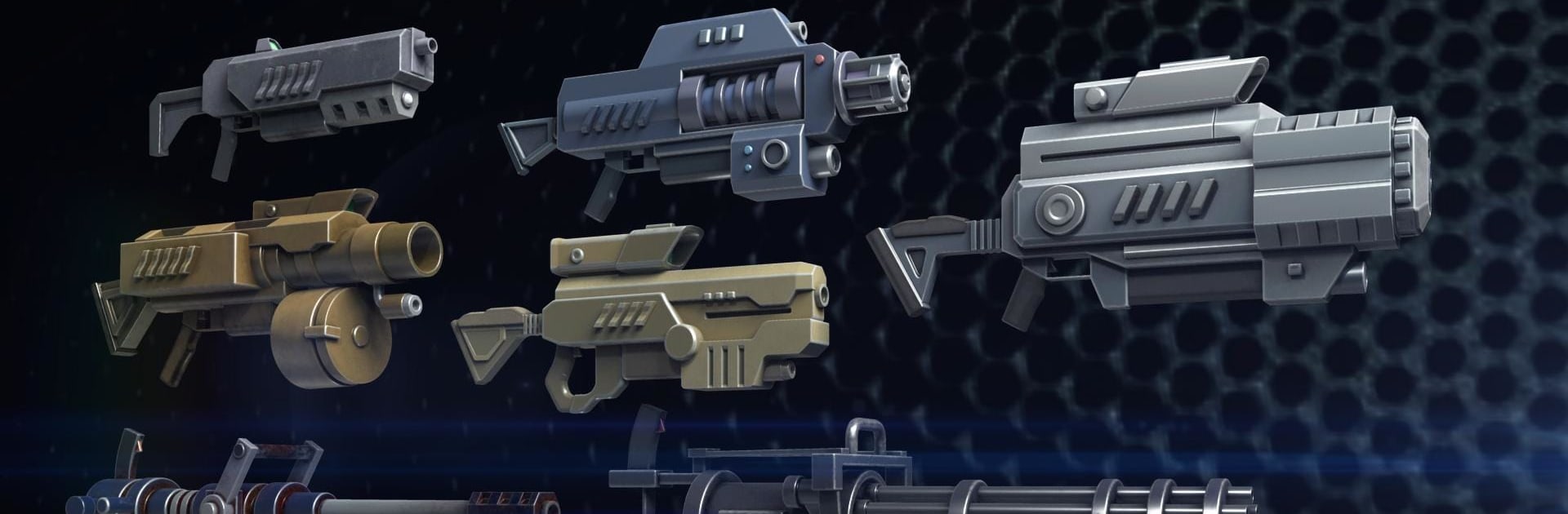
Combat has a good rhythm. Enemies push hard, so switching guns actually matters. The assault rifle covers basics, the rotary minigun chews through clusters, the flamethrower clears close swarms, and the laser or plasma gear helps punch through tougher shells. Grenades arc nicely if someone likes setting up hits from a distance. Coins go toward extra armor and more health, the difficulty ticks up after each mission, and boss fights like a massive armored slug or a huge spider make players think about spacing, not only holding the trigger.

On PC with BlueStacks the game plays clean, with snappy keyboard aiming and quick weapon swaps that feel better than touch. Performance is smooth, even on modest hardware. Early stages work offline, which is handy. It is straightforward action, chunky sound effects, and that arcade grind that rewards steady runs without getting too fancy.

Ready to top the leaderboard? We bet you do. Let precise controls and sharp visuals optimized on BlueStacks lead you to victory.


Game Features

Enhancements

  • Macros
  • Multi Instance
  • Multi Instance Sync
  • Eco Mode
  • Enhancements
Macros

Macros

Skip the boring parts of a game. Play Metal Ranger. 2D Shooter with Macros and get the edge. Simply record a sequence of commands and execute them at any moment.
Multi Instance

Multi Instance

Why limit to one game on your phone when you can play many on your PC? Open multiple instances of Metal Ranger. 2D Shooter at once with Multi-Instance. Leverage the power of different accounts by doing more.
Multi Instance Sync

Multi Instance Sync

Get the best out of Metal Ranger. 2D Shooter with Multi-Instance Sync. Play the game from different accounts and build your own empire. Use Multi-instance sync to repeat the action in the main BlueStacks instance on all other instances.
Eco Mode

Eco Mode

Find the rarest heroes by making multiple summons in Metal Ranger. 2D Shooter. And while you are at it, reduce your PC’s resource consumption with the Eco Mode. Farm efficiently. Get the best results.
Read More

How to Download and Play Metal Ranger. 2D Shooter on PC or Mac

  • Download and install BlueStacks on your PC or Mac

  • Complete Google sign-in to access the Play Store, or do it later

  • Look for Metal Ranger. 2D Shooter in the search bar at the top right corner

  • Click to install Metal Ranger. 2D Shooter from the search results

  • Complete Google sign-in (if you skipped step 2) to install Metal Ranger. 2D Shooter

  • Click the Metal Ranger. 2D Shooter icon on the home screen to start playing

video
Watch Video

Minimum System Requirements

With BlueStacks 5, you can get started on a PC that fulfills the following requirements.

  • Operating System

    Microsoft Windows 7 or above, macOS 11 (Big Sur) or above

  • Processor

    Intel, AMD or Apple Silicon Processor

  • RAM

    at least 4GB

  • HDD

    10GB Free Disk Space

Note:

* You must be an Administrator on your PC. Up to date graphics drivers from Microsoft or the chipset vendor.

Metal Ranger. 2D Shooter - FAQs

  • How to play Metal Ranger. 2D Shooter on Windows PC & Mac?

    Play Metal Ranger. 2D Shooter on your PC or Mac by following these simple steps.

    • Click on 'Play Metal Ranger. 2D Shooter on PC’ to download BlueStacks
    • Install it and log-in to Google Play Store
    • Launch and play the game.
  • Why is BlueStacks the fastest and safest platform to play games on PC?

    BlueStacks respects your privacy and is always safe and secure to use. It does not carry any malware, spyware, or any sort of additional software that could harm your PC.

    It is engineered to optimize speed and performance for a seamless gaming experience.

  • What are Metal Ranger. 2D Shooter PC requirements?

    Minimum requirement to run Metal Ranger. 2D Shooter on your PC

    • OS: Microsoft Windows 7 or above MacOS 11 (Big Sur) or above
    • Processor: Intel, AMD or Apple Silicon Processor
    • RAM: Your PC must have at least 4GB of RAM. (Note that having 4GB or more disk space is not a substitute for RAM)
    • HDD: 10GB Free Disk Space.
    • You must be an Administrator on your PC.