Poolrooms Museum
Poolrooms Museum

Poolrooms Museum

Adventure

| mobaroid

Play on PC with BlueStacks or from our cloud

  • Overview
  • Game Features
  • How to Play

Page Modified On: June 17, 2026

Play Poolrooms Museum on PC or Mac

Step into the World of Poolrooms Museum, a thrilling Adventure game from the house of mobaroid. Play this Android game on BlueStacks App Player and experience immersive gaming on PC or Mac.

About the Game

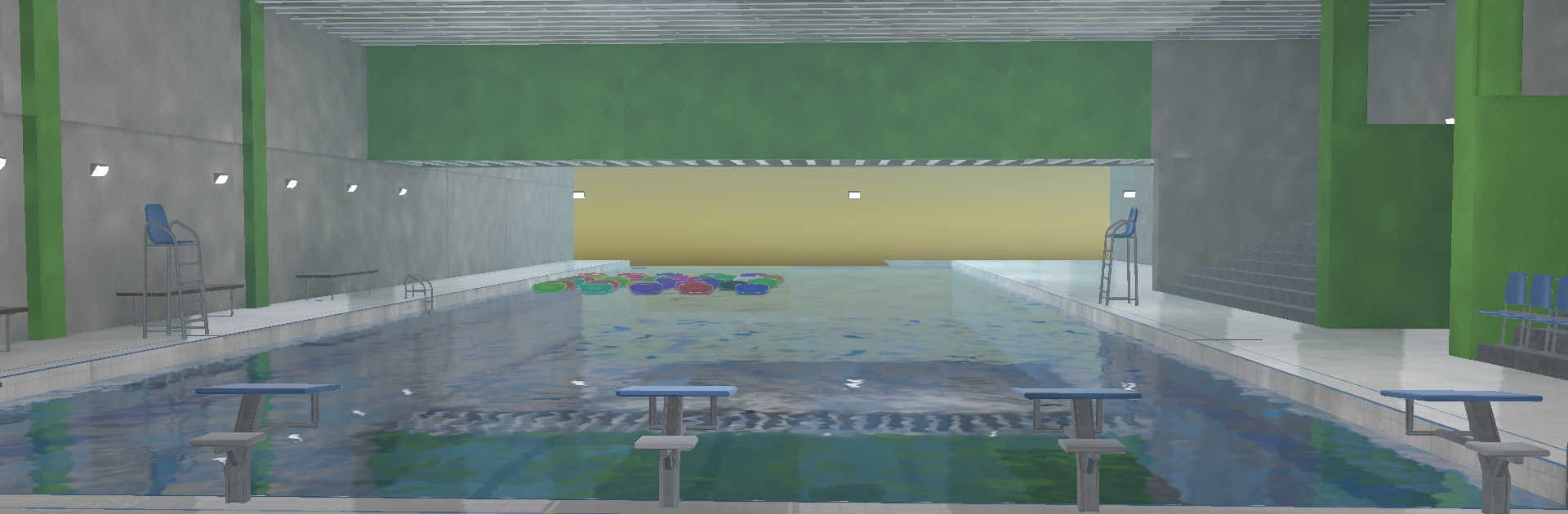
Poolrooms Museum is a moody Adventure that drops you inside a sprawling indoor pool complex where everything feels familiar… until it doesn’t. There’s no rush and no complicated systems—just you, quiet halls, and water that reflects more than it should. It’s all about noticing the odd little shifts that make a calm place feel strangely off. Prefer to wander those echoing corridors on a larger display? BlueStacks handles it smoothly.

Game Features

  • Liminal pools and endless corners: Roam a maze of tiled walkways, pale pillars, and still basins that seem to go on forever.
  • Atmosphere that creeps up on you: The calm is almost comforting, yet something about the silence keeps your shoulders tense.
  • Subtle changes worth a second look: Floating rings switch colors, migrate to new spots, or show up where you’re sure nothing was before.
  • Spaces that feel different on return: Retrace your steps and notice how paths, edges, and sightlines don’t line up quite the way you remember.
  • First-person, zero friction: Simple controls let you walk, look, and observe without UI clutter getting in the way.
  • Reflections that toy with perception: Clean water surfaces and soft lighting create mirror-like moments that make you question what’s solid.
  • Exploration at your pace: No timers, no quest checklist—just freeform wandering and the quiet thrill of paying attention.
  • Built for noticing the small stuff: The reward here is the feeling—those tiny, unsettling details that only appear when you slow down and really look.

Start your journey now. Download the game on BlueStacks, invite your friends, and march on a new adventure.


Game Features

Enhancements

  • Macros
  • Multi Instance
  • Multi Instance Sync
  • Script
  • Enhancements
Macros

Macros

Automate the predictable in Poolrooms Museum and transform your gameplay with Macros. Get access to inventive Macros in the BlueStacks Macro Community
Multi Instance

Multi Instance

Play Poolrooms Museum on one window. And chat with your friend on the other. Press CTRL + Shift + 8 to open the Multi-Instance Manager. And start creating fresh instances or clone an existing one.
Multi Instance Sync

Multi Instance Sync

Play Poolrooms Museum with the power of Multi-Instance Sync. Replicate what you are doing on the main instance on all other instances. Level up faster, play more.
Script

Script

Script your way to gaming glory in Poolrooms Museum with BlueStacks Script. Write and run a set of commands to automate repeated tasks. Trigger the command by assigning it to any key.
Read More

How to Download and Play Poolrooms Museum on PC or Mac

  • Download and install BlueStacks on your PC or Mac

  • Complete Google sign-in to access the Play Store, or do it later

  • Look for Poolrooms Museum in the search bar at the top right corner

  • Click to install Poolrooms Museum from the search results

  • Complete Google sign-in (if you skipped step 2) to install Poolrooms Museum

  • Click the Poolrooms Museum icon on the home screen to start playing

video
Watch Video

Minimum System Requirements

With BlueStacks 5, you can get started on a PC that fulfills the following requirements.

  • Operating System

    Microsoft Windows 7 or above, macOS 11 (Big Sur) or above

  • Processor

    Intel, AMD or Apple Silicon Processor

  • RAM

    at least 4GB

  • HDD

    10GB Free Disk Space

Note:

* You must be an Administrator on your PC. Up to date graphics drivers from Microsoft or the chipset vendor.

Poolrooms Museum - FAQs

  • How to play Poolrooms Museum on Windows PC & Mac?

    Play Poolrooms Museum on your PC or Mac by following these simple steps.

    • Click on 'Play Poolrooms Museum on PC’ to download BlueStacks
    • Install it and log-in to Google Play Store
    • Launch and play the game.
  • Why is BlueStacks the fastest and safest platform to play games on PC?

    BlueStacks respects your privacy and is always safe and secure to use. It does not carry any malware, spyware, or any sort of additional software that could harm your PC.

    It is engineered to optimize speed and performance for a seamless gaming experience.

  • What are Poolrooms Museum PC requirements?

    Minimum requirement to run Poolrooms Museum on your PC

    • OS: Microsoft Windows 7 or above MacOS 11 (Big Sur) or above
    • Processor: Intel, AMD or Apple Silicon Processor
    • RAM: Your PC must have at least 4GB of RAM. (Note that having 4GB or more disk space is not a substitute for RAM)
    • HDD: 10GB Free Disk Space.
    • You must be an Administrator on your PC.