
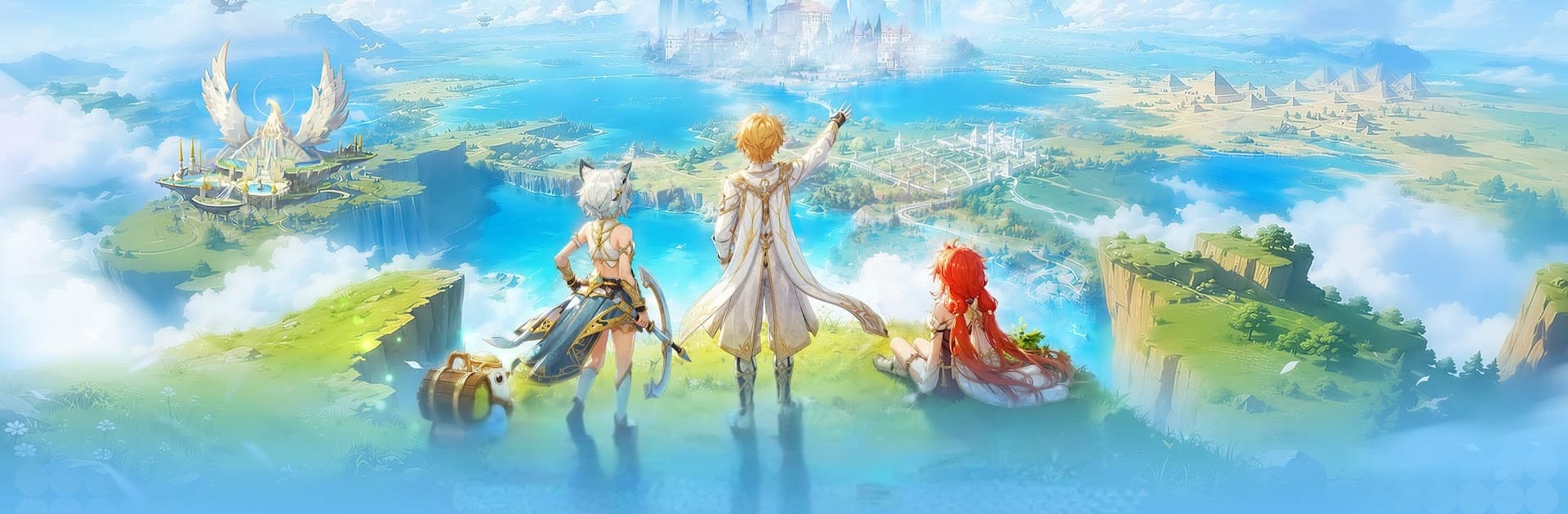
Tales of Aura:MMORPG

Tales of Aura:MMORPG

Adventure

| JUST OKAY LIMITED.

Play on PC with BlueStacks or from our cloud

  • Overview
  • Game Features
  • How to Play

Page Modified On: October 23, 2026

Play Tales of Aura:MMORPG on PC or Mac

Step into the World of Tales of Aura:MMORPG, a thrilling Adventure game from the house of JUST OKAY LIMITED.. Play this Android game on BlueStacks App Player and experience immersive gaming on PC or Mac.

About the Game

Tales of Aura:MMORPG is an Adventure game where bright, anime-styled fantasy meets easygoing progression and teamwork. You play the Chosen One on a quest to track down sacred relics, gather a crew of heroes and pets, and untangle the threads of a long-buried prophecy. Prefer a bigger screen and steady controls? It runs smoothly on BlueStacks.

Game Features

  • Vast, colorful world: Wander through dreamy castles, lush forests, flower-swept plains, and frosty frontiers while following a story that steadily opens new routes, quests, and dungeons.
  • Flexible classes: Pick a combat style that fits—up-close bruiser, ranged sharpshooter, or elemental caster—and unlock fresh skills and advancement paths that matter in solo play and party fights.
  • Hero companions: Recruit unique heroes, upgrade their kits, and sync their abilities with your build so you can punch above your weight in tougher encounters.
  • Adorable pets: Collect and train pets with distinct attributes, then lean into elemental matchups and skill chains to turn them into true battle partners.
  • Combat your way: Jump into story instances, towering boss showdowns, competitive modes, and co-op challenges to earn the goods you need to grow on your terms.
  • Chill side activities: Need a breather from swords and spells? Cast a line and enjoy fishing and other relaxing extras between big battles.
  • Style that’s yours: Mix outfits, wings, mounts, and more to craft a look that actually feels like your character—not just another set of armor.
  • Better together: Join a guild, meet new friends, and coordinate strategies for tricky raids—or just team up to explore and snap scenic screenshots along the way.

BlueStacks gives you more room to focus on the game and less time adjusting around mobile limitations.


Game Features

Enhancements

  • Macros
  • Multi Instance
  • Multi Instance Sync
  • Script
  • Enhancements
Macros

Macros

Automate the predictable in Tales of Aura:MMORPG and transform your gameplay with Macros. Get access to inventive Macros in the BlueStacks Macro Community
Multi Instance

Multi Instance

Play Tales of Aura:MMORPG on one window. And chat with your friend on the other. Press CTRL + Shift + 8 to open the Multi-Instance Manager. And start creating fresh instances or clone an existing one.
Multi Instance Sync

Multi Instance Sync

Play Tales of Aura:MMORPG with the power of Multi-Instance Sync. Replicate what you are doing on the main instance on all other instances. Level up faster, play more.
Script

Script

Script your way to gaming glory in Tales of Aura:MMORPG with BlueStacks Script. Write and run a set of commands to automate repeated tasks. Trigger the command by assigning it to any key.
Read More

How to Download and Play Tales of Aura:MMORPG on PC or Mac

  • Download and install BlueStacks on your PC or Mac

  • Complete Google sign-in to access the Play Store, or do it later

  • Look for Tales of Aura:MMORPG in the search bar at the top right corner

  • Click to install Tales of Aura:MMORPG from the search results

  • Complete Google sign-in (if you skipped step 2) to install Tales of Aura:MMORPG

  • Click the Tales of Aura:MMORPG icon on the home screen to start playing

video
Watch Video

Minimum System Requirements

With BlueStacks 5, you can get started on a PC that fulfills the following requirements.

  • Operating System

    Microsoft Windows 7 or above, macOS 11 (Big Sur) or above

  • Processor

    Intel, AMD or Apple Silicon Processor

  • RAM

    at least 4GB

  • HDD

    10GB Free Disk Space

Note:

* You must be an Administrator on your PC. Up to date graphics drivers from Microsoft or the chipset vendor.

Tales of Aura:MMORPG - FAQs

  • How to play Tales of Aura:MMORPG on Windows PC & Mac?

    Play Tales of Aura:MMORPG on your PC or Mac by following these simple steps.

    • Click on 'Play Tales of Aura:MMORPG on PC’ to download BlueStacks
    • Install it and log-in to Google Play Store
    • Launch and play the game.
  • Why is BlueStacks the fastest and safest platform to play games on PC?

    BlueStacks respects your privacy and is always safe and secure to use. It does not carry any malware, spyware, or any sort of additional software that could harm your PC.

    It is engineered to optimize speed and performance for a seamless gaming experience.

  • What are Tales of Aura:MMORPG PC requirements?

    Minimum requirement to run Tales of Aura:MMORPG on your PC

    • OS: Microsoft Windows 7 or above MacOS 11 (Big Sur) or above
    • Processor: Intel, AMD or Apple Silicon Processor
    • RAM: Your PC must have at least 4GB of RAM. (Note that having 4GB or more disk space is not a substitute for RAM)
    • HDD: 10GB Free Disk Space.
    • You must be an Administrator on your PC.







