Terraria
Terraria

Terraria

Adventure

| 505 Games Srl

Play on PC with BlueStacks or from our cloud

  • Overview
  • Game Features
  • How to Play

Page Modified On: April 09, 2026

Play Terraria on PC or Mac

Join millions to experience Terraria, an exciting Adventure game from 505 Games Srl. With BlueStacks App Player, you are always a step ahead of your opponent, ready to outplay them with faster gameplay and better control with the mouse and keyboard on your PC or Mac.

About the Game
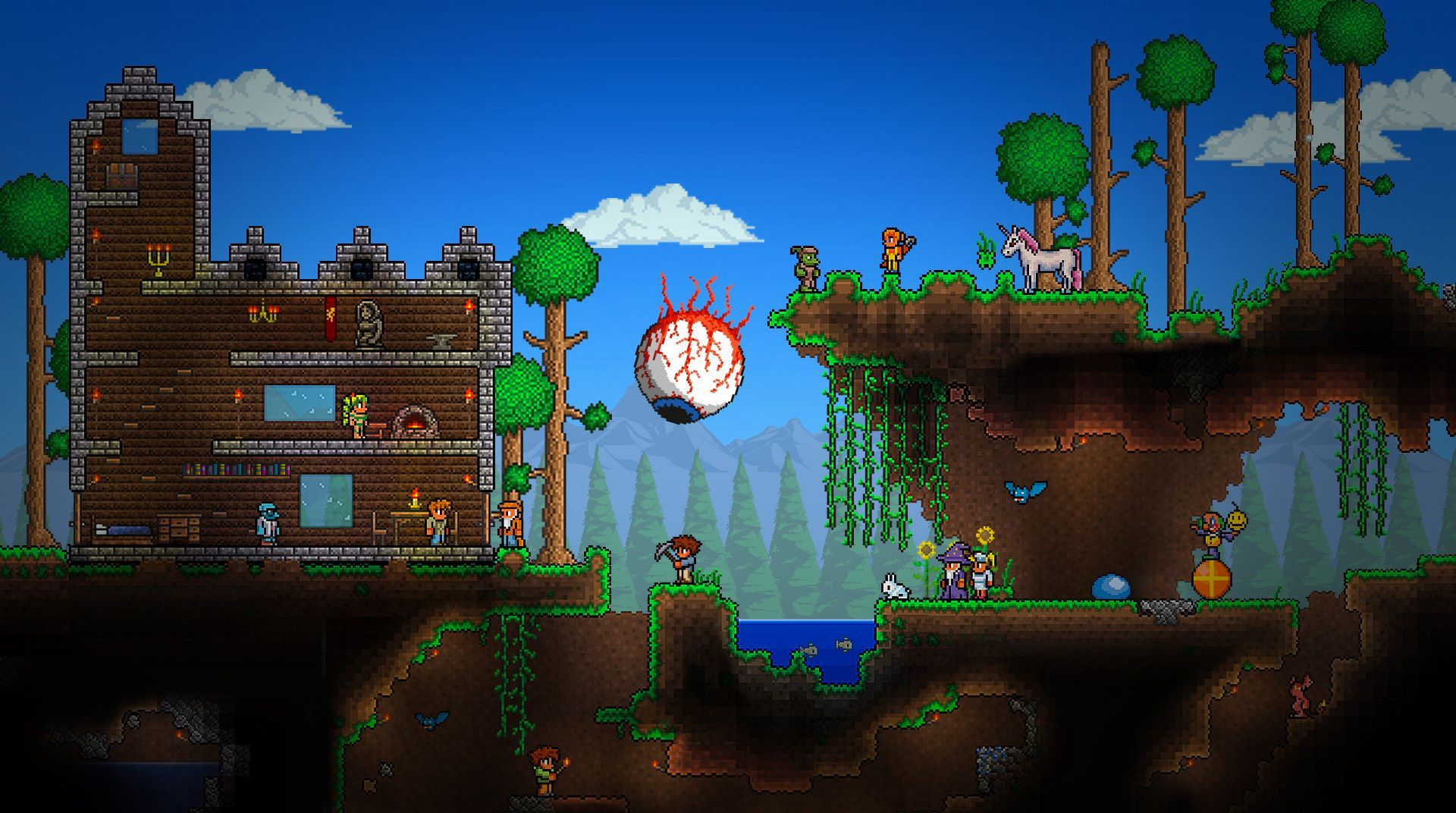
Terraria is a side-scrolling sandbox where your next idea becomes your next adventure. Start small with a few tools, then mine, craft, and fight your way into bigger challenges and stranger places. It’s an Adventure by 505 Games Srl that hands you the keys and lets you figure out what kind of world you want to build—and how far you want to push it.

Game Features

1.4.5: Bigger and Boulder: Fresh content lands with a Dead Cells crossover (new weapons and combat accessories), iconic Pals from Palworld, four transformation mounts, five new boulder types, and a bunch of new whips, Summoner prefixes, kites, critters, and décor.
Remix your world: Try a new Skyblock-style seed, or use the updated creation menu to mix special seeds for wild combinations. Existing seeds get smarter tweaks, too.
A sandbox that’s actually huge: Stack your inventory with thousands of items, meet a wide range of helpful NPCs, and square up against hundreds of enemies across a sprawling 2D world.
Biomes above and below: Wander lush forests, scrape through deserts and dungeons, descend into the underworld, or brave corruption-soaked zones—the scenery keeps changing, and so do the threats.
Combat that feels good: Weapon reworks and balance passes make builds more fun to experiment with, whether you’re swinging blades, cracking whips, or commanding minions.
Build like a pro: Easy-to-learn tools scale into serious architecture—cozy cabins, weird labs, grand castles, you name it.
Play together: Team up with up to 7 friends locally or online and turn a humble camp into a thriving town—or a boss arena.
Tuned for mobile: Customize the UI and controls to match your style. Prefer buttons? There’s full Bluetooth gamepad support with remappable inputs.
Worlds your way: Generate Small, Medium, or Large maps (just like on PC), roll fun random names, and uncover hidden easter egg seeds.
Extra polish everywhere: Sharper visuals for classic sprites and a pile of quality-of-life improvements keep the whole experience feeling fresh.
Where to play: On the go or on PC with BlueStacks if you’re into bigger screens and comfy controls.

Get ready for a buttery smooth, high-performance gaming action only on BlueStacks.

Game Features

Enhancements

  • Macros
  • Multi Instance
  • Multi Instance Sync
  • Script
  • Enhancements
Macros

Macros

Automate the predictable in Terraria and transform your gameplay with Macros. Get access to inventive Macros in the BlueStacks Macro Community
Multi Instance

Multi Instance

Play Terraria on one window. And chat with your friend on the other. Press CTRL + Shift + 8 to open the Multi-Instance Manager. And start creating fresh instances or clone an existing one.
Multi Instance Sync

Multi Instance Sync

Play Terraria with the power of Multi-Instance Sync. Replicate what you are doing on the main instance on all other instances. Level up faster, play more.
Script

Script

Script your way to gaming glory in Terraria with BlueStacks Script. Write and run a set of commands to automate repeated tasks. Trigger the command by assigning it to any key.
Read More

How to Download and Play Terraria on PC or Mac

  • Download and install BlueStacks on your PC or Mac

  • Complete Google sign-in to access the Play Store, or do it later

  • Look for Terraria in the search bar at the top right corner

  • Click to install Terraria from the search results

  • Complete Google sign-in (if you skipped step 2) to install Terraria

  • Click the Terraria icon on the home screen to start playing

video
Watch Video

Minimum System Requirements

With BlueStacks 5, you can get started on a PC that fulfills the following requirements.

  • Operating System

    Microsoft Windows 7 or above, macOS 11 (Big Sur) or above

  • Processor

    Intel, AMD or Apple Silicon Processor

  • RAM

    at least 4GB

  • HDD

    10GB Free Disk Space

Note:

* You must be an Administrator on your PC. Up to date graphics drivers from Microsoft or the chipset vendor.

Terraria - FAQs

  • How to play Terraria on Windows PC & Mac?

    Play Terraria on your PC or Mac by following these simple steps.

    • Click on 'Play Terraria on PC’ to download BlueStacks
    • Install it and log-in to Google Play Store
    • Launch and play the game.
  • Why is BlueStacks the fastest and safest platform to play games on PC?

    BlueStacks respects your privacy and is always safe and secure to use. It does not carry any malware, spyware, or any sort of additional software that could harm your PC.

    It is engineered to optimize speed and performance for a seamless gaming experience.

  • What are Terraria PC requirements?

    Minimum requirement to run Terraria on your PC

    • OS: Microsoft Windows 7 or above MacOS 11 (Big Sur) or above
    • Processor: Intel, AMD or Apple Silicon Processor
    • RAM: Your PC must have at least 4GB of RAM. (Note that having 4GB or more disk space is not a substitute for RAM)
    • HDD: 10GB Free Disk Space.
    • You must be an Administrator on your PC.