Last Kingdom
Last Kingdom

Last Kingdom

Arcade

| Larks Holding Limited

Play on PC with BlueStacks or from our cloud

  • Overview
  • Game Features
  • How to Play

Page Modified On: August 07, 2026

Play Last Kingdom on PC or Mac

Last Kingdom by Larks Holding Limited has plenty to keep you busy. BlueStacks lets you play it on PC or Mac with more screen space, better control, and fewer mobile limits.

About the Game

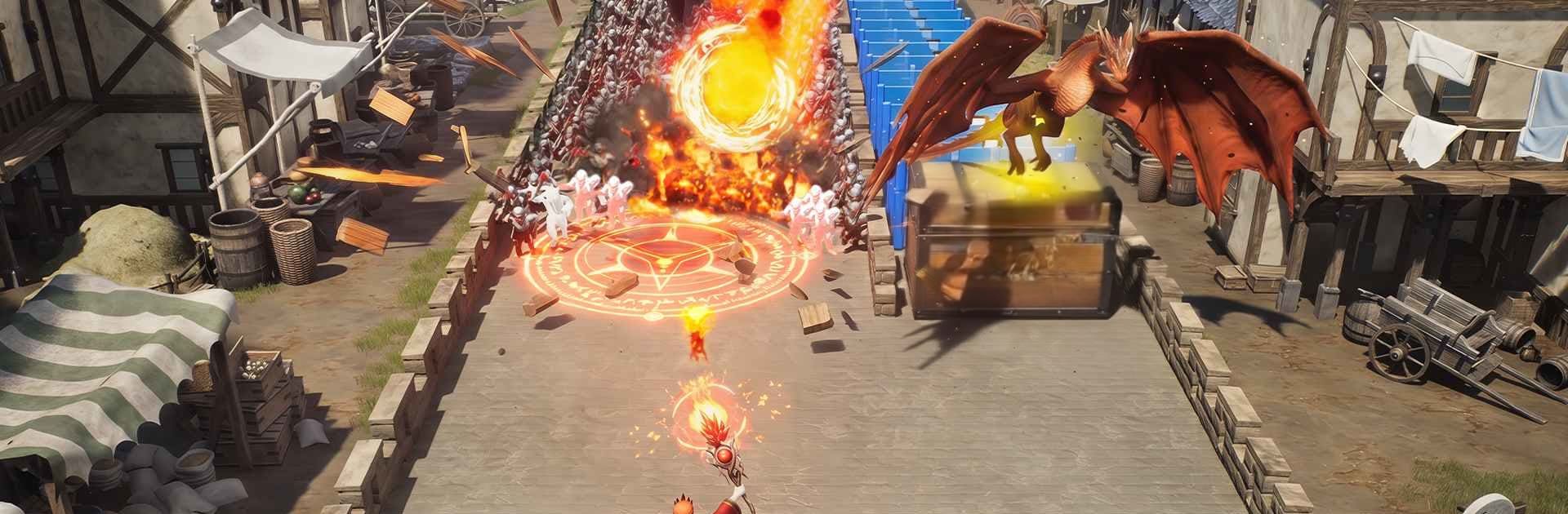
Last Kingdom blends fast Arcade action with kingdom-building and real-time strategy. You play as an exiled prince starting from a wrecked village and clawing your way back to power with grit, smart choices, and a little dragon fire. Prefer playing on a bigger screen? It also runs smoothly on PC with BlueStacks.

Game Features

  • Quick-swipe power boosts: Smash through enemy lines by choosing the right number gates mid-run. One smart swipe can spike your strength and flip a losing fight into a clean win.
  • Heroes with real bite: Recruit a crew of knights, warriors, priests, and mages, each packing distinct attacks—from heavy blade combos to explosive spell bursts. Build balanced squads that actually complement each other.
  • Raise a battle-ready dragon: Find a mysterious egg, hatch it, and grow a winged powerhouse that can turn sieges and save bad engagements. Time its roar and breath for maximum chaos.
  • Build, craft, and trade: Start with wheat, logs, and iron, then process them into valuable goods. Fulfilling orders funds your rise from a shabby hamlet to a thriving stronghold.
  • Real-time command, full control: Move multiple armies at once, chain hero abilities, and adapt tactics on the fly. When defenses won’t budge, send in the dragon and watch walls crumble.
  • A living world to reclaim: Expand from village to town to towering castles across a sprawling medieval map. March on rivals, secure key routes, and inch closer to taking back your crown.
  • Guild wars and grand conquests: Team up or face off against other Lords in large-scale battles. Seize castles, carve out territory, and use strategy and diplomacy to push your banner across the continent.

Get ready for a buttery smooth, high-performance gaming action only on BlueStacks.

Game Features

Enhancements

  • Macros
  • Multi Instance
  • Multi Instance Sync
  • Script
  • Enhancements
Macros

Macros

Automate the predictable in Last Kingdom and transform your gameplay with Macros. Get access to inventive Macros in the BlueStacks Macro Community
Multi Instance

Multi Instance

Play Last Kingdom on one window. And chat with your friend on the other. Press CTRL + Shift + 8 to open the Multi-Instance Manager. And start creating fresh instances or clone an existing one.
Multi Instance Sync

Multi Instance Sync

Play Last Kingdom with the power of Multi-Instance Sync. Replicate what you are doing on the main instance on all other instances. Level up faster, play more.
Script

Script

Script your way to gaming glory in Last Kingdom with BlueStacks Script. Write and run a set of commands to automate repeated tasks. Trigger the command by assigning it to any key.
Read More

How to Download and Play Last Kingdom on PC or Mac

  • Download and install BlueStacks on your PC or Mac

  • Complete Google sign-in to access the Play Store, or do it later

  • Look for Last Kingdom in the search bar at the top right corner

  • Click to install Last Kingdom from the search results

  • Complete Google sign-in (if you skipped step 2) to install Last Kingdom

  • Click the Last Kingdom icon on the home screen to start playing

video
Watch Video

Minimum System Requirements

With BlueStacks 5, you can get started on a PC that fulfills the following requirements.

  • Operating System

    Microsoft Windows 7 or above, macOS 11 (Big Sur) or above

  • Processor

    Intel, AMD or Apple Silicon Processor

  • RAM

    at least 4GB

  • HDD

    10GB Free Disk Space

Note:

* You must be an Administrator on your PC. Up to date graphics drivers from Microsoft or the chipset vendor.

Last Kingdom - FAQs

  • How to play Last Kingdom on Windows PC & Mac?

    Play Last Kingdom on your PC or Mac by following these simple steps.

    • Click on 'Play Last Kingdom on PC’ to download BlueStacks
    • Install it and log-in to Google Play Store
    • Launch and play the game.
  • Why is BlueStacks the fastest and safest platform to play games on PC?

    BlueStacks respects your privacy and is always safe and secure to use. It does not carry any malware, spyware, or any sort of additional software that could harm your PC.

    It is engineered to optimize speed and performance for a seamless gaming experience.

  • What are Last Kingdom PC requirements?

    Minimum requirement to run Last Kingdom on your PC

    • OS: Microsoft Windows 7 or above MacOS 11 (Big Sur) or above
    • Processor: Intel, AMD or Apple Silicon Processor
    • RAM: Your PC must have at least 4GB of RAM. (Note that having 4GB or more disk space is not a substitute for RAM)
    • HDD: 10GB Free Disk Space.
    • You must be an Administrator on your PC.