Grid Fit
Grid Fit

Grid Fit

Casual

| TopNotch Games

Play on PC with BlueStacks or from our cloud

  • Overview
  • Game Features
  • How to Play

Page Modified On: October 12, 2026

Play Grid Fit on PC or Mac

Explore a whole new adventure with Grid Fit, a Casual game created by TopNotch Games. Experience great gameplay with BlueStacks, the most popular gaming platform to play Android games on your PC or Mac.

About the Game

Grid Fit is a Casual puzzle about giving every little face the exact space it needs. You’ll drag out rectangles to match the number on each tile, watching the characters react as you experiment—uneasy when cramped, relieved when you nail it. It’s calm, tactile, and quietly clever; it also plays nicely on BlueStacks if you want a bigger canvas.

Game Features

  • Living grid, real reactions: Each block shows how it feels as you resize its space—tense when too small, stretched when too big, content when just right.
  • Easy-to-grasp rules: The number equals the area; drag to form a rectangle, keep exactly one face per region, and don’t let shapes overlap.
  • Thoughtful challenge curve: Start with quick wins, then tackle boards with hidden numbers and locked tiles that demand careful planning.
  • No rush, no stress: There are no countdowns or harsh penalties, so you can pause, rethink, and solve at your own pace.
  • Clean, focus-first design: Minimal visuals and gentle feedback help you settle into a steady flow without distractions.
  • Helpful hints when needed: Use the lightbulb to reveal a correct placement for a stubborn block and keep your momentum.
  • Brainy but soothing: Strengthens spatial reasoning and deduction while the expressive faces make the logic feel intuitive and fun.
  • Satisfying finishes: Fill every space correctly and the board snaps into tidy order with a grid full of relaxed, happy expressions.

Ready to top the leaderboard? We bet you do. Let precise controls and sharp visuals optimized on BlueStacks lead you to victory.


Game Features

Enhancements

  • Macros
  • Multi Instance
  • Script
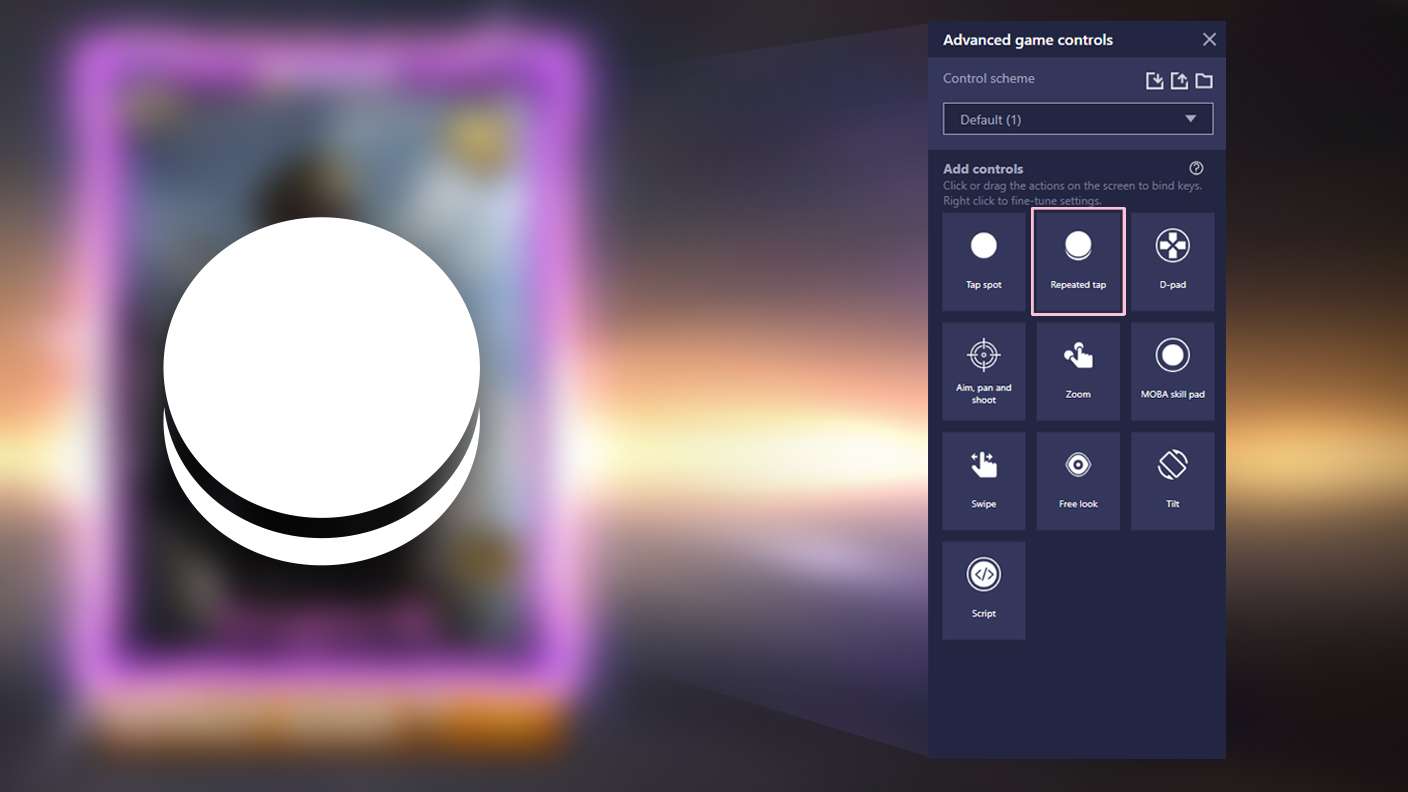
  • Repeated Tap
  • Enhancements
Macros

Macros

Automate the predictable in Grid Fit and transform your gameplay with Macros. Get access to inventive Macros in the BlueStacks Macro Community
Multi Instance

Multi Instance

Play Grid Fit on one window. And chat with your friend on the other. Press CTRL + Shift + 8 to open the Multi-Instance Manager. And start creating fresh instances or clone an existing one.
Script

Script

Script your way to gaming glory in Grid Fit with BlueStacks Script. Write and run a set of commands to automate repeated tasks. Trigger the command by assigning it to any key.
Repeated Tap

Repeated Tap

BlueStacks lets you master Grid Fit with useful features like the Repeated Tap. Now you do not have to press the same key repeatedly to initiate an action. Just assign it to one key and you are good to go.
Read More

How to Download and Play Grid Fit on PC or Mac

  • Download and install BlueStacks on your PC or Mac

  • Complete Google sign-in to access the Play Store, or do it later

  • Look for Grid Fit in the search bar at the top right corner

  • Click to install Grid Fit from the search results

  • Complete Google sign-in (if you skipped step 2) to install Grid Fit

  • Click the Grid Fit icon on the home screen to start playing

video
Watch Video

Minimum System Requirements

With BlueStacks 5, you can get started on a PC that fulfills the following requirements.

  • Operating System

    Microsoft Windows 7 or above, macOS 11 (Big Sur) or above

  • Processor

    Intel, AMD or Apple Silicon Processor

  • RAM

    at least 4GB

  • HDD

    10GB Free Disk Space

Note:

* You must be an Administrator on your PC. Up to date graphics drivers from Microsoft or the chipset vendor.

Grid Fit - FAQs

  • How to play Grid Fit on Windows PC & Mac?

    Play Grid Fit on your PC or Mac by following these simple steps.

    • Click on 'Play Grid Fit on PC’ to download BlueStacks
    • Install it and log-in to Google Play Store
    • Launch and play the game.
  • Why is BlueStacks the fastest and safest platform to play games on PC?

    BlueStacks respects your privacy and is always safe and secure to use. It does not carry any malware, spyware, or any sort of additional software that could harm your PC.

    It is engineered to optimize speed and performance for a seamless gaming experience.

  • What are Grid Fit PC requirements?

    Minimum requirement to run Grid Fit on your PC

    • OS: Microsoft Windows 7 or above MacOS 11 (Big Sur) or above
    • Processor: Intel, AMD or Apple Silicon Processor
    • RAM: Your PC must have at least 4GB of RAM. (Note that having 4GB or more disk space is not a substitute for RAM)
    • HDD: 10GB Free Disk Space.
    • You must be an Administrator on your PC.