American Stock Car Series

American Stock Car Series

Racing

| FNK Games

Play on PC with BlueStacks or from our cloud

  • Overview
  • Game Features
  • How to Play

Page Modified On: October 08, 2026

Play American Stock Car Series on PC or Mac

Explore a whole new adventure with American Stock Car Series, a Racing game created by FNK Games. Experience great gameplay with BlueStacks, the most popular gaming platform to play Android games on your PC or Mac.

About the Game

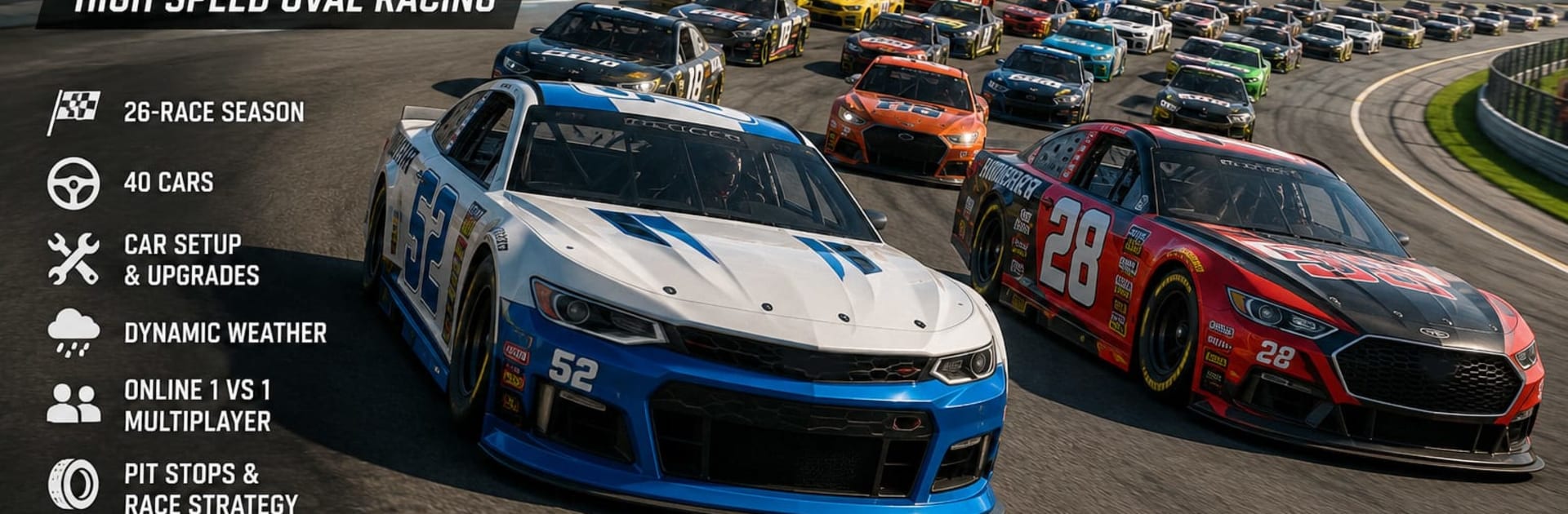
American Stock Car Series is all about door-to-door oval action where patience, drafting, and gutsy passes decide the day. This Racing experience throws you into full 40-car grids, a playoff-style season, and a deep toolbox of setups and strategy to master. Want a wider view while you play? It runs smoothly on BlueStacks, too.

Game Features

  • Full Season, Real Stakes: Run a 26-race calendar with a two-part format—survive 16 Regular Season rounds to rank among the top 16, then fight through a 10-race Final Phase while the whole field still battles around you.
  • Packed Grids, Fierce Drafting: Share the asphalt with 40 cars at once, where slipstreams, side drafts, and timing your moves can swing the race in a heartbeat.
  • Real American Ovals: Tackle U.S.-inspired speedways and short tracks, with 30+ circuits in total and 13 distinct ovals that each demand a different approach.
  • Two Ways to Drive: Choose Standard for quick, pick-up-and-play fun or flip to Simulation for authentic handling, deeper strategy, and a more demanding feel.
  • Practice and Qualifying: Dial in your lines during Practice, then chase pole position before each championship event to set yourself up for clean air.
  • Quick Race and Online Duels: Jump into instant races or go head-to-head in 1v1 matchmaking and private showdowns with friends.
  • Wrench-Friendly Setup: Tune engine power, gear ratios, aerodynamics, and suspension—every tweak affects acceleration, top speed, tire wear, and stability.
  • Build Your Beast: Earn credits and unlock up to 50 performance upgrades per car to squeeze out pace where it matters most.
  • Strategy That Wins: Manage tire wear, fuel, and pit windows, and react to track evolution to gain time without burning up your rubber.
  • Weather in Play: Sunshine, clouds, or rain can flip grip levels on a whim, forcing you to adjust lines, timing, and tactics mid-race.
  • Make It Yours: Create bold paint schemes with the livery editor so your car looks as sharp as it drives.

Start playing American Stock Car Series on BlueStacks and get a smoother, more comfortable PC or Mac setup.


Game Features

Enhancements

  • Macros
  • Multi Instance
  • Multi Instance Sync
  • Script
  • Enhancements
Macros

Macros

Automate the predictable in American Stock Car Series and transform your gameplay with Macros. Get access to inventive Macros in the BlueStacks Macro Community
Multi Instance

Multi Instance

Play American Stock Car Series on one window. And chat with your friend on the other. Press CTRL + Shift + 8 to open the Multi-Instance Manager. And start creating fresh instances or clone an existing one.
Multi Instance Sync

Multi Instance Sync

Play American Stock Car Series with the power of Multi-Instance Sync. Replicate what you are doing on the main instance on all other instances. Level up faster, play more.
Script

Script

Script your way to gaming glory in American Stock Car Series with BlueStacks Script. Write and run a set of commands to automate repeated tasks. Trigger the command by assigning it to any key.
Read More

How to Download and Play American Stock Car Series on PC or Mac

  • Download and install BlueStacks on your PC or Mac

  • Complete Google sign-in to access the Play Store, or do it later

  • Look for American Stock Car Series in the search bar at the top right corner

  • Click to install American Stock Car Series from the search results

  • Complete Google sign-in (if you skipped step 2) to install American Stock Car Series

  • Click the American Stock Car Series icon on the home screen to start playing

video
Watch Video

Minimum System Requirements

With BlueStacks 5, you can get started on a PC that fulfills the following requirements.

  • Operating System

    Microsoft Windows 7 or above, macOS 11 (Big Sur) or above

  • Processor

    Intel, AMD or Apple Silicon Processor

  • RAM

    at least 4GB

  • HDD

    10GB Free Disk Space

Note:

* You must be an Administrator on your PC. Up to date graphics drivers from Microsoft or the chipset vendor.

American Stock Car Series - FAQs

  • How to play American Stock Car Series on Windows PC & Mac?

    Play American Stock Car Series on your PC or Mac by following these simple steps.

    • Click on 'Play American Stock Car Series on PC’ to download BlueStacks
    • Install it and log-in to Google Play Store
    • Launch and play the game.
  • Why is BlueStacks the fastest and safest platform to play games on PC?

    BlueStacks respects your privacy and is always safe and secure to use. It does not carry any malware, spyware, or any sort of additional software that could harm your PC.

    It is engineered to optimize speed and performance for a seamless gaming experience.

  • What are American Stock Car Series PC requirements?

    Minimum requirement to run American Stock Car Series on your PC

    • OS: Microsoft Windows 7 or above MacOS 11 (Big Sur) or above
    • Processor: Intel, AMD or Apple Silicon Processor
    • RAM: Your PC must have at least 4GB of RAM. (Note that having 4GB or more disk space is not a substitute for RAM)
    • HDD: 10GB Free Disk Space.
    • You must be an Administrator on your PC.