CarX Drift Racing 2
CarX Drift Racing 2

CarX Drift Racing 2

Racing

| CarX Technologies

Play on PC with BlueStacks or from our cloud

  • Overview
  • Game Features
  • How to Play

Page Modified On: April 09, 2026

Play CarX Drift Racing 2 on PC or Mac

From the innovators and creators at CarX Technologies, CarX Drift Racing 2 is another fun addition to the World of Racing games. Go beyond your mobile screen and play it bigger and better on your PC or Mac. An immersive experience awaits you.

About the Game

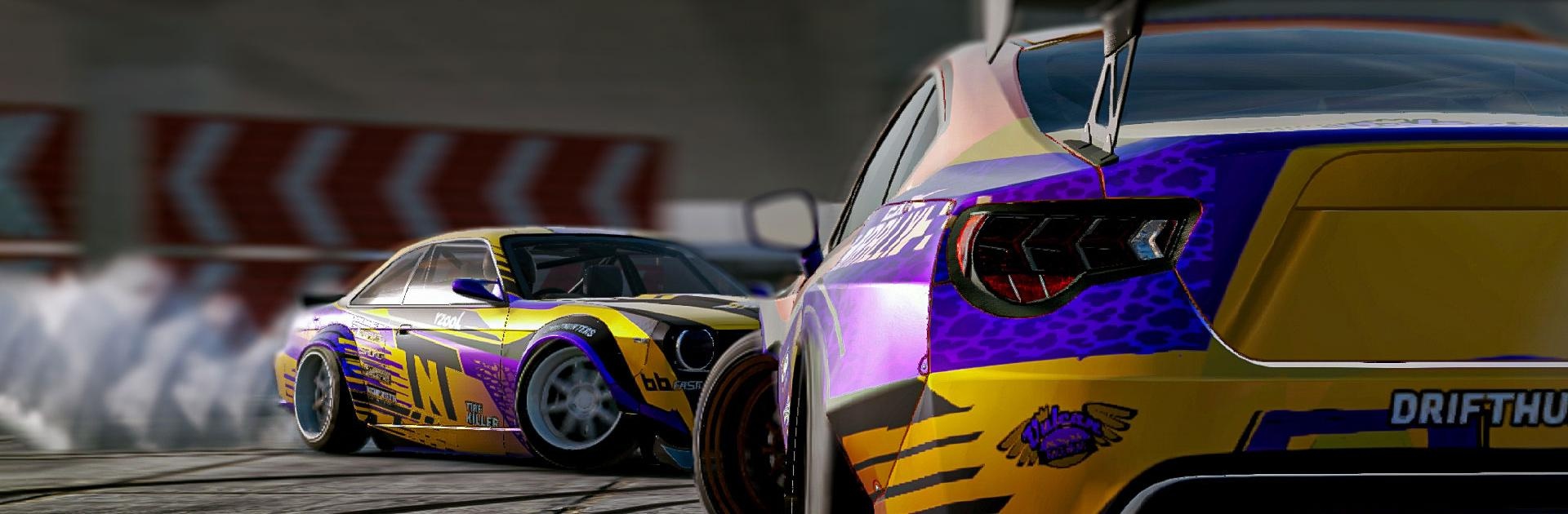
CarX Drift Racing 2 is all about sideways speed and precise control, built for players who love the art of sliding a car just right. Made by CarX Technologies, this Racing sim nails the feeling of weight transfer, grip, and throttle play without getting in your way. Prefer a bigger screen? It also plays smoothly on BlueStacks.

Game Features

  • Online Rooms: Jump into real-time sessions with friends, choose a track, burn rubber together, and rack up points. Earn ranks and peep the action from a slick drone camera.
  • Authentic Handling: Steering feels tight and responsive for quick transitions, donuts, and smooth link-ups. Tire pressure, surface changes (asphalt, sand, grass, snow), and setup choices really affect how your car behaves.
  • Pro-Level Tuning: Dial in suspension geometry, spring rates, camber, toe, and tire pressure. Fine-tune engine output, turbo boost, gearbox ratios, brakes, and the diff to match your driving style.
  • Standout Style: Swap mirrors, lights, bumpers, skirts, and more. Build your look with body kits, rims, and layered vinyls that make your car unmistakably yours.
  • XDS Tandem Mode: Run one lap as the Leader, then chase your own line as the Follower. Scoring mirrors real competition standards, so you can practice clean proximity and angle like the pros.
  • Top-32 Brackets: Qualify, climb each round, and aim for the top spot. You’ll snag rewards as you progress through the tournament tree.
  • Multiplayer & Clubs: Battle real players in online championships, run tandems, unlock premium rides, and join or create clubs to chat and compare runs.
  • Solo Modes: Win cups, earn in-game cash, unlock 65+ sports cars and new tracks, and use Ghost mode to keep shaving time and tightening lines.
  • Detailed Tracks: From tight technical sections to flowing layouts, every circuit is built for stylish slides and high-speed commitment.
  • Profile Progress: Your cars, tracks, and currency are saved to your profile. A steady connection keeps everything synced.

Get ready for a buttery smooth, high-performance gaming action only on BlueStacks.

Game Features

Enhancements

  • Macros
  • Multi Instance
  • Multi Instance Sync
  • Script
  • Enhancements
Macros

Macros

Automate the predictable in CarX Drift Racing 2 and transform your gameplay with Macros. Get access to inventive Macros in the BlueStacks Macro Community
Multi Instance

Multi Instance

Play CarX Drift Racing 2 on one window. And chat with your friend on the other. Press CTRL + Shift + 8 to open the Multi-Instance Manager. And start creating fresh instances or clone an existing one.
Multi Instance Sync

Multi Instance Sync

Play CarX Drift Racing 2 with the power of Multi-Instance Sync. Replicate what you are doing on the main instance on all other instances. Level up faster, play more.
Script

Script

Script your way to gaming glory in CarX Drift Racing 2 with BlueStacks Script. Write and run a set of commands to automate repeated tasks. Trigger the command by assigning it to any key.
Read More

How to Download and Play CarX Drift Racing 2 on PC or Mac

  • Download and install BlueStacks on your PC or Mac

  • Complete Google sign-in to access the Play Store, or do it later

  • Look for CarX Drift Racing 2 in the search bar at the top right corner

  • Click to install CarX Drift Racing 2 from the search results

  • Complete Google sign-in (if you skipped step 2) to install CarX Drift Racing 2

  • Click the CarX Drift Racing 2 icon on the home screen to start playing

video
Watch Video

Minimum System Requirements

With BlueStacks 5, you can get started on a PC that fulfills the following requirements.

  • Operating System

    Microsoft Windows 7 or above, macOS 11 (Big Sur) or above

  • Processor

    Intel, AMD or Apple Silicon Processor

  • RAM

    at least 4GB

  • HDD

    10GB Free Disk Space

Note:

* You must be an Administrator on your PC. Up to date graphics drivers from Microsoft or the chipset vendor.

CarX Drift Racing 2 - FAQs

  • How to play CarX Drift Racing 2 on Windows PC & Mac?

    Play CarX Drift Racing 2 on your PC or Mac by following these simple steps.

    • Click on 'Play CarX Drift Racing 2 on PC’ to download BlueStacks
    • Install it and log-in to Google Play Store
    • Launch and play the game.
  • Why is BlueStacks the fastest and safest platform to play games on PC?

    BlueStacks respects your privacy and is always safe and secure to use. It does not carry any malware, spyware, or any sort of additional software that could harm your PC.

    It is engineered to optimize speed and performance for a seamless gaming experience.

  • What are CarX Drift Racing 2 PC requirements?

    Minimum requirement to run CarX Drift Racing 2 on your PC

    • OS: Microsoft Windows 7 or above MacOS 11 (Big Sur) or above
    • Processor: Intel, AMD or Apple Silicon Processor
    • RAM: Your PC must have at least 4GB of RAM. (Note that having 4GB or more disk space is not a substitute for RAM)
    • HDD: 10GB Free Disk Space.
    • You must be an Administrator on your PC.