Broken Ranks
Broken Ranks

Broken Ranks

Role Playing

| Whitemoon

Play on PC with BlueStacks or from our cloud

  • Overview
  • Game Features
  • How to Play

Page Modified On: September 02, 2026

Play Broken Ranks on PC or Mac

Explore a whole new adventure with Broken Ranks, a Role Playing game created by Whitemoon. Experience great gameplay with BlueStacks, the most popular gaming platform to play Android games on your PC or Mac.

About the Game

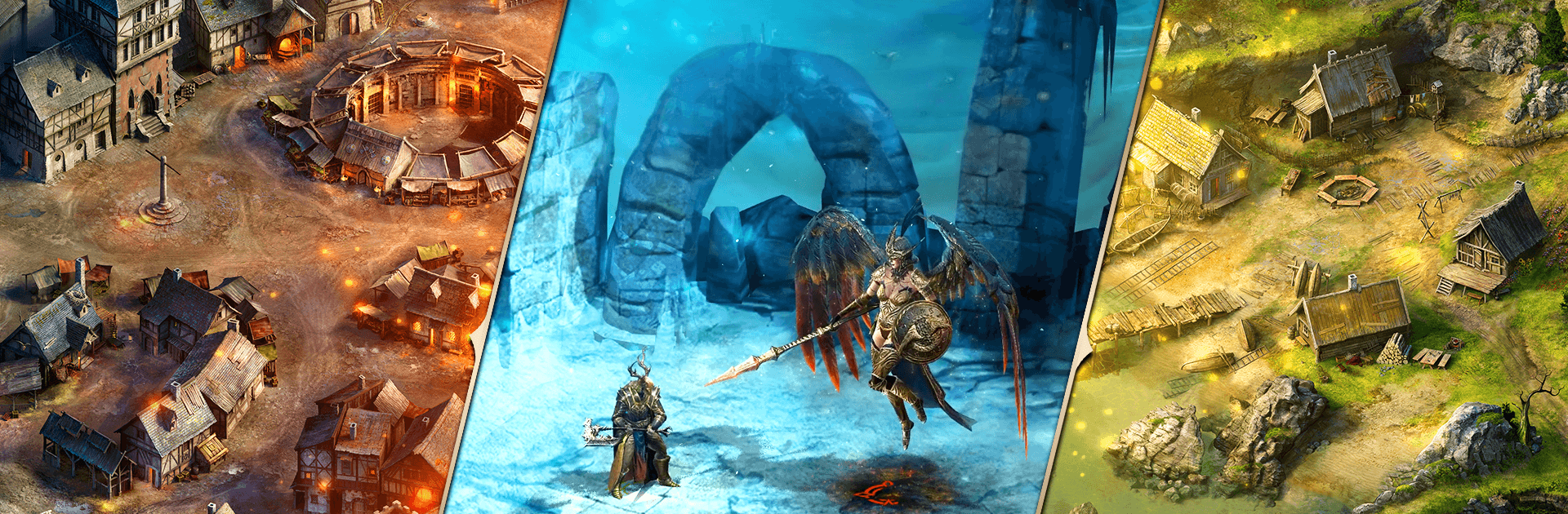
Broken Ranks is a dark, isometric online Role Playing adventure that blends smart, turn-based tactics with a world that never really cuts you a break. You’ll roam harsh lands, face monsters that don’t play fair, and make choices that can help people—or mess things up in surprising ways. Prefer playing on a PC? It also runs smoothly with BlueStacks so you can settle in and stay a while.

Game Features

  • Isometric World, Big Mood: Wander bustling cities, wind-scoured peaks, and shadowy ruins where danger—and rare loot—wait around the corner.
  • Tactical Turn-Based Battles: Each round ticks down on a timer, pushing you to plan quickly, sync skills, and squeeze every advantage from positioning.
  • Party and PvP Clashes: Team up to crack tough encounters or challenge other players in tense, party-based showdowns that get the pulse going.
  • Choices With Consequences: Storylines branch and bend; pick sides, solve messy village politics, and sometimes choose between a moonshiner, a flirt, or a shady trader for leadership. Totally normal, right?
  • Seven Distinct Classes: Pick from Barbarian, Fire Mage, Archer, Voodoo, Sheed, Druid, or Knight—each with unique abilities that open up fresh tactics as you progress.
  • A Refugee’s Long Road: Step into the boots of someone rebuilding a life after loss, chasing justice while navigating a brutally pragmatic world.
  • Gritty Tone With Dry Humor: It’s bleak but not joyless—you might hunt “ghosts” in a well and find two tipsy locals arguing about the moonshine shortage instead.
  • Loot, Fame, and Real Risk: Powerful enemies guard the best rewards, and victory feels earned because nothing here is handed to you.
  • Living MMO Layer: Chat, organize parties, and cross paths with other adventurers who are just as stubborn—and curious—as you are.

Start playing Broken Ranks on BlueStacks and get a smoother, more comfortable PC or Mac setup.

Game Features

Enhancements

  • Macros
  • Rerolling
  • Eco Mode
  • Multi Instance Sync
  • Enhancements
Macros

Macros

Focus more on the fun part of the game, skip the tedious aspects. Master Broken Ranks with Macros. Record yourself completing the monotonous tasks you wish to automate and replay them later with just one keypress.
Rerolling

Rerolling

Speed up the rerolling process in Broken Ranks. Perform multiple summons and keep looking for the best Heroes. Use Multi-Instance sync to replicate the rerolling mechanism in all instances.
Eco Mode

Eco Mode

Farm in-game resources with ease in Broken Ranks. Enable the Eco Mode when running the game in multiple instances. And lower your PC's resource consumption.
Multi Instance Sync

Multi Instance Sync

With the Multi-instance Sync, you can do even more in Broken Ranks. Sync the action of the main instance and repeat them in real time for all other instances. Sync and sit back, let the game progress unfold.
Read More

How to Download and Play Broken Ranks on PC or Mac

  • Download and install BlueStacks on your PC or Mac

  • Complete Google sign-in to access the Play Store, or do it later

  • Look for Broken Ranks in the search bar at the top right corner

  • Click to install Broken Ranks from the search results

  • Complete Google sign-in (if you skipped step 2) to install Broken Ranks

  • Click the Broken Ranks icon on the home screen to start playing

video
Watch Video

Minimum System Requirements

With BlueStacks 5, you can get started on a PC that fulfills the following requirements.

  • Operating System

    Microsoft Windows 7 or above, macOS 11 (Big Sur) or above

  • Processor

    Intel, AMD or Apple Silicon Processor

  • RAM

    at least 4GB

  • HDD

    10GB Free Disk Space

Note:

* You must be an Administrator on your PC. Up to date graphics drivers from Microsoft or the chipset vendor.

Broken Ranks - FAQs

  • How to play Broken Ranks on Windows PC & Mac?

    Play Broken Ranks on your PC or Mac by following these simple steps.

    • Click on 'Play Broken Ranks on PC’ to download BlueStacks
    • Install it and log-in to Google Play Store
    • Launch and play the game.
  • Why is BlueStacks the fastest and safest platform to play games on PC?

    BlueStacks respects your privacy and is always safe and secure to use. It does not carry any malware, spyware, or any sort of additional software that could harm your PC.

    It is engineered to optimize speed and performance for a seamless gaming experience.

  • What are Broken Ranks PC requirements?

    Minimum requirement to run Broken Ranks on your PC

    • OS: Microsoft Windows 7 or above MacOS 11 (Big Sur) or above
    • Processor: Intel, AMD or Apple Silicon Processor
    • RAM: Your PC must have at least 4GB of RAM. (Note that having 4GB or more disk space is not a substitute for RAM)
    • HDD: 10GB Free Disk Space.
    • You must be an Administrator on your PC.