Mechanic 3D My Favorite Car

Mechanic 3D My Favorite Car

Simulation

| GamesEZ

Play on PC with BlueStacks or from our cloud

  • Overview
  • Game Features
  • How to Play

Page Modified On: September 19, 2025

Play Mechanic 3D My Favorite Car on PC or Mac

Step into the World of Mechanic 3D My Favorite Car, a thrilling Simulation game from the house of GamesEZ. Play this Android game on BlueStacks App Player and experience immersive gaming on PC or Mac.

About the Game

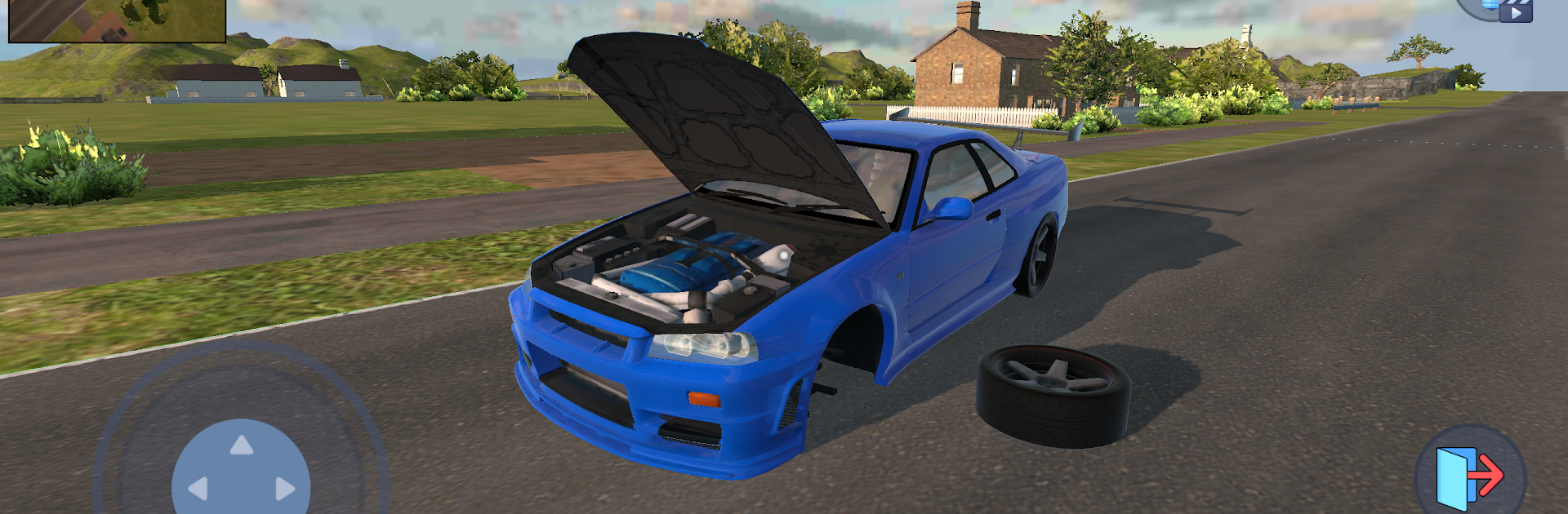
Mechanic 3D My Favorite Car is a hands-on Simulation from GamesEZ that drops you right into the garage. You’re not just tapping buttons—you’re breaking down real car parts, fixing what’s busted, and putting everything back together so it runs like a dream. Expect a laid-back, satisfying loop of diagnosing issues, swapping components, and giving each ride your own custom touch.

Game Features

  • First-person garage feel: Work up close and personal with every nut and bolt. Seeing the car from your own perspective makes each repair feel authentic.
  • Tear down and rebuild: Disassemble components, spot the damage, and install fresh parts. It’s detailed without being overwhelming.
  • Real tools, real steps: Use common mechanic tools the way they’re meant to be used. Learn the flow of proper repairs as you go.
  • Tuning that changes the ride: Upgrade body panels and suspension with sport or racing-style parts. Your choices affect how the car looks and handles.
  • Clean, paint, and detail: Restore parts with cleaning, then hit them with new paint to bring life back to tired metal.
  • Dozens of parts to master: Explore systems piece by piece—engine, suspension, bodywork, and more—until the whole machine makes sense.
  • Orders with variety: Take on different jobs, from quick fixes to full overhauls, and earn rewards for doing solid work.
  • Easy to pick up: Simple controls and clear steps make it friendly for beginners, while the deeper systems keep gearheads busy.
  • Helpful bonuses: Earn perks and goodies as you complete tasks, making the next repair faster or more rewarding.
  • Smooth on PC with BlueStacks: Prefer a bigger screen and mouse precision? You can play Mechanic 3D My Favorite Car on BlueStacks without changing how the game feels.

Get ready for a buttery smooth, high-performance gaming action only on BlueStacks.

Game Features

Enhancements

  • Macros
  • Multi Instance
  • Multi Instance Sync
  • Script
  • Enhancements
Macros

Macros

Automate the predictable in Mechanic 3D My Favorite Car and transform your gameplay with Macros. Get access to inventive Macros in the BlueStacks Macro Community
Multi Instance

Multi Instance

Play Mechanic 3D My Favorite Car on one window. And chat with your friend on the other. Press CTRL + Shift + 8 to open the Multi-Instance Manager. And start creating fresh instances or clone an existing one.
Multi Instance Sync

Multi Instance Sync

Play Mechanic 3D My Favorite Car with the power of Multi-Instance Sync. Replicate what you are doing on the main instance on all other instances. Level up faster, play more.
Script

Script

Script your way to gaming glory in Mechanic 3D My Favorite Car with BlueStacks Script. Write and run a set of commands to automate repeated tasks. Trigger the command by assigning it to any key.
Read More

How to Download and Play Mechanic 3D My Favorite Car on PC or Mac

  • Download and install BlueStacks on your PC or Mac

  • Complete Google sign-in to access the Play Store, or do it later

  • Look for Mechanic 3D My Favorite Car in the search bar at the top right corner

  • Click to install Mechanic 3D My Favorite Car from the search results

  • Complete Google sign-in (if you skipped step 2) to install Mechanic 3D My Favorite Car

  • Click the Mechanic 3D My Favorite Car icon on the home screen to start playing

video
Watch Video

Minimum System Requirements

With BlueStacks 5, you can get started on a PC that fulfills the following requirements.

  • Operating System

    Microsoft Windows 7 or above, macOS 11 (Big Sur) or above

  • Processor

    Intel, AMD or Apple Silicon Processor

  • RAM

    at least 4GB

  • HDD

    10GB Free Disk Space

Note:

* You must be an Administrator on your PC. Up to date graphics drivers from Microsoft or the chipset vendor.

Mechanic 3D My Favorite Car - FAQs

  • How to play Mechanic 3D My Favorite Car on Windows PC & Mac?

    Play Mechanic 3D My Favorite Car on your PC or Mac by following these simple steps.

    • Click on 'Play Mechanic 3D My Favorite Car on PC’ to download BlueStacks
    • Install it and log-in to Google Play Store
    • Launch and play the game.
  • Why is BlueStacks the fastest and safest platform to play games on PC?

    BlueStacks respects your privacy and is always safe and secure to use. It does not carry any malware, spyware, or any sort of additional software that could harm your PC.

    It is engineered to optimize speed and performance for a seamless gaming experience.

  • What are Mechanic 3D My Favorite Car PC requirements?

    Minimum requirement to run Mechanic 3D My Favorite Car on your PC

    • OS: Microsoft Windows 7 or above MacOS 11 (Big Sur) or above
    • Processor: Intel, AMD or Apple Silicon Processor
    • RAM: Your PC must have at least 4GB of RAM. (Note that having 4GB or more disk space is not a substitute for RAM)
    • HDD: 10GB Free Disk Space.
    • You must be an Administrator on your PC.