Solar Smash
Solar Smash

Solar Smash

Simulation

| Paradyme Games

Play on PC with BlueStacks or from our cloud

  • Overview
  • Tips & Tricks
  • Game Features
  • How to Play

Page Modified On: October 23, 2026

Play Solar Smash on PC or Mac

Play Solar Smash by Paradyme Games on PC or Mac with BlueStacks. Use a bigger screen, mouse and keyboard controls, and smoother performance while you play.

About the Game

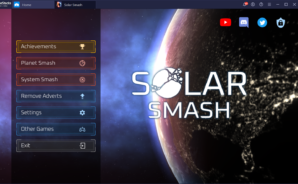
Solar Smash hands you the keys to the cosmos and dares you to make a mess—or a masterpiece. This is a Simulation sandbox where you can sculpt planets, set orbits, and then obliterate everything with absurdly powerful toys, all backed by crunchy physics. Whether you’re in a chill experiment mood or craving cataclysmic chaos, it’s all here. Prefer a bigger screen? It plays nicely on BlueStacks, too.

Game Features

  • Planet Smash mode: Focus on a single world and test every destructive idea you’ve ever had, from precision laser cuts to apocalyptic chain reactions that leave nothing but glowing rubble.
  • Solar System Smash mode: Build or pick a full star system (yes, including ours), tweak orbits, trigger collisions, and watch gravity write wild stories across space.
  • A ridiculous arsenal: Fire up lasers, meteors, nukes, antimatter missiles, railguns, UFOs, battleships, space fighters, orbital ion cannons, black holes, shields, defensive satellites, laser swords, giant monsters, celestial beings, and even oddities like space shibas.
  • Real physics, spectacular consequences: Gravity feels authentic—objects pull, sling, and shatter in believable ways—so when things go wrong, they go gloriously wrong.
  • Megastructures and cosmic curiosities: Play around with ring worlds, fortified moons, and other exotic builds that push your experiments into new, weirder territory.
  • Quick to learn, wild to master: Pick a tool, aim, and unleash it. Swap weapons on the fly, layer effects, and escalate from small scars to full planetary vaporization in seconds.
  • Creative freedom without rules: Build serene systems, stage cinematic disasters, or bounce between both—your universe, your story.
  • Visual effects note: Some scenes include intense flashes and bursts of light, so keep that in mind if you’re sensitive to strobing.

BlueStacks gives you more room to focus on the game and less time adjusting around mobile limitations.

Game Features

Enhancements

  • Macros
  • Multi Instance
  • Multi Instance Sync
  • Script
  • Enhancements
Macros

Macros

Automate the predictable in Solar Smash and transform your gameplay with Macros. Get access to inventive Macros in the BlueStacks Macro Community
Multi Instance

Multi Instance

Play Solar Smash on one window. And chat with your friend on the other. Press CTRL + Shift + 8 to open the Multi-Instance Manager. And start creating fresh instances or clone an existing one.
Multi Instance Sync

Multi Instance Sync

Play Solar Smash with the power of Multi-Instance Sync. Replicate what you are doing on the main instance on all other instances. Level up faster, play more.
Script

Script

Script your way to gaming glory in Solar Smash with BlueStacks Script. Write and run a set of commands to automate repeated tasks. Trigger the command by assigning it to any key.
Read More

How to Download and Play Solar Smash on PC or Mac

  • Download and install BlueStacks on your PC or Mac

  • Complete Google sign-in to access the Play Store, or do it later

  • Look for Solar Smash in the search bar at the top right corner

  • Click to install Solar Smash from the search results

  • Complete Google sign-in (if you skipped step 2) to install Solar Smash

  • Click the Solar Smash icon on the home screen to start playing

video
Watch Video

Minimum System Requirements

With BlueStacks 5, you can get started on a PC that fulfills the following requirements.

  • Operating System

    Microsoft Windows 7 or above, macOS 11 (Big Sur) or above

  • Processor

    Intel, AMD or Apple Silicon Processor

  • RAM

    at least 4GB

  • HDD

    10GB Free Disk Space

Note:

* You must be an Administrator on your PC. Up to date graphics drivers from Microsoft or the chipset vendor.

Solar Smash - FAQs

  • How to play Solar Smash on Windows PC & Mac?

    Play Solar Smash on your PC or Mac by following these simple steps.

    • Click on 'Play Solar Smash on PC’ to download BlueStacks
    • Install it and log-in to Google Play Store
    • Launch and play the game.
  • Why is BlueStacks the fastest and safest platform to play games on PC?

    BlueStacks respects your privacy and is always safe and secure to use. It does not carry any malware, spyware, or any sort of additional software that could harm your PC.

    It is engineered to optimize speed and performance for a seamless gaming experience.

  • What are Solar Smash PC requirements?

    Minimum requirement to run Solar Smash on your PC

    • OS: Microsoft Windows 7 or above MacOS 11 (Big Sur) or above
    • Processor: Intel, AMD or Apple Silicon Processor
    • RAM: Your PC must have at least 4GB of RAM. (Note that having 4GB or more disk space is not a substitute for RAM)
    • HDD: 10GB Free Disk Space.
    • You must be an Administrator on your PC.