Turboprop Flight Simulator

Turboprop Flight Simulator

Simulation

| AXgamesoft

Play on PC with BlueStacks or from our cloud

  • Overview
  • Game Features
  • How to Play

Page Modified On: September 10, 2026

Play Turboprop Flight Simulator on PC or Mac

Explore a whole new adventure with Turboprop Flight Simulator, a Simulation game created by AXgamesoft. Experience great gameplay with BlueStacks, the most popular gaming platform to play Android games on your PC or Mac.

About the Game

Turboprop Flight Simulator puts you in the left seat of some serious prop-powered machines. It’s a grounded, hands-on Simulation where you’ll haul cargo, run search-and-rescue, shuttle passengers, and even handle special ops across a chain of islands. Expect detailed cockpits, believable physics, and plenty of freedom to learn, experiment, and fly your way—also comfy to play on PC with BlueStacks if you like a keyboard-and-mouse setup.

Game Features

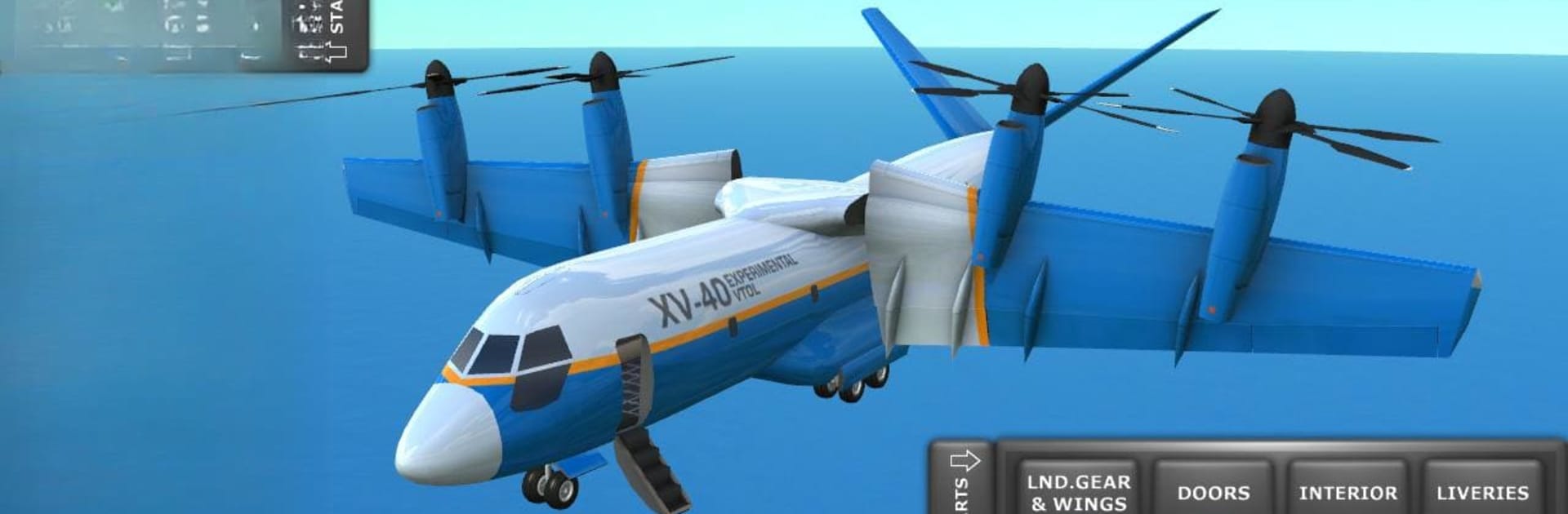
  • Big turboprop lineup: Fly everything from tactical airlifters and coastguard variants to regional airliners, tilt-wing VTOL prototypes, and nimble seaplanes.
  • Learn-by-doing training: Start with clear tutorials that walk you through taxiing, takeoff, landing, and the basics of handling heavier aircraft.
  • Mission variety: Tackle cargo runs, SAR tasks, special operations, and passenger hops—short hops, long legs, tight approaches, the works.
  • First-person interiors: Walk through cabins and cargo bays, flip switches, open doors and ramps, and check out the aircraft up close.
  • Realistic feel: Aerodynamics and weight matter here, so you’ll notice the difference between a light hop and a fully loaded departure.
  • Full flight controls: Use rudder, flaps, spoilers, thrust reversers, auto-brakes, and gear—everything you need for proper procedures.
  • Ground vehicles included: Drive support vehicles when the job calls for it, keeping the whole operation moving.
  • True cargo ops: Load, unload, and even airdrop supplies and vehicles from the ramp—timing and speed make all the difference.
  • Short fields and JATO: Take off from improvised strips and use jet-assisted boosts when the runway or terrain gets tricky.
  • Free-flight freedom: Explore without constraints or plot point-to-point routes on the map for more structured trips.
  • Time-of-day options: Fly sunrise hops, midday crossings, or night arrivals to change the mood and challenge.
  • Multiple camera angles: Swap between external views and cockpit seats, including captain and copilot perspectives.
  • Cockpit detail and sound: Climb into fully modeled panels and hear turbines and propellers with punchy, convincing audio.
  • Damage modeling: Clip a wingtip or push too hard and you’ll see visual damage, up to full structural breakups.
  • Flexible setup: Choose tilt, stick, or mixed controls, and switch units for speed, altitude, and distance to match your style.
  • Fewer interruptions: No mandatory ads—only optional, rewarded ones between flights if you want them.

BlueStacks gives you more room to focus on the game and less time adjusting around mobile limitations.


Game Features

Enhancements

  • Macros
  • Multi Instance
  • Multi Instance Sync
  • Script
  • Enhancements
Macros

Macros

Automate the predictable in Turboprop Flight Simulator and transform your gameplay with Macros. Get access to inventive Macros in the BlueStacks Macro Community
Multi Instance

Multi Instance

Play Turboprop Flight Simulator on one window. And chat with your friend on the other. Press CTRL + Shift + 8 to open the Multi-Instance Manager. And start creating fresh instances or clone an existing one.
Multi Instance Sync

Multi Instance Sync

Play Turboprop Flight Simulator with the power of Multi-Instance Sync. Replicate what you are doing on the main instance on all other instances. Level up faster, play more.
Script

Script

Script your way to gaming glory in Turboprop Flight Simulator with BlueStacks Script. Write and run a set of commands to automate repeated tasks. Trigger the command by assigning it to any key.
Read More

How to Download and Play Turboprop Flight Simulator on PC or Mac

  • Download and install BlueStacks on your PC or Mac

  • Complete Google sign-in to access the Play Store, or do it later

  • Look for Turboprop Flight Simulator in the search bar at the top right corner

  • Click to install Turboprop Flight Simulator from the search results

  • Complete Google sign-in (if you skipped step 2) to install Turboprop Flight Simulator

  • Click the Turboprop Flight Simulator icon on the home screen to start playing

video
Watch Video

Minimum System Requirements

With BlueStacks 5, you can get started on a PC that fulfills the following requirements.

  • Operating System

    Microsoft Windows 7 or above, macOS 11 (Big Sur) or above

  • Processor

    Intel, AMD or Apple Silicon Processor

  • RAM

    at least 4GB

  • HDD

    10GB Free Disk Space

Note:

* You must be an Administrator on your PC. Up to date graphics drivers from Microsoft or the chipset vendor.

Turboprop Flight Simulator - FAQs

  • How to play Turboprop Flight Simulator on Windows PC & Mac?

    Play Turboprop Flight Simulator on your PC or Mac by following these simple steps.

    • Click on 'Play Turboprop Flight Simulator on PC’ to download BlueStacks
    • Install it and log-in to Google Play Store
    • Launch and play the game.
  • Why is BlueStacks the fastest and safest platform to play games on PC?

    BlueStacks respects your privacy and is always safe and secure to use. It does not carry any malware, spyware, or any sort of additional software that could harm your PC.

    It is engineered to optimize speed and performance for a seamless gaming experience.

  • What are Turboprop Flight Simulator PC requirements?

    Minimum requirement to run Turboprop Flight Simulator on your PC

    • OS: Microsoft Windows 7 or above MacOS 11 (Big Sur) or above
    • Processor: Intel, AMD or Apple Silicon Processor
    • RAM: Your PC must have at least 4GB of RAM. (Note that having 4GB or more disk space is not a substitute for RAM)
    • HDD: 10GB Free Disk Space.
    • You must be an Administrator on your PC.