Midnight Car Driving Drifting

Midnight Car Driving Drifting

Strategy

| Gaming Zone Hub

Play on PC with BlueStacks or from our cloud

  • Overview
  • Game Features
  • How to Play

Page Modified On: July 14, 2026

Play Midnight Car Driving Drifting on PC or Mac

Explore a whole new adventure with Midnight Car Driving Drifting, a Strategy game created by Gaming Zone Hub. Experience great gameplay with BlueStacks, the most popular gaming platform to play Android games on your PC or Mac.

About the Game

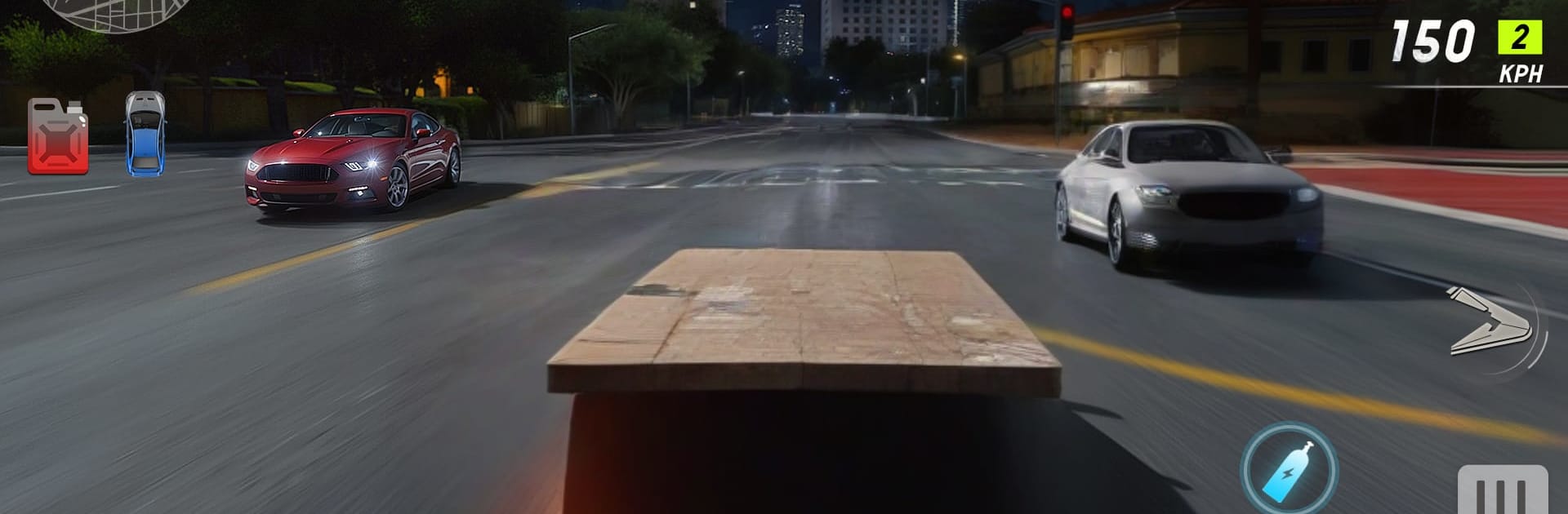
Midnight Car Driving Drifting is all about late-night runs through a neon-soaked city where every corner dares you to hold the slide a little longer. It’s fast, stylish, and surprisingly thoughtful—more than just mashing the gas, you’re managing momentum and chasing that perfect line through the glow. Expect sweeping drifts across highways, mountain curves, and forgotten industrial stretches, all wrapped in a moody midnight vibe.

Game Features

  • Futuristic open world at night: Cruise a neon-lit city that feels alive after dark, from glossy boulevards to shadowy outskirts.
  • Drift-first handling: The fun lives in the slide—feather the throttle, set your angle, and keep the car balanced as you paint long arcs across the asphalt.
  • Varied routes to master: Glide along glowing highways, carve misty mountain passes, and thread through abandoned highway zones without breaking your flow.
  • Strategy in every corner: Genre: Strategy comes through as you plan entries, manage speed, and pick clean exits—each turn is a small puzzle with big payoffs.
  • Moody visual atmosphere: Reflections, distant lights, and rolling fog give midnight drives a slick, cinematic feel.
  • Pace your runs: String together smooth transitions and smarter lines to keep speed up and rhythm steady—patience beats panic.
  • Explore at your style: Hunt for wide spaces to stretch a drift or tighter streets that test precision and timing.
  • Better on a bigger screen: Prefer sharper visuals and steady control? BlueStacks makes those midnight slides feel extra crisp without getting in the way.

Start playing Midnight Car Driving Drifting on BlueStacks and get a smoother, more comfortable PC or Mac setup.


Game Features

Enhancements

  • Macros
  • Multi Instance
  • Multi Instance Sync
  • Eco Mode
  • Enhancements
Macros

Macros

Skip the boring parts of a game. Play Midnight Car Driving Drifting with Macros and get the edge. Simply record a sequence of commands and execute them at any moment.
Multi Instance

Multi Instance

Why limit to one game on your phone when you can play many on your PC? Open multiple instances of Midnight Car Driving Drifting at once with Multi-Instance. Leverage the power of different accounts by doing more.
Multi Instance Sync

Multi Instance Sync

Get the best out of Midnight Car Driving Drifting with Multi-Instance Sync. Play the game from different accounts and build your own empire. Use Multi-instance sync to repeat the action in the main BlueStacks instance on all other instances.
Eco Mode

Eco Mode

Find the rarest heroes by making multiple summons in Midnight Car Driving Drifting. And while you are at it, reduce your PC’s resource consumption with the Eco Mode. Farm efficiently. Get the best results.
Read More

How to Download and Play Midnight Car Driving Drifting on PC or Mac

  • Download and install BlueStacks on your PC or Mac

  • Complete Google sign-in to access the Play Store, or do it later

  • Look for Midnight Car Driving Drifting in the search bar at the top right corner

  • Click to install Midnight Car Driving Drifting from the search results

  • Complete Google sign-in (if you skipped step 2) to install Midnight Car Driving Drifting

  • Click the Midnight Car Driving Drifting icon on the home screen to start playing

video
Watch Video

Minimum System Requirements

With BlueStacks 5, you can get started on a PC that fulfills the following requirements.

  • Operating System

    Microsoft Windows 7 or above, macOS 11 (Big Sur) or above

  • Processor

    Intel, AMD or Apple Silicon Processor

  • RAM

    at least 4GB

  • HDD

    10GB Free Disk Space

Note:

* You must be an Administrator on your PC. Up to date graphics drivers from Microsoft or the chipset vendor.

Midnight Car Driving Drifting - FAQs

  • How to play Midnight Car Driving Drifting on Windows PC & Mac?

    Play Midnight Car Driving Drifting on your PC or Mac by following these simple steps.

    • Click on 'Play Midnight Car Driving Drifting on PC’ to download BlueStacks
    • Install it and log-in to Google Play Store
    • Launch and play the game.
  • Why is BlueStacks the fastest and safest platform to play games on PC?

    BlueStacks respects your privacy and is always safe and secure to use. It does not carry any malware, spyware, or any sort of additional software that could harm your PC.

    It is engineered to optimize speed and performance for a seamless gaming experience.

  • What are Midnight Car Driving Drifting PC requirements?

    Minimum requirement to run Midnight Car Driving Drifting on your PC

    • OS: Microsoft Windows 7 or above MacOS 11 (Big Sur) or above
    • Processor: Intel, AMD or Apple Silicon Processor
    • RAM: Your PC must have at least 4GB of RAM. (Note that having 4GB or more disk space is not a substitute for RAM)
    • HDD: 10GB Free Disk Space.
    • You must be an Administrator on your PC.