Miner Fighters
Miner Fighters

Miner Fighters

Strategy

| Unico Studio

Play on PC with BlueStacks or from our cloud

  • Overview
  • Game Features
  • How to Play

Page Modified On: October 19, 2026

Play Miner Fighters on PC or Mac

Bring your A-game to Miner Fighters, the Strategy game sensation from Unico Studio. Give your gameplay the much-needed boost with precise game controls, high FPS graphics, and top-tier features on your PC or Mac with BlueStacks.

About the Game

Miner Fighters blends gold mining with wave-clearing combat into a punchy Strategy game. You’ll dig for resources, hire a quirky crew of heroes, and hold the line against swarms of enemies and towering bosses while your squad keeps getting stronger. Progress carries over between sessions, and if you like playing on a bigger screen, it runs smoothly on BlueStacks.

Game Features

  • Core Mining-Battle Loop: Mine gold, invest in recruits and upgrades, then test your build against incoming waves and milestone bosses—the cycle keeps getting tougher and more rewarding.
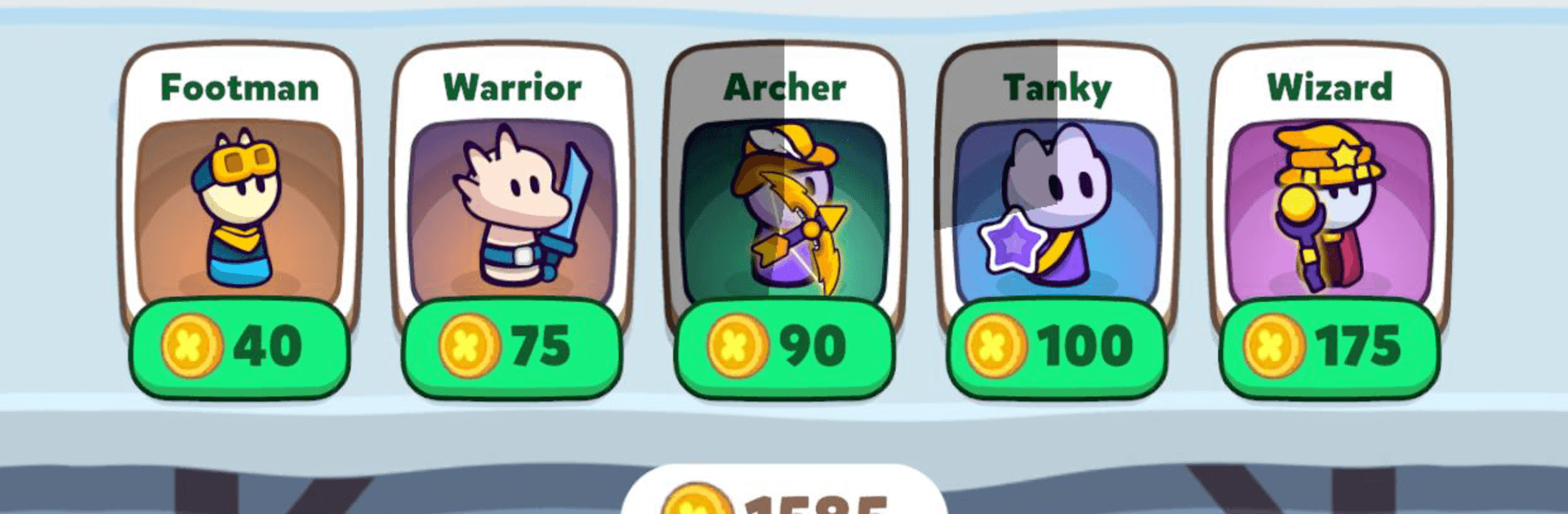
  • Playable Classes: Field Fighter, Warrior, Tanky, Archer, and Wizard; each brings its own role and rhythm, so swapping one hero can change your whole game plan.
  • Stat Tuning & Evolution: Boost Health, Damage, Defense, and Luck, then evolve heroes to unlock fresh looks and noticeable power spikes on the battlefield.
  • Waves Then Bosses: Enemy waves ramp up in pace and pressure, and bosses arrive with patterns and surprises that punish sloppy setups and reward smart planning.
  • Card Draft Between Waves: After each stand, choose a card to reshape your run—amp damage, speed up spawns, call in extra miners, or add special abilities for clutch moments.
  • Maps With Personality: Push through distinct maps featuring unique enemy mixes and boss encounters that nudge you to rethink positioning, timing, and team comps.
  • Gadgets & Boosters: Drop turrets, pop shields, and trigger boosters when things get hairy to tilt tough fights back in your favor.
  • Progress That Doesn’t Pause: Your miners keep working while you’re away, so you return to a handy stash you can pour into smarter builds and farther pushes.
  • Team Synergy Experiments: Mix roles and abilities to craft lineups tailored to specific bosses or objectives—tinkerers will have a field day finding clever combos.

Start playing Miner Fighters on BlueStacks and get a smoother, more comfortable PC or Mac setup.

Game Features

Enhancements

  • Macros
  • Multi Instance
  • Multi Instance Sync
  • Eco Mode
  • Enhancements
Macros

Macros

Skip the boring parts of a game. Play Miner Fighters with Macros and get the edge. Simply record a sequence of commands and execute them at any moment.
Multi Instance

Multi Instance

Why limit to one game on your phone when you can play many on your PC? Open multiple instances of Miner Fighters at once with Multi-Instance. Leverage the power of different accounts by doing more.
Multi Instance Sync

Multi Instance Sync

Get the best out of Miner Fighters with Multi-Instance Sync. Play the game from different accounts and build your own empire. Use Multi-instance sync to repeat the action in the main BlueStacks instance on all other instances.
Eco Mode

Eco Mode

Find the rarest heroes by making multiple summons in Miner Fighters. And while you are at it, reduce your PC’s resource consumption with the Eco Mode. Farm efficiently. Get the best results.
Read More

How to Download and Play Miner Fighters on PC or Mac

  • Download and install BlueStacks on your PC or Mac

  • Complete Google sign-in to access the Play Store, or do it later

  • Look for Miner Fighters in the search bar at the top right corner

  • Click to install Miner Fighters from the search results

  • Complete Google sign-in (if you skipped step 2) to install Miner Fighters

  • Click the Miner Fighters icon on the home screen to start playing

video
Watch Video

Minimum System Requirements

With BlueStacks 5, you can get started on a PC that fulfills the following requirements.

  • Operating System

    Microsoft Windows 7 or above, macOS 11 (Big Sur) or above

  • Processor

    Intel, AMD or Apple Silicon Processor

  • RAM

    at least 4GB

  • HDD

    10GB Free Disk Space

Note:

* You must be an Administrator on your PC. Up to date graphics drivers from Microsoft or the chipset vendor.

Miner Fighters - FAQs

  • How to play Miner Fighters on Windows PC & Mac?

    Play Miner Fighters on your PC or Mac by following these simple steps.

    • Click on 'Play Miner Fighters on PC’ to download BlueStacks
    • Install it and log-in to Google Play Store
    • Launch and play the game.
  • Why is BlueStacks the fastest and safest platform to play games on PC?

    BlueStacks respects your privacy and is always safe and secure to use. It does not carry any malware, spyware, or any sort of additional software that could harm your PC.

    It is engineered to optimize speed and performance for a seamless gaming experience.

  • What are Miner Fighters PC requirements?

    Minimum requirement to run Miner Fighters on your PC

    • OS: Microsoft Windows 7 or above MacOS 11 (Big Sur) or above
    • Processor: Intel, AMD or Apple Silicon Processor
    • RAM: Your PC must have at least 4GB of RAM. (Note that having 4GB or more disk space is not a substitute for RAM)
    • HDD: 10GB Free Disk Space.
    • You must be an Administrator on your PC.