GoreBox 27 Reality Crusher V3 Guide Physics Tricks and Spawning Secrets
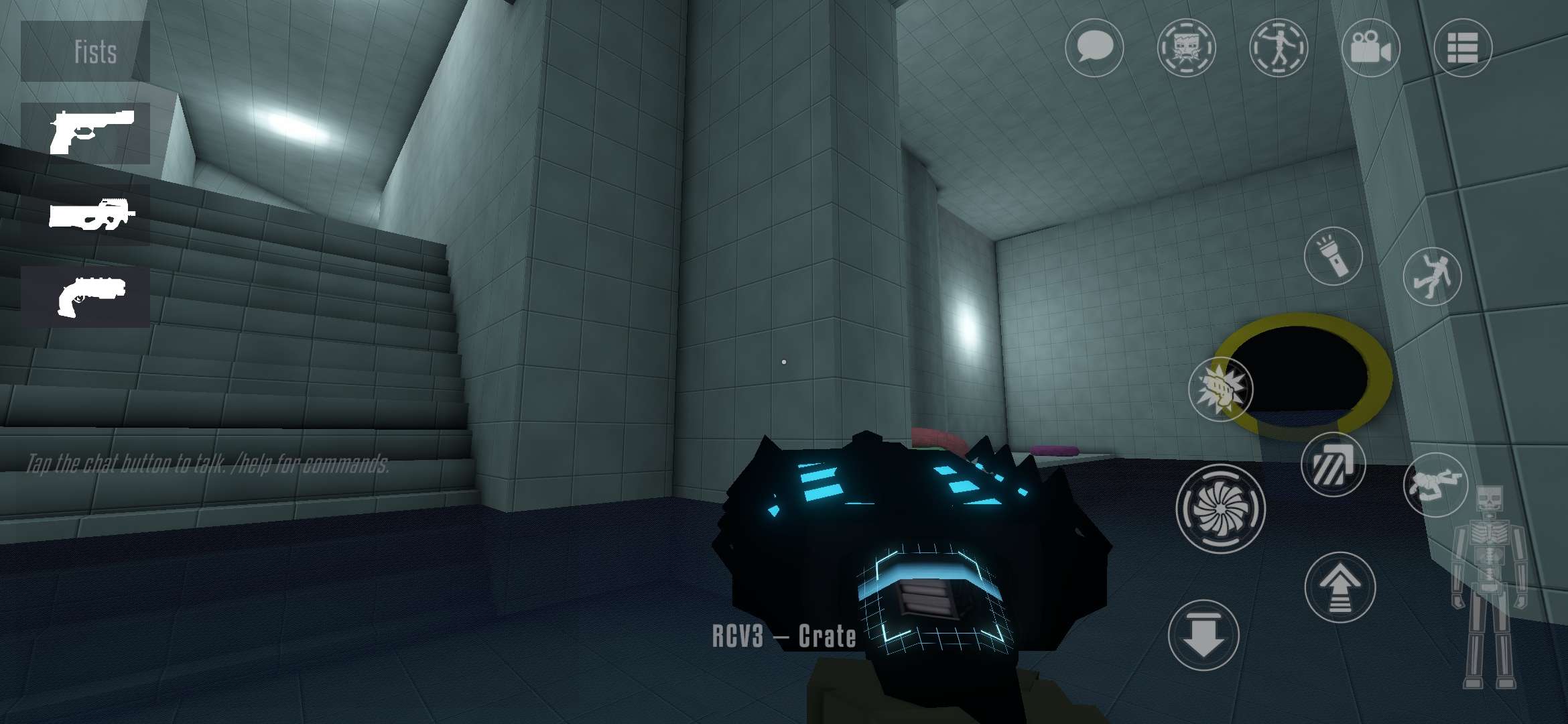

The GoreBox 27 Reality Crusher is the tool that turns this sandbox into a physics lab. The Reality Crusher V3, called RCV3 in game, spawns props, grabs anything physical, throws it and rips it apart. This guide covers what the RCV3 can do in the latest Early Access build, how it differs from the old RCV2, and the physics and spawning tricks that make every session more fun.
What Is the Reality Crusher V3 in GoreBox 27?
The Reality Crusher is the signature tool of the GoreBox series, a gravity gun and spawner rolled into one. GoreBox 27 replaced the RCV2 from GoreBox Animosity with a brand new model, the RCV3. It arrived in the 0.5.0 Restricted Prototype on August 8, 2026. Two days later, the 0.6.2 build gave it a small screen that shows the prop or entity picked in the spawn menu.
The tool has no ammo and deals no damage by itself. Everything it spawns or throws follows the same gravity and collision rules as the rest of the world, and that is why it feels so satisfying to use. The name also has history. GoreBox Remastered called it the Toolgun, GoreBox Animosity upgraded it to the RCV2, and GoreBox 27 brings the third version. Even Melon Sandbox has a Tool Gun item that nods to the old GoreBox Remastered design.

Here is what the RCV3 can do right now, based on the official GoreBox 27 feature list:
- Spawn: Places props and entities chosen from the spawn menu.
- Grab: Picks up any physical object and holds it at range.
- Fling: Throws the held object, which then follows normal physics.
- Tear apart: Rips objects into pieces.
- Crush: Wrecks objects without any explosives.
- Build: Puts up fences and walls for quick cover or arena layouts.
How to Spawn and Move Objects With the GoreBox 27 Reality Crusher
Spawning is a two step job. Select the RCV3 from the inventory, open the spawn menu and pick a prop, explosive or NPC. The pick shows up on the RCV3 screen, which makes it easy to double check the item before placing it. Aim at the spot and use the tool to drop it into the world.
Moving things works the same way. Aim at any physical object, grab it, then turn the camera to carry it. Let go to drop it gently or throw it to send it flying.
GoreBox 27 is still in Early Access, and default buttons can shift between updates, so the controls page in Settings is the best place to check bindings. On PC, two keys are worth knowing. N toggles noclip, which now works more like flight and makes placing props up high much easier. F9 hides the HUD for clean screenshots of a finished build. The game also has full controller support.

GoreBox 27 Reality Crusher V3 vs RCV2: What Changed
| Feature | RCV2 (GoreBox Animosity) | RCV3 (GoreBox 27) |
| First added | In use since 2022 | 0.5.0 build, August 8, 2026 |
| Screen | Shows the active mode, with stripes that change color | Shows the item picked in the spawn menu |
| Confirmed abilities | 20 modes listed on the GoreBox wiki | Spawn, grab, fling, tear, crush, build |
| Mode switching | Radial menu since the 16.3 update | TBA |
The RCV2 collected its modes over years. Rotate, freeze and link arrived in 11.3.0 in February 2023, nine more modes landed in 12.0.0, and the 16.3 update finally gave it a radial menu. The RCV3 starts fresh on a new engine, so its list is shorter for now. The official feature list confirms the core abilities above, and anything beyond that is TBA until a patch confirms it.
For players coming from GoreBox Animosity, here are the RCV2 modes grouped by what they do. Whether each one returns on the RCV3 is still TBA.
- Building: Link, Rope, Wire, Balloon, Interphase, Transform Editor and Multi Selection join, hang, wire, lift, phase, edit or clone props.
- Size and gravity: Shrink and Enlarge change size without changing mass, while Gravitizer makes props float.
- Chaos: Explosion, Launch, Ignite, Meteor and Laser handle the destruction.
- Utility: Interact, Teleport, Poser, Invulnerability and Immortality trigger items from afar, move the player, pose GoreDolls or block damage.
GoreBox 27 Physics Manipulation Tricks With the Reality Crusher
The RCV3 never cheats the simulation. Every object it spawns or throws plays by the same rules as bullets, bodies and fire, and that is exactly why these tricks work.

Read Materials Before Building Cover
Thin, light pieces of scenery bend and get tossed around, while heavy, solid structures take damage but hold their shape. Bullets follow similar logic and pass through walls based on their calibre and the wall’s thickness. Throw a few objects at different walls early in a session to learn which ones are real cover, then use the build ability to put fences and walls in the lanes that need them.
Stack, Drop and Collapse
The classic sandbox tests still teach the most. Build a tall stack of crates and yank out one piece near the base. Then hover a heavy prop over a weak roof and let it fall. Two minutes of this shows how weight and momentum behave better than any menu ever could.
Chain Reactions With Fire and Fuel
Fire in GoreBox 27 spreads through grass, wood, cloth and spilled fuel, and smoke fills rooms and chokes GoreDolls. Line up gas cans or propane tanks with the RCV3, then shoot the first one from a safe distance to watch the blaze travel. GoreDolls catch fire and burn to death unless the flames are put out, so always keep a clear exit.

Plan Nuclear Tests Around the Wind
The Aerial Bomb is a nuclear bomb, and its radioactive fallout drifts with the wind. That fallout causes radiation sickness and can even turn GoreDolls into Mutants. Check which way the wind blows before spawning it, and keep the blast on the far side of the player. The Neutron Bottle and Plasma Bottle are good explosives to test before going nuclear.
Jump Pads, Teleporters and Turrets
Props like jump pads and teleporters turn the RCV3 into a level design tool. Chain a jump pad into a teleporter for a quick obstacle run, or place live cameras around a trap and keep watch from a safe spot. Turrets work too, and bots can even man them. Fans of contraption building from these Melon Sandbox tips and tricks will feel right at home.
GoreBox 27 Spawning Secrets Most Players Miss
The spawn menu holds more than it first seems. The latest update brings the count to over 200 props, including TVs, live cameras, turrets, jump pads and teleporters. A few tools around spawning also save a lot of setup time:
- NPC spawn cards: Set an NPC’s skill, weapons, look and side, then save it as a personal spawn card.
- Scene saves: Save a full scene with every build, NPC and position, then load it again later.
- Map Editor: On PC, build houses, working doors, lifts and water, then play the map straight away.
- Host saves: Server hosts can save their sessions and pick up where they left off.
Some props sit in the game files without showing up in the spawn menu. Community creators have started a GoreBox 27 tutorials series on YouTube about spawning these secret props, following similar videos made for GoreBox Animosity. In Animosity, the trick used the Seller Shelf entity. Players typed a hidden item’s file path into the shelf, bought it, and the item spawned at the crosshair. The exact steps for GoreBox 27 are TBA, since hidden content and the methods to reach it can change or vanish with any Early Access patch. Test new tricks in an offline Sandbox session first, and avoid modded APKs, because modified game files put an account at risk in online play.
Spawning also has a cost. Dozens of bots and piles of wreckage drag the frame rate down, especially on phones. Clear old debris with the RCV3 before starting a new build, and add bots in small groups instead of all at once.
Players can enjoy playing GoreBox 27 on a bigger screen of their PC or Laptop via BlueStacks along with your keyboard and mouse.