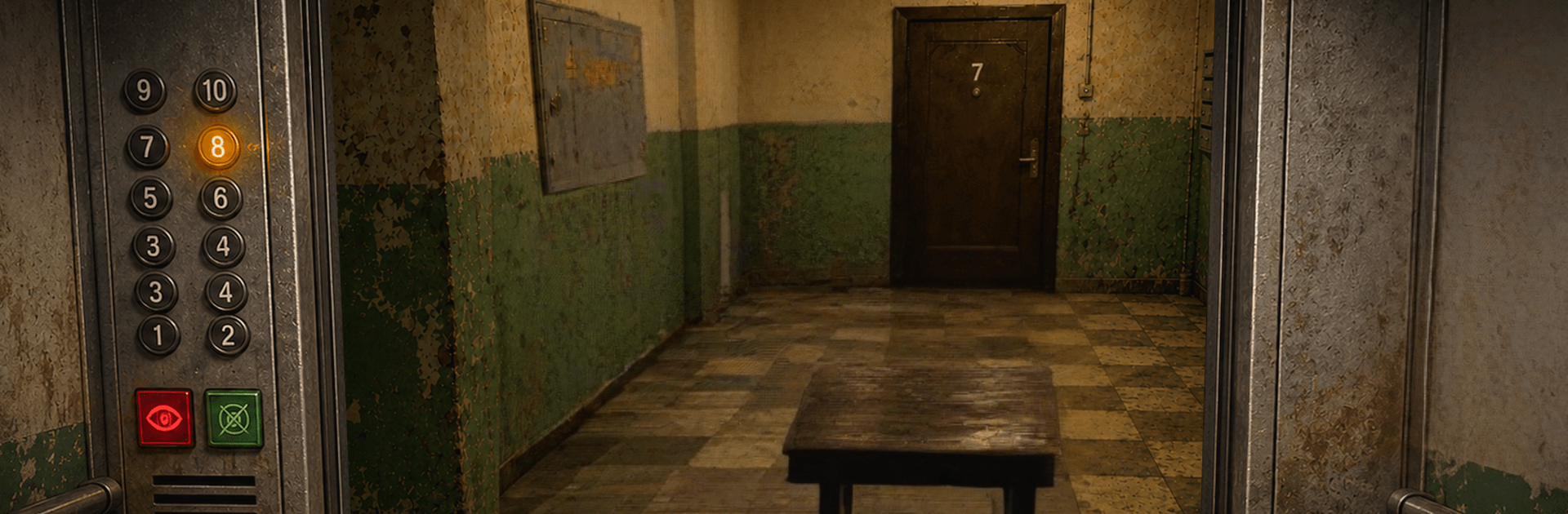
10th Floor: Elevator Anomalies

10th Floor: Elevator Anomalies

Action

| D one Games

Play on PC with BlueStacks or from our cloud

  • Overview
  • Game Features
  • How to Play

Page Modified On: September 07, 2026

Play 10th Floor: Elevator Anomalies on PC or Mac

Step into the World of 10th Floor: Elevator Anomalies, a thrilling Action game from the house of D one Games. Play this Android game on BlueStacks App Player and experience immersive gaming on PC or Mac.

About the Game

After a late shift, you step into an elevator that refuses to stop. 10th Floor: Elevator Anomalies mixes slow-burn dread with bursts of panic as floors repeat, neighbors feel wrong, and the building itself starts to bend; it lands squarely in the Genre: Action space while leaning on observation and risky calls. Prefer a keyboard and a bigger display? It runs smoothly on PC with BlueStacks.

Game Features

  • Anomaly Hunting: Study every hallway and landing for things that don’t add up—missing trinkets, a new door, a picture frame out of order, or a sound from nowhere.
  • Relentless Elevator Loop: Ride past where the building should end as floors repeat, shuffle, and warp your sense of place.
  • Unstable Architecture: Watch corridors stretch into darkness, stairwells twist, and rooms fold into angles that shouldn’t exist.
  • Unsettling Encounters: Cross paths with hooded figures, hostile tenants, and quiet strangers who might be harmless—or not.
  • Choice-Based Survival: Decide if an anomaly is present on each floor; call it wrong and you’re slammed back to the start, sometimes without a second chance.
  • First-Person Tension: Navigate tight spaces with limited visibility that keep your nerves humming and your head on a swivel.
  • Randomized Frights: Runs change with unpredictable events, so memory helps—but never saves—you completely.
  • Chase and Stealth Moments: Sneak past roaming threats or sprint when something finally notices you.
  • Audio Cues Matter: Track whispers, distant laughter, and sudden knocks to tell normal from not, even when visuals try to trick you.
  • Gritty Setting: Explore a decaying post‑Soviet apartment block where flickering lights, peeling walls, and liminal spaces set an oppressive mood.

Start your journey now. Download the game on BlueStacks, invite your friends, and march on a new adventure.


Game Features

Enhancements

  • Macros
  • Multi Instance
  • Multi Instance Sync
  • Eco Mode
  • Enhancements
Macros

Macros

Skip the boring parts of a game. Play 10th Floor: Elevator Anomalies with Macros and get the edge. Simply record a sequence of commands and execute them at any moment.
Multi Instance

Multi Instance

Why limit to one game on your phone when you can play many on your PC? Open multiple instances of 10th Floor: Elevator Anomalies at once with Multi-Instance. Leverage the power of different accounts by doing more.
Multi Instance Sync

Multi Instance Sync

Get the best out of 10th Floor: Elevator Anomalies with Multi-Instance Sync. Play the game from different accounts and build your own empire. Use Multi-instance sync to repeat the action in the main BlueStacks instance on all other instances.
Eco Mode

Eco Mode

Find the rarest heroes by making multiple summons in 10th Floor: Elevator Anomalies. And while you are at it, reduce your PC’s resource consumption with the Eco Mode. Farm efficiently. Get the best results.
Read More

How to Download and Play 10th Floor: Elevator Anomalies on PC or Mac

  • Download and install BlueStacks on your PC or Mac

  • Complete Google sign-in to access the Play Store, or do it later

  • Look for 10th Floor: Elevator Anomalies in the search bar at the top right corner

  • Click to install 10th Floor: Elevator Anomalies from the search results

  • Complete Google sign-in (if you skipped step 2) to install 10th Floor: Elevator Anomalies

  • Click the 10th Floor: Elevator Anomalies icon on the home screen to start playing

video
Watch Video

Minimum System Requirements

With BlueStacks 5, you can get started on a PC that fulfills the following requirements.

  • Operating System

    Microsoft Windows 7 or above, macOS 11 (Big Sur) or above

  • Processor

    Intel, AMD or Apple Silicon Processor

  • RAM

    at least 4GB

  • HDD

    10GB Free Disk Space

Note:

* You must be an Administrator on your PC. Up to date graphics drivers from Microsoft or the chipset vendor.

10th Floor: Elevator Anomalies - FAQs

  • How to play 10th Floor: Elevator Anomalies on Windows PC & Mac?

    Play 10th Floor: Elevator Anomalies on your PC or Mac by following these simple steps.

    • Click on 'Play 10th Floor: Elevator Anomalies on PC’ to download BlueStacks
    • Install it and log-in to Google Play Store
    • Launch and play the game.
  • Why is BlueStacks the fastest and safest platform to play games on PC?

    BlueStacks respects your privacy and is always safe and secure to use. It does not carry any malware, spyware, or any sort of additional software that could harm your PC.

    It is engineered to optimize speed and performance for a seamless gaming experience.

  • What are 10th Floor: Elevator Anomalies PC requirements?

    Minimum requirement to run 10th Floor: Elevator Anomalies on your PC

    • OS: Microsoft Windows 7 or above MacOS 11 (Big Sur) or above
    • Processor: Intel, AMD or Apple Silicon Processor
    • RAM: Your PC must have at least 4GB of RAM. (Note that having 4GB or more disk space is not a substitute for RAM)
    • HDD: 10GB Free Disk Space.
    • You must be an Administrator on your PC.