RPG Overrogue
RPG Overrogue

RPG Overrogue

Card

| KEMCO

Play on PC with BlueStacks or from our cloud

  • Overview
  • Game Features
  • How to Play

Page Modified On: November 10, 2025

Play RPG Overrogue on PC or Mac

RPG Overrogue brings the Card genre to life, and throws up exciting challenges for gamers. Developed by KEMCO, this Android game is best experienced on BlueStacks, the World’s #1 app player for PC and Mac users.

About the Game

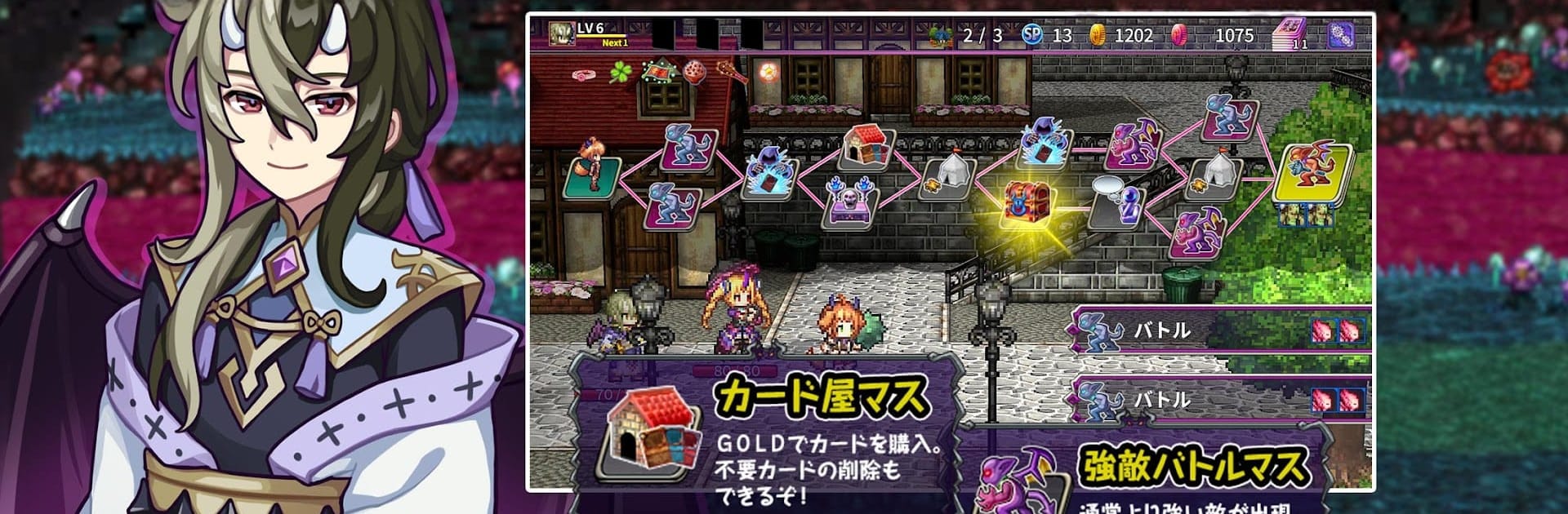
RPG Overrogue is a rogue-lite Card adventure from KEMCO where monsters fight for the throne in a brutal Selection Battle. You’ll weave through shifting labyrinths, draft a deck on the fly, and string together wicked combos to grab the crown. Every run shakes things up—new cards, new relics, new risks.

Game Features

  • Roguelite Deckbuilding: Start with a simple setup and grow your deck as you explore. Pick cards, prune mistakes, and chase those synergies that turn close calls into stomp victories.
  • Five Themed Labyrinths: Tackle distinct dungeons that play by different rules—think poison tricks, graveyard shenanigans, and more. Each theme changes how you build and fight.
  • Turn-Based Card Battles: Decisions matter. Timing, order, and clever combos decide whether you scrape by or steamroll.
  • 300+ Cards to Discover: Mix status effects, summons, and wild interactions. Experiment until you find a build that feels downright unfair.
  • 150+ Treasures and Relics: Equip powerful perks that reshape your strategy—stack effects, break limits, and bend the odds in your favor.
  • JRPG Flavor: Expect quirky characters, flashy skills, and that classic KEMCO feel wrapped around the deckbuilding core.
  • Paths, Events, and Crystals: Choose routes, face events, tackle elites, and gather crystals on the way to becoming Overlord. Risky choices can pay off big.
  • Play Your Way: It’s free to play with optional purchases, including an ad removal option and a premium edition with bonus Blightstones.
  • PC-Friendly with BlueStacks: Prefer a keyboard and mouse? Run it on your PC with BlueStacks for smooth control and steady performance.

Ready to top the leaderboard? We bet you do. Let precise controls and sharp visuals optimized on BlueStacks lead you to victory.


Game Features

Enhancements

  • Macros
  • Multi Instance
  • Multi Instance Sync
  • Script
  • Enhancements
Macros

Macros

Automate the predictable in RPG Overrogue and transform your gameplay with Macros. Get access to inventive Macros in the BlueStacks Macro Community
Multi Instance

Multi Instance

Play RPG Overrogue on one window. And chat with your friend on the other. Press CTRL + Shift + 8 to open the Multi-Instance Manager. And start creating fresh instances or clone an existing one.
Multi Instance Sync

Multi Instance Sync

Play RPG Overrogue with the power of Multi-Instance Sync. Replicate what you are doing on the main instance on all other instances. Level up faster, play more.
Script

Script

Script your way to gaming glory in RPG Overrogue with BlueStacks Script. Write and run a set of commands to automate repeated tasks. Trigger the command by assigning it to any key.
Read More

How to Download and Play RPG Overrogue on PC or Mac

  • Download and install BlueStacks on your PC or Mac

  • Complete Google sign-in to access the Play Store, or do it later

  • Look for RPG Overrogue in the search bar at the top right corner

  • Click to install RPG Overrogue from the search results

  • Complete Google sign-in (if you skipped step 2) to install RPG Overrogue

  • Click the RPG Overrogue icon on the home screen to start playing

video
Watch Video

Minimum System Requirements

With BlueStacks 5, you can get started on a PC that fulfills the following requirements.

  • Operating System

    Microsoft Windows 7 or above, macOS 11 (Big Sur) or above

  • Processor

    Intel, AMD or Apple Silicon Processor

  • RAM

    at least 4GB

  • HDD

    10GB Free Disk Space

Note:

* You must be an Administrator on your PC. Up to date graphics drivers from Microsoft or the chipset vendor.

RPG Overrogue - FAQs

  • How to play RPG Overrogue on Windows PC & Mac?

    Play RPG Overrogue on your PC or Mac by following these simple steps.

    • Click on 'Play RPG Overrogue on PC’ to download BlueStacks
    • Install it and log-in to Google Play Store
    • Launch and play the game.
  • Why is BlueStacks the fastest and safest platform to play games on PC?

    BlueStacks respects your privacy and is always safe and secure to use. It does not carry any malware, spyware, or any sort of additional software that could harm your PC.

    It is engineered to optimize speed and performance for a seamless gaming experience.

  • What are RPG Overrogue PC requirements?

    Minimum requirement to run RPG Overrogue on your PC

    • OS: Microsoft Windows 7 or above MacOS 11 (Big Sur) or above
    • Processor: Intel, AMD or Apple Silicon Processor
    • RAM: Your PC must have at least 4GB of RAM. (Note that having 4GB or more disk space is not a substitute for RAM)
    • HDD: 10GB Free Disk Space.
    • You must be an Administrator on your PC.