OTR 2
OTR 2

OTR 2

Racing

| DogByte Games

Play on PC with BlueStacks or from our cloud

Click here to Pre-Register for OTR 2
  • Overview
  • Features
  • How to Play

Page Modified On: May 04, 2026

Play OTR 2 on PC or Mac

From the innovators and creators at DogByte Games, OTR 2 is another fun addition to the World of Racing games. Go beyond your mobile screen and play it bigger and better on your PC or Mac. An immersive experience awaits you.

About the Game

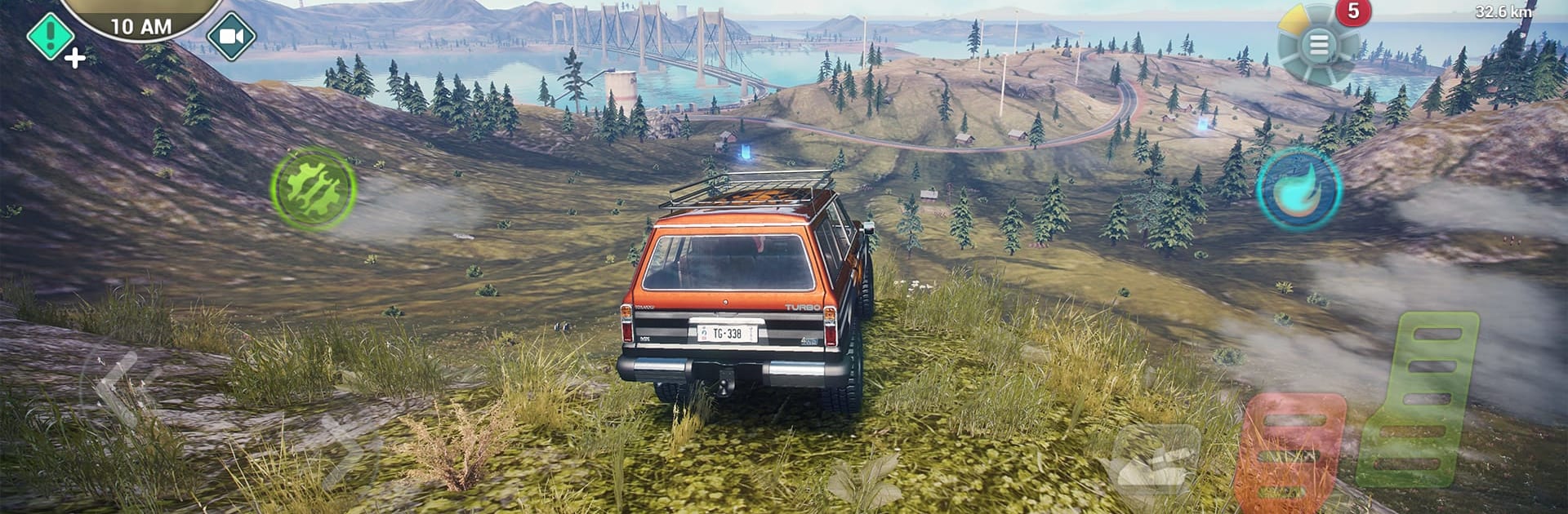
OTR 2 from DogByte Games mixes wide‑open exploration with grit-under-your-tires Racing. It’s a huge sandbox where you can push anything with an engine across mountains, highways, rivers, and backcountry trails—then switch to the skies or the open sea when the road runs out. Expect weighty physics, big playground energy, and the kind of “let’s try it and see” freedom that’s fun solo or with friends.

Game Features

  • Colossal open world: Roam a seamless map packed with peaks, deserts, coastlines, long highways, and secret side routes waiting to be found.
  • Drive, fly, and sail: Tackle rocks in beefy 4x4s, rip asphalt in supercars, lift off in helicopters and planes, or skim the water in fast powerboats.
  • Realistic physics and visuals: Feel every bump and slide, watch mud cake onto your tires, and enjoy sharp lighting with impressive water effects.
  • Advanced damage model: Push too hard and your ride shows it—scrapes, crunches, and performance hits make every decision matter.
  • Day and night cycle: Changing light and visibility keep routes fresh and make night runs feel totally different.
  • Make it yours: Use the Livery Editor for custom paint and decals, then fine-tune performance to match your style.
  • Jump in with friends: Online multiplayer supports up to 6 players for competitive races or relaxed cruising across the same massive world.
  • Missions and rewards: Take on deliveries and challenges to earn cash and unlock more toys and upgrades.
  • Detailed interiors: Cockpits and dashboards are modeled and functional, so first-person driving actually feels like driving.
  • Play offline anywhere: No connection? No problem—explore and race whenever you want.
  • Smooth on BlueStacks: Prefer playing on your computer? OTR 2 runs great on BlueStacks with crisp controls.

Make your gaming sessions memorable with precise controls that give you an edge in close combats and visuals that pop up, bringing every character to life.

Features

  • Macros

    Automate the predictable in OTR 2 and transform your gameplay with Macros. Get access to inventive Macros in the BlueStacks Macro Community

  • Multi Instance

    Play OTR 2 on one window. And chat with your friend on the other. Press CTRL + Shift + 8 to open the Multi-Instance Manager. And start creating fresh instances or clone an existing one.

  • Multi Instance Sync

    Play OTR 2 with the power of Multi-Instance Sync. Replicate what you are doing on the main instance on all other instances. Level up faster, play more.

  • Script

    Script your way to gaming glory in OTR 2 with BlueStacks Script. Write and run a set of commands to automate repeated tasks. Trigger the command by assigning it to any key.

How to Download and Play OTR 2 on PC or Mac

  • Download and install BlueStacks on your PC or Mac

  • Complete Google sign-in to access the Play Store, or do it later

  • Look for OTR 2 in the search bar at the top right corner

  • Click to install OTR 2 from the search results

  • Complete Google sign-in (if you skipped step 2) to install OTR 2

  • Click the OTR 2 icon on the home screen to start playing

video
Watch Video

Minimum System Requirements

With BlueStacks 5, you can get started on a PC that fulfills the following requirements.

  • Operating System

    Microsoft Windows 7 or above, macOS 11 (Big Sur) or above

  • Processor

    Intel, AMD or Apple Silicon Processor

  • RAM

    at least 4GB

  • HDD

    10GB Free Disk Space

Note:

* You must be an Administrator on your PC. Up to date graphics drivers from Microsoft or the chipset vendor.

Exclusive Gaming Content. And More.

Get the latest updates on the BlueStacks Blog.

See More
OTR 2

Be among the first to play OTR 2 on PC

Get notified when the Game launches

OTR 2 - FAQs

  • How to play OTR 2 on Windows PC & Mac?

    Play OTR 2 on your PC or Mac by following these simple steps.

    • Click on 'Play OTR 2 on PC’ to download BlueStacks
    • Install it and log-in to Google Play Store
    • Launch and play the game.
  • Why is BlueStacks the fastest and safest platform to play games on PC?

    BlueStacks respects your privacy and is always safe and secure to use. It does not carry any malware, spyware, or any sort of additional software that could harm your PC.

    It is engineered to optimize speed and performance for a seamless gaming experience.

  • What are OTR 2 PC requirements?

    Minimum requirement to run OTR 2 on your PC

    • OS: Microsoft Windows 7 or above MacOS 11 (Big Sur) or above
    • Processor: Intel, AMD or Apple Silicon Processor
    • RAM: Your PC must have at least 4GB of RAM. (Note that having 4GB or more disk space is not a substitute for RAM)
    • HDD: 10GB Free Disk Space.
    • You must be an Administrator on your PC.