Indian Train Simulator: Game

Indian Train Simulator: Game

Simulation

| Highbrow Interactive

Play on PC with BlueStacks or from our cloud

  • Overview
  • Game Features
  • How to Play

Page Modified On: April 08, 2026

Play Indian Train Simulator: Game on PC or Mac

Step into the World of Indian Train Simulator: Game, a thrilling Simulation game from the house of Highbrow Interactive. Play this Android game on BlueStacks App Player and experience immersive gaming on PC or Mac.

About the Game

Indian Train Simulator: Game is a full-on rail experience that puts you in the driver’s seat across India’s busiest corridors. Built by Highbrow Interactive, this Simulation title focuses on believable physics, detailed stations, and that unmistakable Indian Railways vibe—from the cab controls to the station announcements. Expect long hauls, real-world junctions, and a big roster of iconic locomotives that actually feel different to drive. Prefer a bigger screen? It also plays smoothly on BlueStacks.

Game Features

  • Real India on Rails: Travel through major routes and famous junctions like Delhi, Mumbai, Chennai, Lucknow, Varanasi, Howrah, Nagpur, and Hyderabad, with proper distances instead of tiny loops.
  • Locomotives You Know: Handle WAP, WDM, WDG, and WDP series engines, plus high-speed stars like Vande Bharat and Amrit Bharat Express. Each one has its own character.
  • Authentic Driving Controls: Manage throttle, independent brakes, and signals. Keep an eye on speed limits, gradients, and station halts—mess up, and you’ll feel it.
  • Rich Coach Variety: Pull ICF and LHB coaches, Humsafar, Tejas, Rajdhani, and freight wagons. Mix rakes, tweak liveries, and tune horns and headlights for your perfect setup.
  • Career, Custom, and Challenge: Run timed services in Career, build your own routes and rake combos in Custom, or test your nerve with strict signals and tight schedules in Challenge.
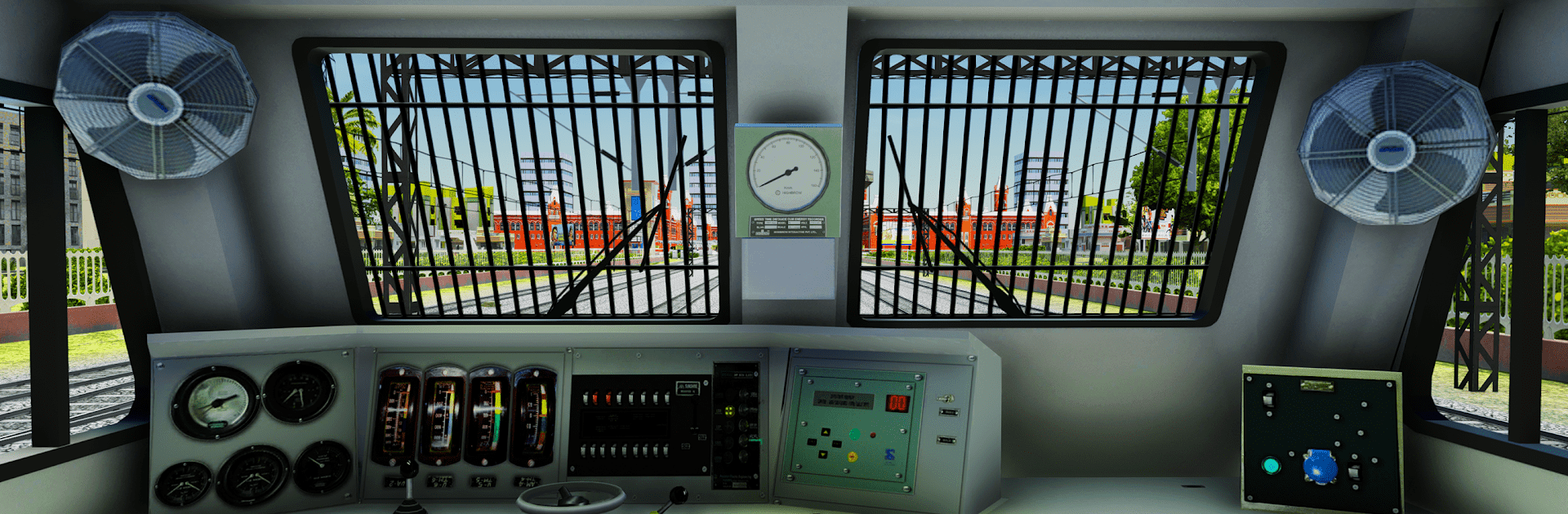
  • Cab View and Sound: First‑person driving with working gauges and mirrors, proper horns, station ambience, and even radio/music for those long night shifts.
  • Weather and Time: Drive through rain, fog, and bright daylight or after-dark runs with evolving lighting and visibility that change how you operate.
  • Long Journeys, Real Terrain: Tackle ghats, tunnels, crossings, and busy yards that demand attention and careful braking.
  • Smoother Performance: Optimized for a wide range of phones with a lite preset, dynamic resolution for steadier FPS, fewer interruptions from ads, and starter locos so you can get rolling fast.
  • Growing Feature Set: The team keeps refining AI traffic and station life, and plans include offline options for select routes plus deeper passenger and coupling/decoupling systems.

Make your gaming sessions memorable with precise controls that give you an edge in close combats and visuals that pop up, bringing every character to life.


Game Features

Enhancements

  • Macros
  • Multi Instance
  • Multi Instance Sync
  • Script
  • Enhancements
Macros

Macros

Automate the predictable in Indian Train Simulator: Game and transform your gameplay with Macros. Get access to inventive Macros in the BlueStacks Macro Community
Multi Instance

Multi Instance

Play Indian Train Simulator: Game on one window. And chat with your friend on the other. Press CTRL + Shift + 8 to open the Multi-Instance Manager. And start creating fresh instances or clone an existing one.
Multi Instance Sync

Multi Instance Sync

Play Indian Train Simulator: Game with the power of Multi-Instance Sync. Replicate what you are doing on the main instance on all other instances. Level up faster, play more.
Script

Script

Script your way to gaming glory in Indian Train Simulator: Game with BlueStacks Script. Write and run a set of commands to automate repeated tasks. Trigger the command by assigning it to any key.
Read More

How to Download and Play Indian Train Simulator: Game on PC or Mac

  • Download and install BlueStacks on your PC or Mac

  • Complete Google sign-in to access the Play Store, or do it later

  • Look for Indian Train Simulator: Game in the search bar at the top right corner

  • Click to install Indian Train Simulator: Game from the search results

  • Complete Google sign-in (if you skipped step 2) to install Indian Train Simulator: Game

  • Click the Indian Train Simulator: Game icon on the home screen to start playing

video
Watch Video

Minimum System Requirements

With BlueStacks 5, you can get started on a PC that fulfills the following requirements.

  • Operating System

    Microsoft Windows 7 or above, macOS 11 (Big Sur) or above

  • Processor

    Intel, AMD or Apple Silicon Processor

  • RAM

    at least 4GB

  • HDD

    10GB Free Disk Space

Note:

* You must be an Administrator on your PC. Up to date graphics drivers from Microsoft or the chipset vendor.

Indian Train Simulator: Game - FAQs

  • How to play Indian Train Simulator: Game on Windows PC & Mac?

    Play Indian Train Simulator: Game on your PC or Mac by following these simple steps.

    • Click on 'Play Indian Train Simulator: Game on PC’ to download BlueStacks
    • Install it and log-in to Google Play Store
    • Launch and play the game.
  • Why is BlueStacks the fastest and safest platform to play games on PC?

    BlueStacks respects your privacy and is always safe and secure to use. It does not carry any malware, spyware, or any sort of additional software that could harm your PC.

    It is engineered to optimize speed and performance for a seamless gaming experience.

  • What are Indian Train Simulator: Game PC requirements?

    Minimum requirement to run Indian Train Simulator: Game on your PC

    • OS: Microsoft Windows 7 or above MacOS 11 (Big Sur) or above
    • Processor: Intel, AMD or Apple Silicon Processor
    • RAM: Your PC must have at least 4GB of RAM. (Note that having 4GB or more disk space is not a substitute for RAM)
    • HDD: 10GB Free Disk Space.
    • You must be an Administrator on your PC.