Pixel Gun 2
Pixel Gun 2

Pixel Gun 2

Action

| Pixel Gun 3D

Play on PC with BlueStacks or from our cloud

Click here to Pre-Register for Pixel Gun 2
  • Overview
  • Features
  • How to Play

Page Modified On: August 04, 2026

Play Pixel Gun 2 on PC or Mac

Pixel Gun 2 by Pixel Gun 3D has plenty to keep you busy. BlueStacks lets you play it on PC or Mac with more screen space, better control, and fewer mobile limits.

About the Game

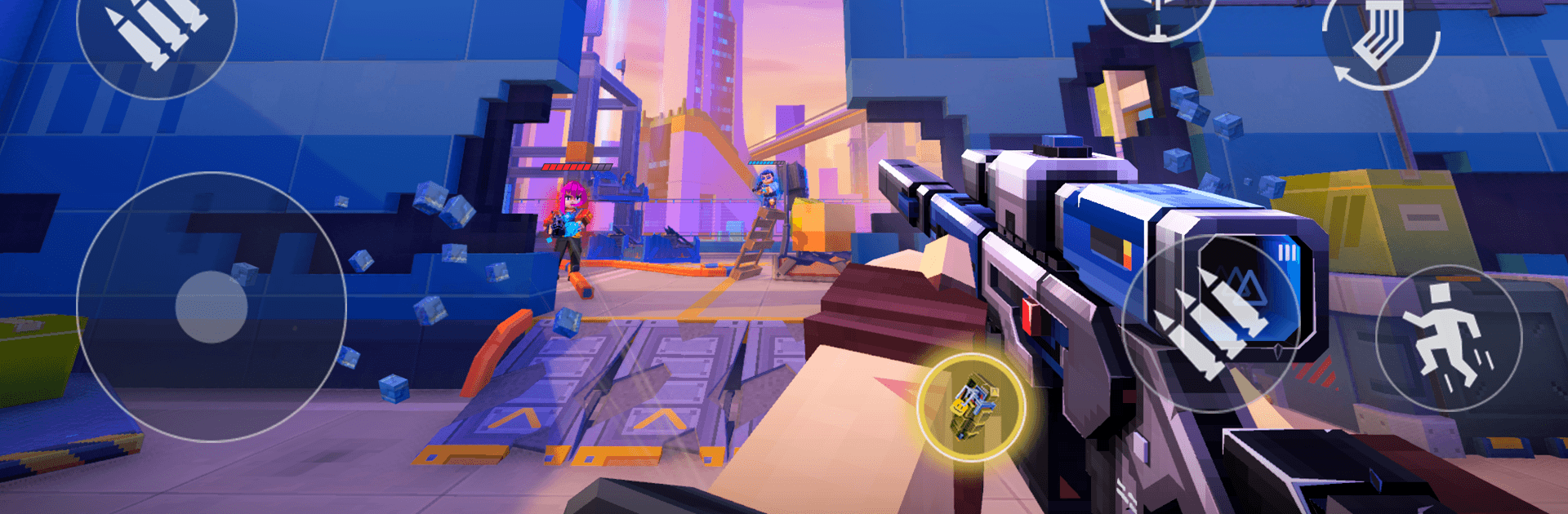
Pixel Gun 2 is a fast, chaotic Action shooter where the battlefield never stays the same for long. Walls crumble, floors open up, and your playstyle morphs on the fly as you stack perks mid-match. It’s perfect for quick PvP bursts or a full evening of creative chaos if you’re in the mood to tinker with builds and outsmart the arena itself.

Game Features

  • Destructible Arenas: Maps break apart as firefights heat up. Blast a shortcut, erase a sniper’s cover, or open a trapdoor to send enemies scrambling.
  • Evolving Mid-Match Perks: Every skirmish reshapes your role. Stack perks and adapt into a stealthy headshot hunter, a gadget-driven speedster, a bruising melee threat—whatever the moment demands.
  • Build It Your Way: Mix characters, weapons, gadgets, armor, perks, and abilities to create something powerful, weird, or brilliantly specific to your playstyle.
  • Short, High-Tempo PvP: Jump into quick rounds that reward smart improvisation and bold moves. Win with aim, creativity, or a well-timed explosive detour.
  • The Pixelstorm Factor: A strange force keeps bending the rules, shaking up matches with new twists. Expect shifting conditions and fresh surprises that keep you guessing.
  • Tactical Mayhem: Use the environment as a weapon. Funnel opponents, collapse cover, and turn map geometry into your biggest ally.
  • Play Anywhere, Keep Everything: Swap between phone and PC and bring your progress with you. Prefer a bigger screen and steady controls? BlueStacks makes the switch feel natural without getting in the way.

BlueStacks gives you more room to focus on the game and less time adjusting around mobile limitations.


Features

  • Macros

    Skip the boring parts of a game. Play Pixel Gun 2 with Macros and get the edge. Simply record a sequence of commands and execute them at any moment.

  • Multi Instance

    Why limit to one game on your phone when you can play many on your PC? Open multiple instances of Pixel Gun 2 at once with Multi-Instance. Leverage the power of different accounts by doing more.

  • Multi Instance Sync

    Get the best out of Pixel Gun 2 with Multi-Instance Sync. Play the game from different accounts and build your own empire. Use Multi-instance sync to repeat the action in the main BlueStacks instance on all other instances.

  • Eco Mode

    Find the rarest heroes by making multiple summons in Pixel Gun 2. And while you are at it, reduce your PC’s resource consumption with the Eco Mode. Farm efficiently. Get the best results.

How to Download and Play Pixel Gun 2 on PC or Mac

  • Download and install BlueStacks on your PC or Mac

  • Complete Google sign-in to access the Play Store, or do it later

  • Look for Pixel Gun 2 in the search bar at the top right corner

  • Click to install Pixel Gun 2 from the search results

  • Complete Google sign-in (if you skipped step 2) to install Pixel Gun 2

  • Click the Pixel Gun 2 icon on the home screen to start playing

video
Watch Video

Minimum System Requirements

With BlueStacks 5, you can get started on a PC that fulfills the following requirements.

  • Operating System

    Microsoft Windows 7 or above, macOS 11 (Big Sur) or above

  • Processor

    Intel, AMD or Apple Silicon Processor

  • RAM

    at least 4GB

  • HDD

    10GB Free Disk Space

Note:

* You must be an Administrator on your PC. Up to date graphics drivers from Microsoft or the chipset vendor.

Exclusive Gaming Content. And More.

Get the latest updates on the BlueStacks Blog.

See More
Pixel Gun 2

Be among the first to play Pixel Gun 2 on PC

Get notified when the Game launches

Pixel Gun 2 - FAQs

  • How to play Pixel Gun 2 on Windows PC & Mac?

    Play Pixel Gun 2 on your PC or Mac by following these simple steps.

    • Click on 'Play Pixel Gun 2 on PC’ to download BlueStacks
    • Install it and log-in to Google Play Store
    • Launch and play the game.
  • Why is BlueStacks the fastest and safest platform to play games on PC?

    BlueStacks respects your privacy and is always safe and secure to use. It does not carry any malware, spyware, or any sort of additional software that could harm your PC.

    It is engineered to optimize speed and performance for a seamless gaming experience.

  • What are Pixel Gun 2 PC requirements?

    Minimum requirement to run Pixel Gun 2 on your PC

    • OS: Microsoft Windows 7 or above MacOS 11 (Big Sur) or above
    • Processor: Intel, AMD or Apple Silicon Processor
    • RAM: Your PC must have at least 4GB of RAM. (Note that having 4GB or more disk space is not a substitute for RAM)
    • HDD: 10GB Free Disk Space.
    • You must be an Administrator on your PC.